
About
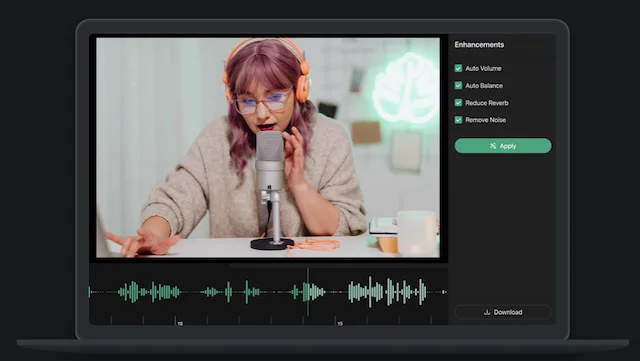
Audo Studio is a browser-based AI audio enhancement platform that transforms raw, noisy recordings into clean, professional-sounding audio in seconds. Leveraging the latest advancements in artificial intelligence and audio processing, it automates tasks that would traditionally require hours of manual editing. The tool's core capabilities include advanced noise removal that eliminates background sounds like traffic, barking dogs, or neighbor noise without manual intervention; echo and reverb reduction to compensate for untreated recording environments; and automatic volume leveling for a consistently pleasant listening experience. All of these enhancements are triggered with a single button click. Audo Studio is entirely browser-based, meaning it works seamlessly across Mac, Windows, and Linux without any software installation. A Developer API is also available for teams that need to integrate audio cleaning into their own applications or workflows. With over 25,000 users and 300,000+ hours of audio cleaned, Audo Studio has established itself as a reliable solution for content creators. It offers a free starter plan with 20 minutes of monthly processing, a Creator plan at $12/month for 600 minutes, and a Pay As You Go option for occasional needs. Whether you're a solo podcaster, a YouTube creator, or an enterprise building audio pipelines, Audo Studio provides a fast, affordable, and effective solution for audio quality improvement.
Key Features
- Advanced Noise Removal: AI-powered background noise elimination removes distracting sounds like traffic, music, barking dogs, and ambient hum automatically — no manual editing required.
- Echo & Reverb Reduction: Automatically reduces room echoes and reverb in recordings, saving creators from needing expensive acoustic foam panels or studio setups.
- Auto Volume Leveling: Intelligently adjusts volume levels across a recording for a consistent, professional-sounding output without manual gain tweaking.
- Browser-Based Processing: Fully web-based with no software installation required, compatible with Mac, Windows, and Linux operating systems.
- Developer API: A dedicated API allows developers and businesses to integrate Audo's audio enhancement capabilities directly into their own apps and pipelines.
Use Cases
- Podcasters cleaning up recordings affected by background noise from home environments, traffic, or pets
- YouTubers enhancing audio quality on video recordings before publishing to improve viewer retention
- Online course creators improving the clarity of lecture recordings made in non-studio environments
- Remote workers and professionals polishing meeting or interview recordings before sharing
- Developers integrating automated audio enhancement into content creation platforms or media apps via the API
Pros
- Extremely Fast Processing: Processes audio up to 10x faster than traditional tools like Adobe Audition or Audacity, saving creators significant editing time.
- One-Click Simplicity: No audio engineering expertise needed — a single click handles noise removal, echo reduction, and volume adjustment automatically.
- Free Tier Available: The Starter plan provides 20 minutes of free audio enhancement per month, making it accessible for occasional users without commitment.
- Cross-Platform Compatibility: Browser-based design ensures it works on any operating system without installation or compatibility issues.
Cons
- Limited Free Tier: The free Starter plan is capped at just 20 minutes of audio processing per month, which may be insufficient for active content creators.
- Echo Reduction Not Yet Live: Dereverberation is listed as 'coming soon,' meaning users with echo-heavy recordings cannot fully rely on the tool yet.
- No Offline Option: Being entirely browser-based means it requires an internet connection and cannot be used offline or integrated into local desktop workflows.
Frequently Asked Questions
How does Audo Studio remove background noise?
Audo Studio uses the latest research in artificial intelligence and audio processing to analyze your audio and separate speech from background noise, automatically cleaning it in seconds.
What operating systems does Audo Studio support?
Audo Studio is entirely browser-based, so it works on any operating system including Mac, Windows, and Linux — no software installation required.
What are the differences between the pricing plans?
The free Starter plan includes 20 minutes of audio enhancement per month. The Creator plan at $12/month includes 600 minutes and all available features. The Pay As You Go option provides a one-time purchase of 600 additional minutes for $20 (or $10 for Creator plan subscribers).
Is there an API available for developers?
Yes, Audo AI offers a Developer API that allows businesses and developers to integrate audio enhancement capabilities directly into their own applications and workflows.
What types of audio does Audo Studio work best with?
Audo Studio is optimized for spoken word content such as podcasts, YouTube videos, online courses, and video calls, where removing background noise and improving speech clarity is the primary goal.