

About
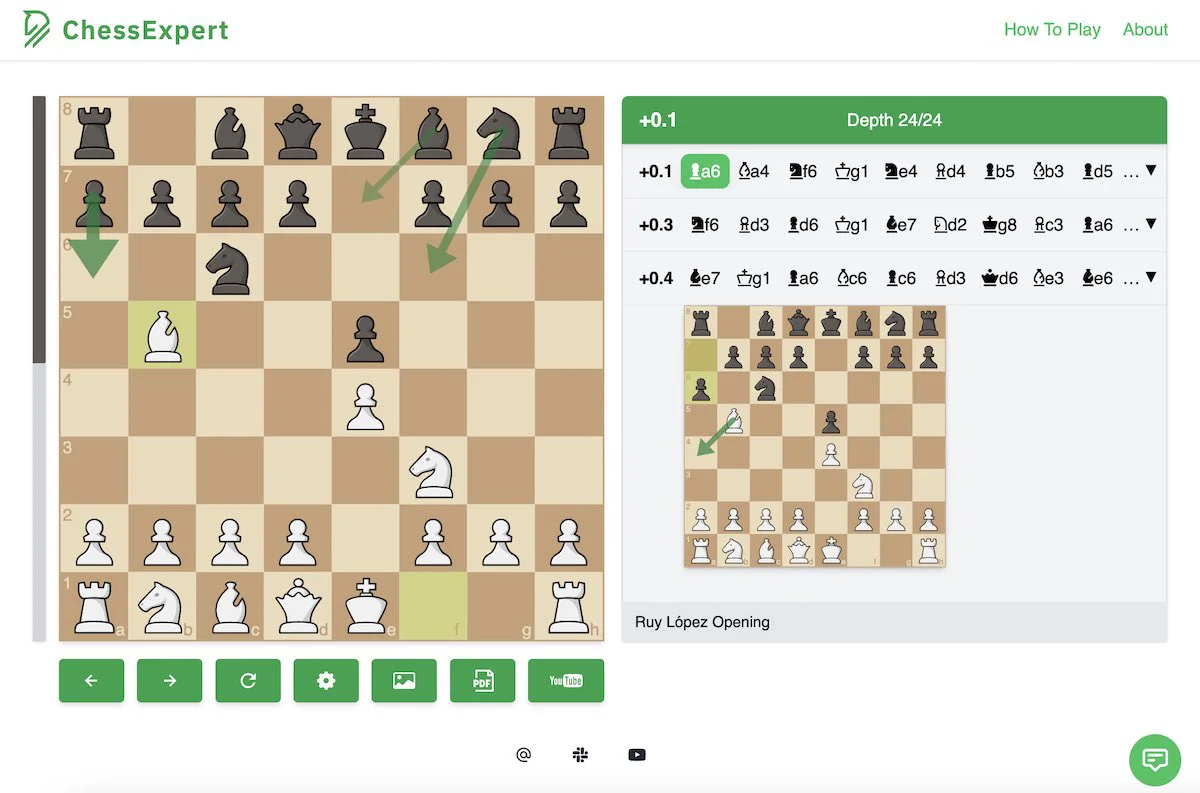
ChessExpert is an AI-driven chess analysis platform designed to help players of all levels study and improve their game. Available as a Chrome extension and a mobile app for iOS and Android, it brings engine-level analysis directly into your browser or phone without any setup, account, or payment required. The tool automatically detects chess boards on popular websites such as Chess.com, Lichess, Chessclub.com, and more, providing real-time best-move calculations, alternative candidate lines, centipawn evaluation scores, and win probabilities. Its image recognition engine achieves 98.7% piece-detection accuracy, allowing users to upload screenshots or photos of physical boards and get instant analysis. ChessExpert also features a dedicated eBook Reader that processes chess PDFs — books, articles, and puzzle collections — letting users click any diagram to extract and analyze the position on the spot. A video recognition mode lets players pause YouTube videos or live streams and receive engine analysis for any frame. Multi-line analysis displays several candidate moves side-by-side with depth and evaluation data, making it ideal for post-game review, opening study, and tactical training. With its zero-friction setup and broad platform support, ChessExpert is suited for casual players, tournament competitors, coaches, and chess enthusiasts who want powerful engine insights without the complexity of traditional analysis software.
Key Features
- Real-Time Best Move Calculator: Engine-recommended best moves with top alternative lines, centipawn evaluation scores, and win probability updated live as the game progresses.
- AI Image & Photo Recognition: Upload any screenshot or photo of a chess position and the AI recognizes every piece with 98.7% accuracy for instant analysis.
- PDF & eBook Reader: Open chess books or articles in PDF format, click any diagram, and ChessExpert automatically extracts and analyzes the position.
- Video & Stream Analysis: Pause any YouTube video or live stream and receive immediate engine analysis for the position shown in the current frame.
- Auto Website Board Detection: Automatically detects and tracks live games on Chess.com, Lichess, and other supported sites with zero configuration required.
Use Cases
- Chess students uploading PDF textbooks to analyze every diagram and understand the engine's best-move recommendations while studying openings and endgames.
- Casual players using the Chrome extension on Chess.com or Lichess to review mistakes and learn from engine suggestions after each game.
- Coaches pausing YouTube instructional videos or tournament live streams to analyze key positions and prepare lesson material.
- Tournament players photographing printed puzzle collections with their phone to instantly check solutions and candidate lines on the go.
- Chess enthusiasts studying historical games by uploading screenshots of positions and receiving multi-line analysis with depth and win-probability data.
Pros
- Completely Free with No Account Required: ChessExpert requires no sign-up, subscription, or payment — just install the extension or app and start analyzing immediately.
- Versatile Input Support: Handles live web games, uploaded images, PDF books, and video frames, making it one of the most flexible chess analysis tools available.
- High Accuracy Piece Recognition: The AI achieves 98.7% board detection accuracy, reliably parsing complex positions from low-quality photos and screenshots.
- Cross-Platform Availability: Works seamlessly across desktop browsers via Chrome extension and on the go via iOS and Android mobile apps.
Cons
- Limited to Chrome Browser: The browser extension is currently only available for Chrome, excluding users of Firefox, Safari, or Edge.
- No Built-In Game Database or Opening Explorer: ChessExpert focuses on position analysis and best-move calculation but does not include an opening library or historical game database.
- Dependent on External Chess Sites: Auto-detection relies on supported websites; uncommon or private platforms may not be recognized without manual input.
Frequently Asked Questions
Is ChessExpert free to use?
Yes, ChessExpert is completely free. There is no payment, account, or sign-up required. Simply install the Chrome extension or download the mobile app and start using it immediately.
Which chess websites does ChessExpert support?
ChessExpert automatically detects and analyzes games on Chess.com, Lichess, Chessclub.com, WorldChess.com, Chess.org, and ChessBase.com, among other supported sites.
Can I analyze positions from a physical chess book?
Yes. You can either upload a photo of a page from your physical book using the image recognition feature or upload the PDF version using the eBook Reader, then click any diagram for instant analysis.
How accurate is the board and piece recognition?
ChessExpert's AI achieves 98.7% accuracy when detecting and identifying chess pieces from images, screenshots, and camera captures.
Is the mobile app available on both iOS and Android?
Yes, the ChessExpert mobile app is available for free on both the Apple App Store (iOS) and Google Play (Android). No account is needed to use the app.