
About
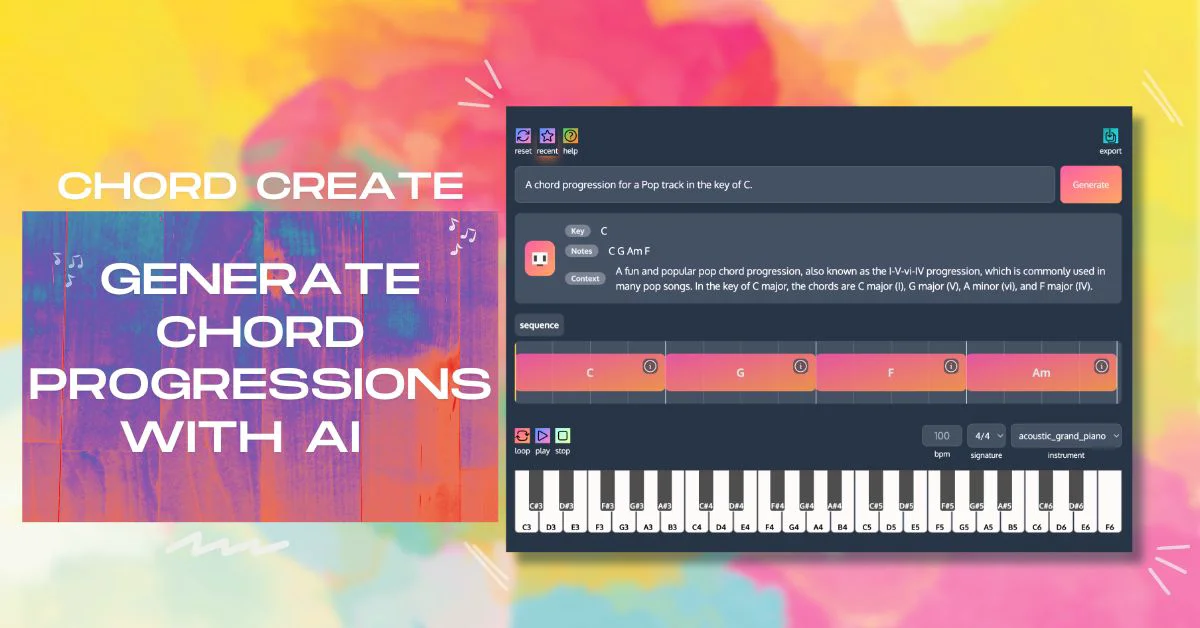
ChordCreate is an AI-powered chord progression tool designed for musicians, songwriters, and music producers who want to spend less time struggling with theory and more time creating. Users simply type a natural language prompt — such as "a dreamy melodic house progression" or "an upbeat G major pop chord sequence with 7ths" — and the AI instantly generates a full chord progression tailored to the request. The platform features an interactive piano roll interface where users can listen to their progressions in real time using instruments like Kawai Grand Piano, tweak BPM (beats per minute), time signatures (e.g., 4/4), and loop lengths. Chords can be humanized for a more natural feel, and individual chord blocks can be swapped or rearranged. Sequence history lets users revisit previous iterations, while fast export capabilities allow musicians to download progressions in MIDI or WAV formats for use in any DAW (Digital Audio Workstation). ChordCreate supports a wide range of musical genres and keys, making it equally useful for pop, house, jazz, and more. It is ideal for beginners who need harmonic inspiration and for experienced producers looking to rapidly prototype ideas. The tool requires no music theory knowledge to get started, yet offers enough depth and customization — including custom chord actions and length settings — to satisfy advanced users. With its clean web-based interface and prompt-driven workflow, ChordCreate bridges the gap between creative intent and music production.
Key Features
- AI Prompt-Based Generation: Describe the mood, genre, key, or style in plain language and the AI instantly generates a matching chord progression.
- In-Browser Piano Roll & Playback: Preview generated progressions using a full-featured piano roll with selectable instruments, adjustable BPM, time signature, and loop controls.
- MIDI & WAV Export: Export chord progressions as MIDI or WAV files for direct import into any DAW or music production environment.
- Chord Swap & Humanization: Swap individual chord blocks, humanize timing for a natural feel, and fine-tune sequences with custom chord actions and lengths.
- Sequence History: Browse and restore previously generated progressions so you never lose a great idea during experimentation.
Use Cases
- A songwriter quickly generates a melancholic minor chord progression for a new track without needing to know advanced music theory.
- An electronic music producer uses ChordCreate to prototype melodic house chord ideas, then exports the MIDI file into Ableton Live for further arrangement.
- A content creator needs background music inspiration and uses ChordCreate to generate loopable chord progressions for video scoring.
- A music educator demonstrates different harmonic styles to students by generating real-time examples across various genres and keys.
- An indie game developer generates unique chord progressions for multiple in-game scenes by prompting ChordCreate with different moods and exporting WAV files.
Pros
- No Music Theory Required: Natural language prompts make it accessible to beginners and non-theory musicians while still producing musically coherent results.
- Instant DAW-Ready Exports: MIDI and WAV export means generated progressions slot directly into professional production workflows with zero friction.
- Fast Iteration: Sequence history, chord swapping, and prompt suggestions allow rapid exploration of harmonic ideas in one session.
Cons
- Web-Only Platform: ChordCreate is browser-based with no dedicated desktop or mobile app, requiring an internet connection at all times.
- Limited to Chord Progressions: The tool focuses solely on harmony — it does not generate full arrangements, melodies, basslines, or drum patterns.
- Instrument Sound Library Is Basic: The built-in playback instrument selection is minimal, which may not fully represent how progressions will sound in a finished track.
Frequently Asked Questions
What is ChordCreate?
ChordCreate is an AI-powered web tool that generates custom chord progressions from natural language prompts. Users describe a style, mood, or genre, and the AI creates a playable chord sequence that can be exported as MIDI or WAV.
Do I need to know music theory to use ChordCreate?
No. ChordCreate is designed so that anyone can generate chord progressions just by describing what they want in plain text, such as 'a dark minor progression for a cinematic scene.'
Can I export chord progressions to my DAW?
Yes. ChordCreate supports MIDI and WAV export, making it easy to import progressions directly into any digital audio workstation like Ableton, FL Studio, or Logic Pro.
Is ChordCreate free to use?
ChordCreate offers a free tier to get started. A sign-in is required to access full features, and a paid plan may be available for advanced functionality.
What genres and styles does ChordCreate support?
ChordCreate supports a wide range of genres including pop, house, jazz, cinematic, and more. Users can specify a genre, key, number of chords, and mood directly in their prompt for tailored results.