

About
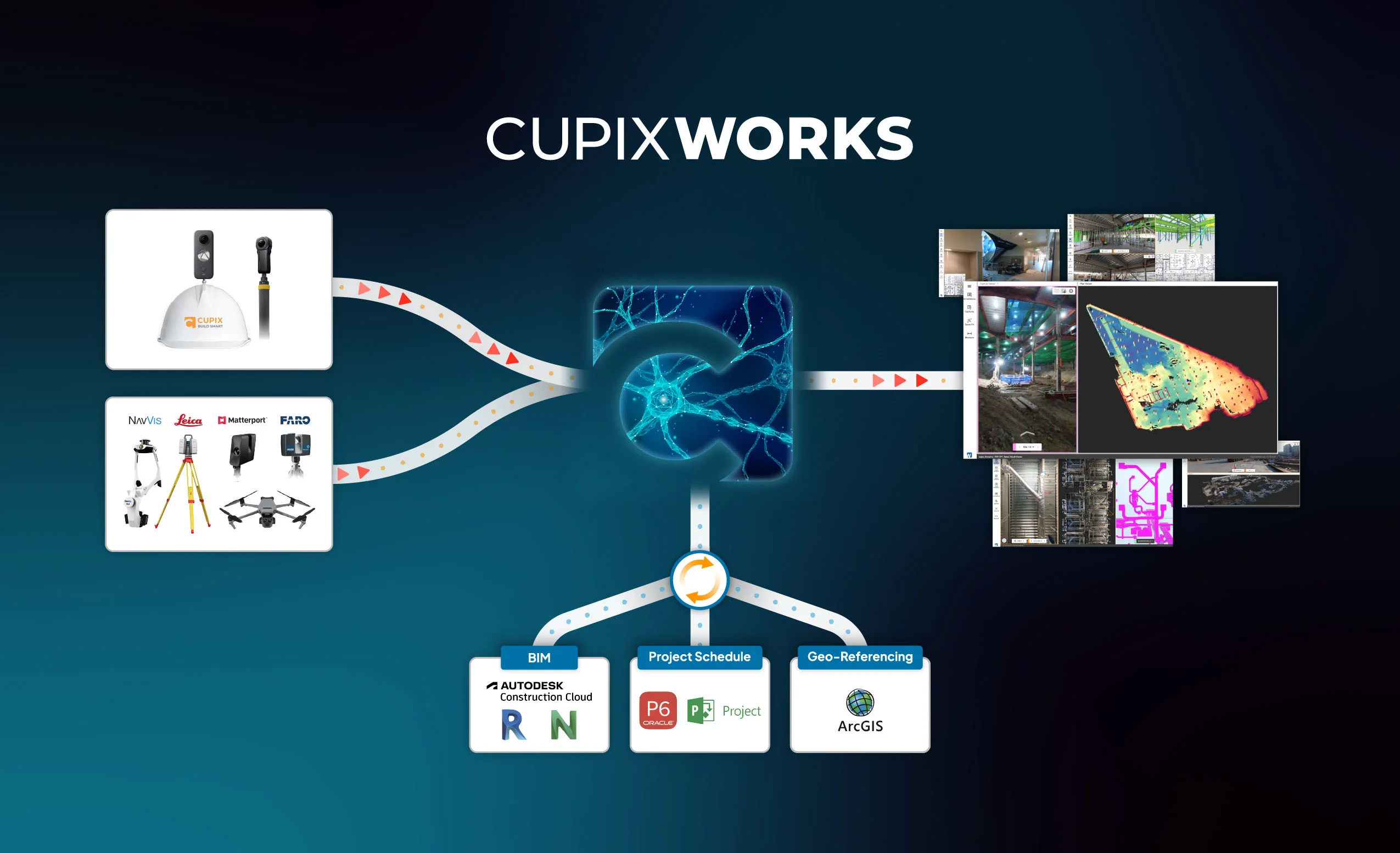
Cupix is an enterprise-grade spatial intelligence platform designed to digitize physical sites using 360° video capture and AI. Users simply walk a site with a 360° camera, and CupixWorks automatically generates accurate 3D models enriched with location and timestamp data—creating a four-dimensional record of the site over time. The platform supports the full construction and facility management lifecycle. Teams can track construction progress against BIM schedules, verify as-built conditions, document compliance, measure existing structures, and flag issues—all without requiring an in-person site visit. The SiteInsights add-on automates completion analysis across work areas, trades, and BIM categories, turning raw video captures into actionable progress reports. Cupix handles highly varied environments, from large commercial buildings and data centers to oil and gas plants, railway corridors, maritime vessels, and residential developments. It unifies reality data from multiple sources—360° video-derived 3D maps, drone orthophotos, laser scans, and BIM models—into one coordinated digital hub. Key use cases include construction progress monitoring, off-site BIM verification, remote spatial collaboration, facilities maintenance documentation, and regulatory compliance record-keeping. The platform is built for construction managers, facility teams, project owners, and enterprise organizations that need to reduce costly site visits, prevent rework, and maintain complete, time-stamped spatial records.
Key Features
- 360° Video to 3D Map: AI automatically converts standard 360° video footage into accurate, measurable 3D spatial models without complex equipment or workflows.
- 4D Documentation & Progress Tracking: Captures spatial data with timestamps to build a time-series record of site evolution, enabling teams to track construction progress and verify completed work.
- Off-Site BIM Verification: Overlays as-built 360° captures with BIM design models so teams can remotely validate that construction matches the planned design and schedule.
- SiteInsights Automated Reporting: Add-on module that automatically analyzes completion rates across work areas, trades, and BIM categories to generate actionable construction progress reports.
- Unified Spatial Data Hub: Integrates 3D maps, drone ortho imagery, laser scans, and BIM models into a single coordinated platform for complete site awareness.
Use Cases
- Construction progress monitoring: automatically track and report completion rates across trades and BIM categories throughout the project lifecycle.
- Remote site inspection: enable project managers and stakeholders to review site conditions, take measurements, and assess work quality without traveling to the job site.
- As-built documentation and compliance: maintain comprehensive, time-stamped spatial records for regulatory compliance, handover documentation, and dispute resolution.
- Facilities maintenance management: create persistent 3D records of building interiors to support maintenance planning, equipment tracking, and space management.
- Off-site BIM verification: compare 360° site captures against design models to verify construction accuracy and identify deviations before they become costly rework.
Pros
- Drastically Reduces Site Visits: Teams can review spatial conditions, measure structures, and collaborate remotely—eliminating unnecessary travel and reducing project costs.
- Simple Capture Process: Requires only a standard 360° camera walk; AI handles 3D reconstruction automatically, saving over 80% of time compared to traditional documentation methods.
- Versatile Industry Support: Works across a wide range of environments including construction sites, industrial plants, maritime vessels, healthcare facilities, and infrastructure corridors.
- Enterprise-Grade Security: Built with enterprise security standards, making it suitable for large organizations handling sensitive facility and infrastructure data.
Cons
- Hardware Dependency: Requires a compatible 360° camera for data capture, adding upfront hardware costs and logistics for field teams.
- Enterprise Pricing: The platform is primarily targeted at large enterprises, making it potentially cost-prohibitive for small contractors or independent teams.
- Learning Curve for Advanced Features: While basic capture is simple, fully leveraging BIM integration, SiteInsights, and multi-source data unification requires training and onboarding.
Frequently Asked Questions
What is a 4D digital twin and how does Cupix create one?
A 4D digital twin is a 3D model of a physical space that also captures changes over time (the 4th dimension). Cupix creates one by processing regular 360° video walkthroughs with AI, automatically generating time-stamped 3D maps that show how the site evolves from capture to capture.
What hardware do I need to use Cupix?
You need a 360° camera to capture footage on-site. Cupix is compatible with a range of consumer and professional 360° cameras. The platform itself is accessed via web browser, so no special software installation is required.
Which industries does Cupix support?
Cupix supports a broad range of industries including construction (commercial, residential, data centers, healthcare, airports), oil and gas, manufacturing, maritime, government, retail, and linear infrastructure projects.
Can Cupix integrate with existing BIM workflows?
Yes. Cupix supports off-site BIM verification by overlaying as-built 360° captures with BIM models, allowing teams to compare actual site conditions against the design model and flag discrepancies remotely.
Is there a free trial or demo available?
Cupix offers a request-a-demo option on their website for prospective customers. Pricing is enterprise-focused, so interested teams are encouraged to contact Cupix directly to discuss plans and trial options.