
About
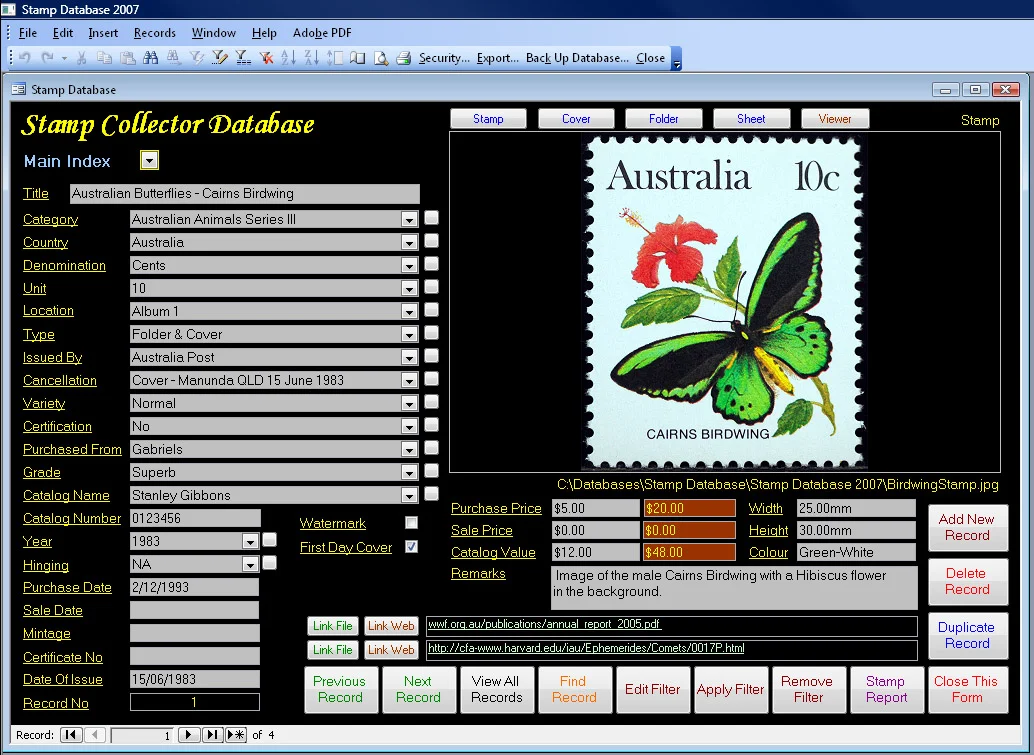
Stamp Collector Database by Database Base Australia is dedicated Windows software that gives stamp enthusiasts a structured, reliable way to catalogue and manage their collections. Each record supports large image fields (550×340 pixels) for stamps, first day covers, and folders/booklets, alongside comprehensive metadata fields including Title, Category, Country, Denomination, Unit, Location, Type, Issued By, Cancellation, Variety, Certification, Grade, Catalog Name, and more. The software ships with three reports — including image-rich printable layouts and label reports — all of which can be filtered to display only selected records. A built-in viewer button launches the default Windows image viewer so collectors can examine stamps at high magnification without a separate magnifier tool. Data portability is a core strength: records can be exported to Excel (.xls), CSV/text formats, HTML, RTF, XML, or another Access database. A backup utility protects collection data, and an import feature allows migration from version 1.0. Each record also supports two web or file links — handy for referencing auction listings, PDFs, or video. A Contacts and Suppliers database tracks collecting associations, dealers, and fellow hobbyists. The database engine handles up to 2 million records, making it suitable even for extensive professional-grade collections. The software is supplied via CD-ROM and/or digital download and is fully compatible with Windows XP through Windows 11.
Key Features
- Image-Rich Record Keeping: Each stamp, first day cover, and folder entry supports large 550×340 pixel image fields with a viewer for full-size inspection — no external magnifier needed.
- Comprehensive Metadata Fields: Capture Title, Category, Country, Denomination, Variety, Grade, Certification, Catalog Name, and more for thorough, searchable collection records.
- Filtered Reports with Images: Generate up to three printable or on-screen reports (including image and label layouts) with filters to display specific subsets of your collection.
- Flexible Data Export: Export records to Excel, CSV, HTML, RTF, XML, or Access database formats for sharing, backup, or further analysis.
- Contacts & Suppliers Directory: Maintain a separate database of collecting associations, dealers, and suppliers, with two web/file links per record for referencing external resources.
Use Cases
- Cataloguing and organising a personal stamp collection with detailed metadata and high-resolution images for easy browsing.
- Creating insurance documentation by generating image-inclusive printed reports that list stamps with their denominations, grades, and valuations.
- Tracking first day covers, folders, booklets, and sheets alongside individual stamps in a single unified database.
- Managing relationships with stamp dealers, auction houses, and collecting associations using the built-in contacts and suppliers directory.
- Preparing collection inventory for buying, selling, or trading by exporting records to Excel or CSV for sharing with other collectors.
Pros
- No Technical Skills Required: Designed for collectors with little computer experience — record entry, image insertion, and reporting are all point-and-click operations.
- Massive Database Capacity: Supports up to 2 million records, making it equally suitable for casual hobbyists and serious philatelists with vast collections.
- Broad Export & Compatibility: Multiple export formats and Microsoft Access underpinning ensure long-term data portability and future compatibility.
Cons
- Windows Only: The software runs exclusively on Windows (XP through 11) and is not available for macOS, Linux, iOS, Android, or as a web application.
- No Cloud or Mobile Access: Collections are stored locally with no built-in cloud sync, making remote access or mobile browsing unavailable.
- Legacy Technology Stack: Built on Microsoft Access, which, while stable, is an aging architecture without modern UI conveniences or automatic updates.
Frequently Asked Questions
Which versions of Windows does the Stamp Collector Database support?
The software is tested and fully compatible with Windows XP, Vista, 7, 8, 10, and 11. It is not suitable for Windows 8 RT.
How many stamps can I store in the database?
The database engine supports up to 2 million records, which is more than enough for even the largest personal or professional stamp collection.
Can I add photos or scans of my stamps?
Yes. Each record includes large image fields (550×340 pixels). Images are automatically resized on insertion and can be viewed at full size using the built-in viewer button.
What export formats are available?
You can export collection data to Excel (.xls), plain text (.txt, .csv, .tab, .asc), HTML, RTF, XML, or another Microsoft Access database (.mdb, .mde).
Is any other software required to run the program?
No additional software is required. The program is self-contained and is supplied on CD-ROM and/or as a digital download.