

About
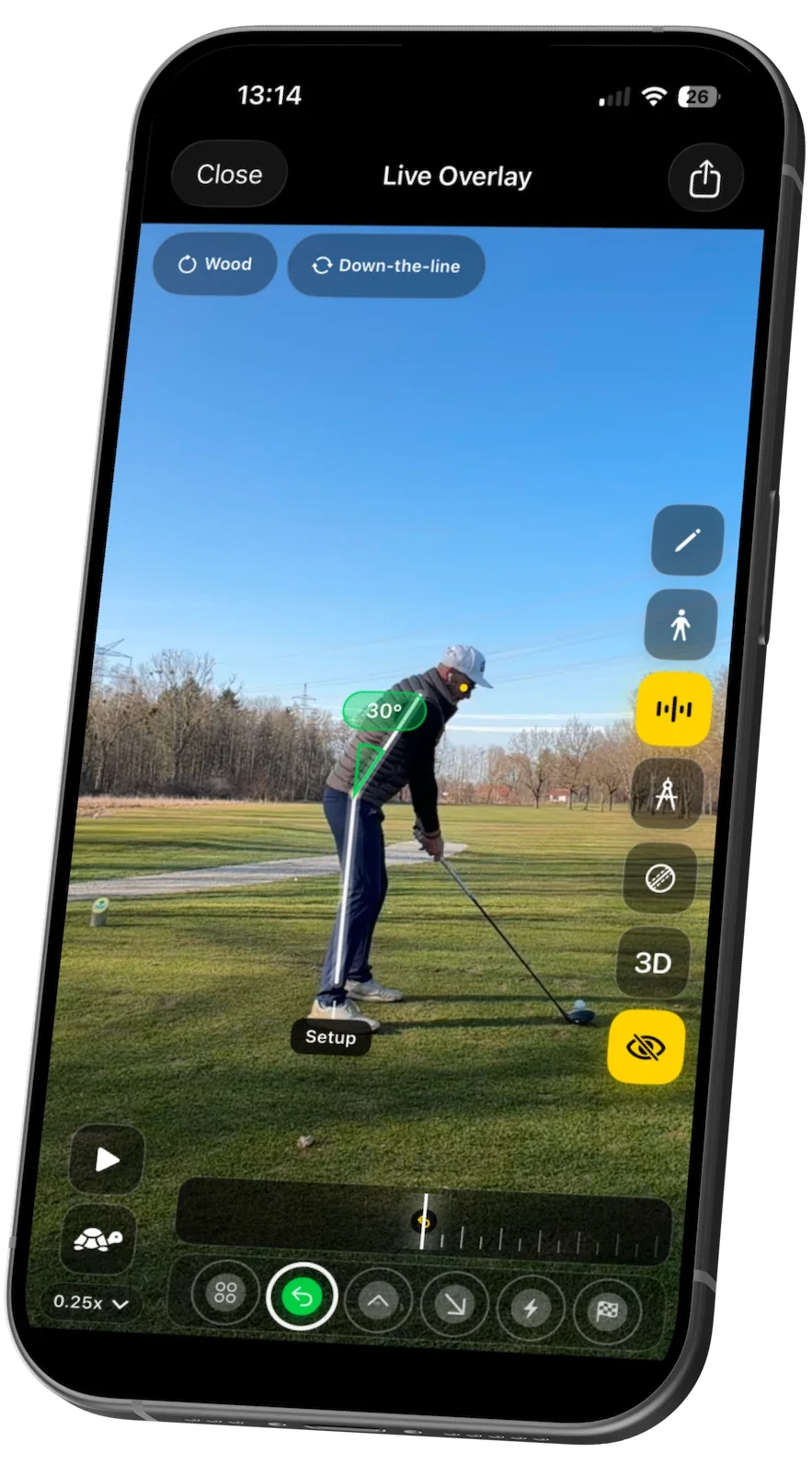
DeepSwing is a professional-grade golf swing analysis app built for iPhone and Apple Watch. Powered entirely by on-device AI, it captures and evaluates your swing in real time—no internet connection or cloud upload required, making it a privacy-first solution for golfers of all skill levels. The app analyzes each swing frame by frame, automatically detecting phases such as setup, backswing, downswing, impact, and follow-through. It measures kinematic angles, spine alignment, swing plane, club path, and tempo, then benchmarks them against ideal ranges to surface what's actually causing misses—whether it's setup, sequencing, path, or face control. DeepSwing's live coach feature provides audio, haptic, and visual feedback between repetitions so you can make real-time adjustments during practice. Advanced AR overlays layer swing plane, hand path, and ball-flight tendencies directly over your recorded video, while a rotatable 3D skeleton playback lets you inspect posture and rotation frame by frame. AI Coach Tips translate the data into plain-language coaching cues in multiple languages, explaining what changed, why it matters, and which drill to work on next. Session history lets golfers compare progress over time to verify that mechanical changes are sticking. DeepSwing is ideal for amateur and competitive golfers seeking objective, data-driven feedback without the cost of an in-person instructor, as well as coaches who want a visual tool to support their students.
Key Features
- On-Device AI Swing Analysis: Analyzes every swing frame by frame—detecting phases, kinematic angles, spine alignment, club path, and tempo—entirely on-device with no cloud uploads.
- Live Coach with Audio & Haptic Feedback: Delivers real-time voice coaching cues, haptic alerts, and visual guidance between repetitions so golfers can adjust immediately during practice.
- Advanced AR Overlays & Swing Tracer: Layers swing plane, hand path, club movement, and ball-flight tendency visuals over recorded video to pinpoint the root cause of misses.
- 3D Skeleton Playback: Lets users inspect posture, rotation, and sequencing frame by frame with a rotatable 3D body model that reveals details a standard video replay misses.
- Progress Tracking Across Sessions: Compares session data over time so golfers can verify whether mechanical changes and drills are producing lasting, measurable improvement.
Use Cases
- Amateur golfers who want objective, data-driven feedback on their swing without the cost of frequent in-person lessons.
- Competitive golfers tracking whether mechanical changes and drills are producing measurable, lasting improvement across practice sessions.
- Golfers practicing at a driving range or indoor simulator who need instant coaching cues without a coach present.
- Golf coaches using the AR overlays and 3D skeleton playback as a visual aid to explain swing faults to their students.
- Multilingual golfers who need coaching tips and interface content in their native language.
Pros
- Complete On-Device Privacy: All AI processing happens on the iPhone—no data is sent to the cloud, making it safe and usable without an internet connection.
- Instant, Actionable Feedback: Live coaching cues and AR overlays are delivered before the ball lands, enabling rapid corrections during a single practice session.
- Multilingual Support: AI Coach Tips and the interface are available in over 15 languages, making it accessible to a global audience of golfers.
- Apple Watch Integration: Apple Watch support extends the coaching experience to the wrist, enabling haptic feedback and phase rating without needing to look at the phone.
Cons
- iOS Only: DeepSwing is exclusive to iPhone and Apple Watch, excluding Android users and those who prefer a web-based or desktop experience.
- Requires Stable Camera Setup: Accurate analysis depends on placing the phone in a stable position with the correct angle, which may require a tripod or additional accessories.
- No Human Coach Integration: The AI coaching is fully automated; there is no built-in option to share swings with or receive feedback from a live human golf instructor within the app.
Frequently Asked Questions
Does DeepSwing require an internet connection?
No. All AI analysis runs entirely on-device using Apple's on-device processing. No internet connection is needed and no video is uploaded to the cloud.
What devices does DeepSwing support?
DeepSwing is available for iPhone and supports Apple Watch for extended haptic and phase feedback during practice.
What does DeepSwing actually measure in my swing?
The app measures swing phases (setup, backswing, downswing, impact, follow-through), kinematic angles, spine alignment, swing plane, club path, tempo, and shot tendency (e.g., slice or draw tendencies).
Is DeepSwing free to use?
DeepSwing operates on a freemium model—there is a free tier with core features available, and additional premium features may require a subscription or in-app purchase.
Where should I position my phone when using DeepSwing?
For best results, place the phone stable to the side or slightly behind the target line at a consistent height. A tripod is recommended to ensure reproducible data across sessions.