
About
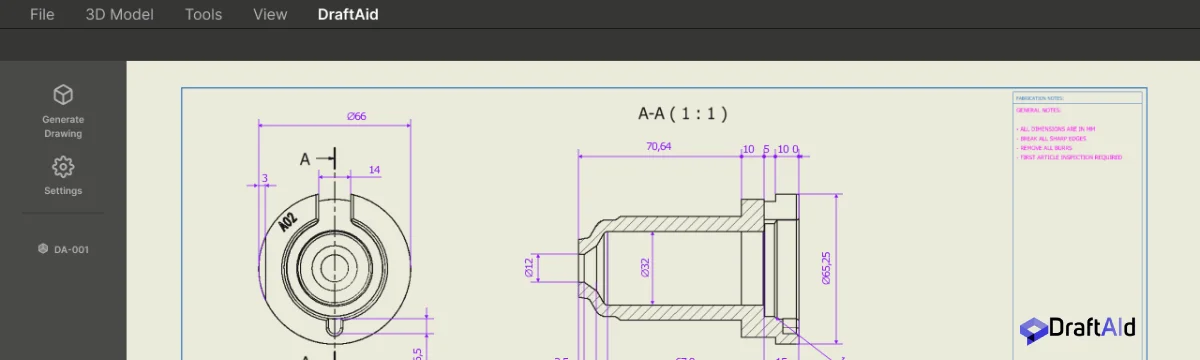
DraftAid is an AI-driven CAD drawing automation solution designed to eliminate the repetitive, time-consuming process of creating 2D technical drawings from 3D models. By leveraging advanced AI, DraftAid auto-generates high-quality fabrication drawings—complete with accurate dimensioning, intelligent annotations, proper scaling, layout optimization, and break lines—so engineers can focus on innovation rather than documentation. The platform integrates natively with major CAD environments including SolidWorks and Inventor, allowing teams to adopt it without overhauling existing workflows. DraftAid automatically applies company-specific drawing templates, standards, and preferences, ensuring every drawing is production-ready and compliant from the start. Its batch-processing capabilities allow teams to generate hundreds of drawings simultaneously in the background. DraftAid serves a wide range of industries: automotive teams rely on it for complex assemblies and precision-machined sheet metal; manufacturing teams use it for pipes, extrusions, and mechanical components; and construction teams leverage it for curtainwalls, profiles, and structural elements. The result is faster project delivery, fewer errors, reduced bottlenecks on the shop floor, and significantly more consistent documentation across the organization. DraftAid is ideal for engineering departments, fabrication shops, and manufacturers looking to scale drafting output without scaling headcount.
Key Features
- AI-Powered 2D Drawing Generation: Automatically converts 3D CAD models into accurate, production-ready 2D fabrication drawings with a single click.
- Native CAD Software Integration: Seamlessly integrates with major CAD platforms including SolidWorks and Inventor, requiring no retraining or workflow overhaul.
- Customizable Templates & Standards: Automatically adapts to your company's drawing templates, standards, and preferences for consistent, compliant output every time.
- Automated Dimensioning & Annotations: Applies precise, intelligent annotations and automated dimensioning to ensure every drawing meets exact manufacturing requirements.
- Batch Drawing Generation: Generates hundreds of high-quality drawings simultaneously in the background, enabling teams to scale output without additional headcount.
Use Cases
- Automotive engineering teams automating 2D fabrication drawings for complex assemblies and precision-machined sheet metal components.
- Manufacturing companies generating production-ready drawings for pipes, extrusions, and mechanical components to reduce shop floor bottlenecks.
- Construction firms automating technical drawings for curtainwalls, structural profiles, and complex building components.
- Engineering departments scaling drawing output to meet project deadlines without increasing headcount or outsourcing.
- Manufacturers standardizing drawing quality and consistency across large teams to minimize errors and ensure compliance with production standards.
Pros
- Massive Time Savings: Automates the most repetitive drafting tasks, allowing engineering teams to produce drawings in a fraction of the traditional time.
- Consistent, Accurate Output: AI-driven precision ensures every drawing meets manufacturing standards, significantly reducing human error and rework.
- Seamless Workflow Integration: Works with existing CAD tools like SolidWorks and Inventor, so teams can adopt DraftAid without disrupting established processes.
- Scalable for Large Projects: Batch processing allows organizations to generate hundreds of drawings simultaneously, supporting high-volume production demands.
Cons
- Enterprise-Focused Pricing: Pricing is not publicly listed and requires scheduling a demo, making it less accessible for freelancers or very small teams.
- Requires Existing 3D Models: DraftAid depends on pre-existing 3D CAD models as input, so teams without a 3D modeling workflow cannot leverage it directly.
- Limited to Supported CAD Platforms: Integration is currently focused on specific CAD tools (SolidWorks, Inventor), which may limit adoption for teams using other software.
Frequently Asked Questions
Which CAD software does DraftAid integrate with?
DraftAid is built to integrate with major CAD platforms including SolidWorks and Inventor, with broader integration support designed to fit into your existing engineering environment.
Can DraftAid adapt to our company's drawing standards and templates?
Yes. DraftAid automatically adapts to your company's specific templates, standards, and preferences, ensuring every generated drawing is compliant and production-ready from the start.
How does DraftAid handle complex assemblies or multi-part drawings?
DraftAid is designed to handle complex drafting needs including intricate assemblies, precision-machined components, sheet metal, pipes, extrusions, and structural profiles across industries like automotive, manufacturing, and construction.
How many drawings can DraftAid generate at once?
DraftAid supports batch generation, allowing teams to produce hundreds of high-quality drawings simultaneously in the background, enabling large-scale drafting without manual intervention.
How do I get started with DraftAid?
You can get started by scheduling a demo through the DraftAid website, where the team will walk you through the platform, integration options, and pricing tailored to your organization's needs.