
About
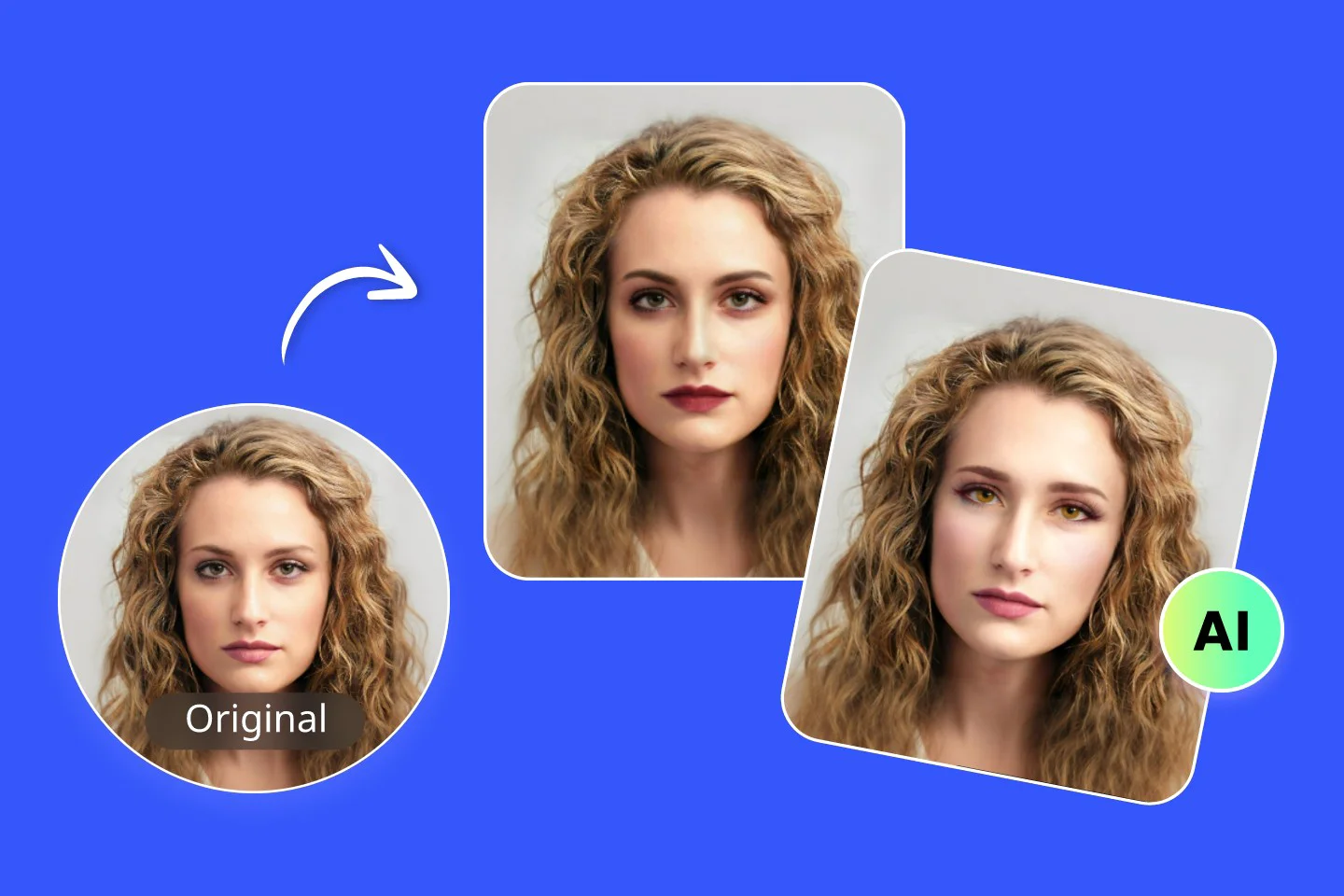
Fotor AI Makeup Generator is a powerful, browser-based virtual makeup try-on tool that leverages artificial intelligence to analyze facial features and apply realistic makeup effects to uploaded photos. As part of the broader Fotor AI photo editing suite, this feature stands out for its ease of use and instant results — no design skills, manual editing, or additional software required. Users can upload any clear frontal face photo and immediately choose from a library of preset makeup templates spanning a wide range of styles, from natural everyday looks to bold and dramatic transformations. Alternatively, users can upload their own reference makeup image to replicate a specific style. The AI precisely applies makeup to different facial zones — eyes, lips, cheeks, and more — while preserving the natural appearance of the subject. The tool is particularly valuable for beauty enthusiasts, content creators, social media influencers, makeup artists, and everyday users who want to experiment with different looks virtually before purchasing cosmetics or booking a session. It also supports use cases in fashion photography, profile picture enhancement, and digital marketing for beauty brands. Fotor's AI Makeup Generator is free to use online, with no account required for basic use. It integrates seamlessly with Fotor's other AI-powered tools like background remover, face editor, hairstyle changer, and portrait generator, making it a comprehensive one-stop shop for AI-driven personal image transformation.
Key Features
- One-Click Virtual Makeup Try-On: Upload a face photo and instantly preview any makeup style with a single click — no manual editing required.
- Preset Makeup Templates: Choose from a diverse library of preset makeup looks, from natural glam to bold editorial styles.
- Custom Makeup Upload: Upload your own reference makeup image and the AI will replicate that style on your photo accurately.
- Targeted Facial Zone Application: AI intelligently applies makeup to specific areas such as eyes, lips, and cheeks for realistic, natural-looking results.
- Instant Download: Download your AI-enhanced makeup photo immediately after generation, ready to share or use anywhere.
Use Cases
- Beauty enthusiasts experimenting with different makeup styles before purchasing cosmetics
- Social media influencers and content creators enhancing profile photos or creating beauty content
- Makeup artists creating before-and-after visualizations for clients
- Fashion and beauty brands generating product visuals or ad creatives with varied makeup looks
- Everyday users wanting to refresh their profile picture with a polished, makeup-enhanced photo
Pros
- Completely Free to Use: The tool is available at no cost online, making professional-quality virtual makeup try-on accessible to everyone.
- No Skills or Software Needed: The fully automated AI workflow means anyone can achieve polished makeup results without design or editing experience.
- Part of a Full AI Photo Suite: Seamlessly integrates with Fotor's broader ecosystem of AI editing tools including background remover, hairstyle changer, and portrait generator.
- Custom Look Upload: The ability to upload a reference makeup image gives users creative flexibility beyond preset options.
Cons
- Requires a Clear Face Photo: The AI works best with well-lit, front-facing photos — angled or low-quality images may produce less accurate results.
- Limited Fine-Tuning Controls: Users have limited ability to manually adjust or fine-tune specific makeup elements after the AI applies the look.
- Advanced Features May Require Account: Some premium templates or high-resolution downloads may require a Fotor account or paid plan.
Frequently Asked Questions
Is the Fotor AI Makeup Generator really free?
Yes, the basic virtual makeup try-on feature is free to use online without any account. Some advanced templates or export options may require a free or paid Fotor account.
What type of photo works best with the AI makeup generator?
The tool works best with clear, well-lit, front-facing photos where facial features are fully visible. Avoid heavily shadowed, blurry, or heavily angled images for optimal results.
Can I use my own makeup reference image?
Yes, in addition to selecting from preset templates, you can upload your own makeup reference image and the AI will apply that specific style to your photo.
What makeup areas can the AI apply effects to?
The AI can apply makeup to multiple facial zones including the eyes (eyeshadow, eyeliner), lips (color, gloss), cheeks (blush, contour), and more.
Is Fotor AI Makeup Generator available on mobile?
Yes, Fotor has mobile apps available for both iOS and Android, which include access to its AI photo editing features including the makeup generator.