
About
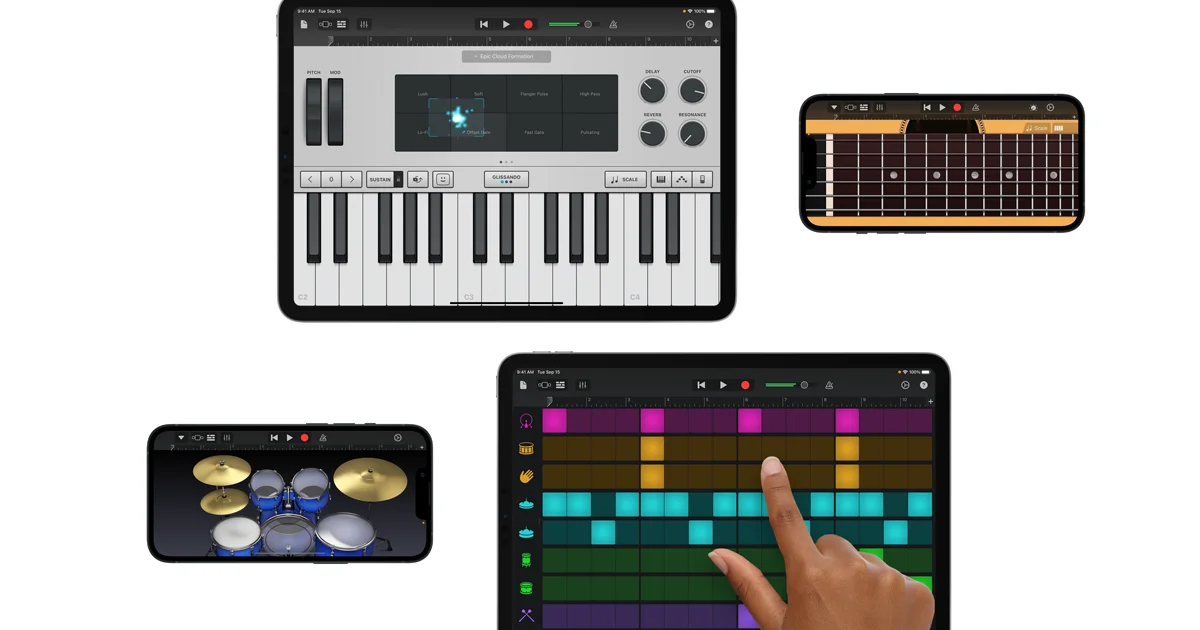
GarageBand for iOS is Apple's powerful, free music production studio designed for iPhone and iPad users of all skill levels. Whether you're a complete beginner or a seasoned musician, GarageBand provides an intuitive and feature-rich environment to compose, record, and share music from anywhere. The app offers a wide range of realistic Touch Instruments — including keyboards, guitars, bass, EDM synths, and traditional Asian instruments like the Guzheng, Koto, and Taiko drums. Smart Instruments automatically handle chords and arrangements so even non-musicians can sound professional instantly. GarageBand's AI-powered Drummer feature gives you access to virtual session drummers across multiple genres, each capable of listening to your riff and generating a complementary beat. The Beat Sequencer lets you build drum patterns inspired by classic drum machines, while Live Loops enables DJ-style music creation with real-time loop triggering and Remix FX transitions. The app also includes Alchemy, one of the world's most advanced synthesizers, with hundreds of Apple-designed patches spanning EDM, Hip Hop, Indie, Rock, and Pop. Guitar and bass players can plug in and choose from a wide selection of amp and stompbox simulations. The ever-growing Sound Library lets you browse and download free sound packs curated by world-class producers. GarageBand is ideal for musicians, students, content creators, and hobbyists who want professional-grade music production on the go.
Key Features
- AI-Powered Drummer: Virtual session drummers that listen to your song and auto-generate complementary beats across acoustic and electronic styles.
- Live Loops & Remix FX: DJ-style loop triggering on a grid with real-time Remix FX transitions using Multi-Touch gestures or device movement.
- Touch Instruments: Realistic playable instruments including keyboards, guitars, bass, EDM synths, and traditional Asian instruments like Guzheng and Koto.
- Alchemy Synthesizer: One of the world's most advanced synths built into the app, with hundreds of Apple-designed patches and a real-time Transform Pad.
- Expandable Sound Library: Browse and download free sound packs, loops, and samples created by world-class producers directly within the app.
Use Cases
- Beginner musicians learning to play and compose on mobile devices without needing physical instruments.
- Content creators producing original background music or jingles for videos and podcasts on the go.
- DJs and electronic music producers building beats and arrangements using Live Loops and the Beat Sequencer.
- Guitarists and bassists recording riff ideas with amp simulations directly from their iPhone or iPad.
- Students exploring music theory and production in an accessible, free environment on Apple devices.
Pros
- Completely Free: GarageBand is available at no cost on the App Store, offering professional-grade music production without any subscription fees.
- Beginner-Friendly: Smart Instruments, Drummer AI, and Smart Drums make it easy for non-musicians to create great-sounding tracks with minimal effort.
- Rich Instrument & Sound Selection: Extensive library of Touch Instruments, amp simulations, synth patches, and downloadable sound packs covering virtually every genre.
- Seamless Apple Ecosystem Integration: Projects can be transferred to GarageBand or Logic Pro on Mac, making it a great starting point for professional production workflows.
Cons
- iOS/iPadOS Only: The app is exclusive to Apple's mobile platform; Android users and Windows/Linux users have no access.
- Limited Advanced Mixing: Compared to desktop DAWs like Logic Pro or Ableton, GarageBand for iOS has fewer mixing, mastering, and plugin options for power users.
- Storage Heavy: Downloading the full Sound Library can consume significant device storage, which may be a constraint on lower-capacity devices.
Frequently Asked Questions
Is GarageBand for iOS free?
Yes, GarageBand is completely free to download and use from the Apple App Store on any compatible iPhone or iPad.
Can I use GarageBand without any musical instruments?
Absolutely. GarageBand's Smart Instruments, Beat Sequencer, Live Loops, and AI Drummer let you create full tracks using only touch — no external instruments required.
Can I connect a real guitar or bass to GarageBand on iOS?
Yes, you can plug in a guitar or bass using an audio interface compatible with iPhone or iPad and choose from a variety of amp and stompbox simulations within the app.
Can I transfer my GarageBand iOS project to a Mac?
Yes, GarageBand projects can be transferred via AirDrop, iCloud, or iTunes to GarageBand or Logic Pro on macOS for further production.
What is the Sound Library in GarageBand?
The Sound Library is an in-app collection of free, downloadable sound packs, loops, and samples created by professional producers, covering a wide range of musical genres and styles.