
About
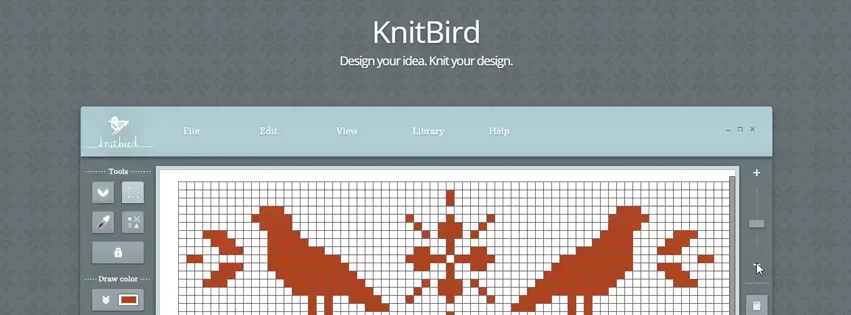
KnitBird is a dedicated knitting chart design application built on the Adobe AIR platform, making it compatible with both Windows and Mac computers. It was created to give knitters and pattern designers an intuitive, purpose-built tool for turning ideas into professional-looking charts without needing complex graphic software. The application includes a comprehensive library of standard knitting symbols, so designers can accurately represent stitches, techniques, and stitch patterns. Users can draw stitches directly on a grid, create dotted and dashed lines, and apply transformations such as move, rotate, and flip to selected sections. A repeat pattern tool makes it simple to tile a motif across a chart, while a built-in color picker supports multi-color work. KnitBird also supports importing raster images and converting them into chart designs — ideal for colorwork, fair isle, or intarsia projects. Charts can be annotated with text instructions and a color/symbol legend, then exported as high-quality JPEG images or print-ready PDF files. A personal design library lets users save and reuse chart fragments across multiple projects. Originally sold at €59, KnitBird is now completely free to download and activate using the product key "free.knitbird." It is well-suited for hobbyist knitters, independent pattern designers, and small craft publishers who need an offline, easy-to-use chart-making tool.
Key Features
- Comprehensive Knitting Symbol Library: Includes most standard knitting symbols used in charts, enabling accurate representation of stitches and techniques.
- Image Import & Conversion: Import raster image files and automatically convert them into knitting chart designs, perfect for colorwork and intarsia projects.
- Repeat Pattern Tool: Easily tile a selected section of your chart into a repeated pattern motif with a single action.
- PDF & JPEG Export: Export finished charts as print-ready PDF files or JPEG images for sharing, publishing, or printing.
- Design Library: Save chart fragments to a personal library and reuse them across multiple projects to speed up design work.
Use Cases
- Hobbyist knitters creating custom stitch charts for personal projects such as sweaters, scarves, and blankets.
- Independent knitwear designers building pattern charts to include in self-published PDF patterns sold on platforms like Ravelry or Etsy.
- Craft teachers and instructors preparing clear, printable knitting charts for workshops and classes.
- Colorwork and fair isle designers importing reference images and converting them into accurate knitting grids.
- Knitting bloggers and content creators producing professional-looking chart visuals for tutorials and articles.
Pros
- Completely Free: Previously sold at €59, KnitBird is now free to download and activate, making professional chart-making accessible to everyone.
- Cross-Platform (Windows & Mac): Built on Adobe AIR, the app runs natively on both Windows and macOS without any platform-specific limitations.
- Purpose-Built for Knitters: Unlike generic design tools, KnitBird is tailored specifically for knitting charts, with domain-specific symbols, grids, and terminology built in.
Cons
- No Longer Actively Developed: Development and support have officially ended, meaning no new features, bug fixes, or symbol additions will be released.
- Requires Adobe AIR: Installation depends on Adobe AIR, a legacy cross-platform runtime that is no longer actively maintained by Adobe.
- Desktop-Only: There is no web or mobile version, so charts can only be created on a Windows or Mac desktop computer.
Frequently Asked Questions
Is KnitBird really free?
Yes. KnitBird was previously sold at €59, but it is now available as a free download. After installing, activate the software using the product key "free.knitbird".
What operating systems does KnitBird support?
KnitBird runs on Microsoft Windows (7, 8.1, Server 2008, and 10) and Mac OS X v10.7 and above. It requires Adobe AIR to be installed.
Can I import my own images into KnitBird?
Yes. KnitBird allows you to import image files and convert them into knitting chart designs, which is useful for colorwork or intarsia patterns based on a photo or illustration.
What file formats can I export my charts in?
You can export your knitting charts as JPEG image files or as print-ready PDF documents.
Is KnitBird still being updated or supported?
No. Development and support for KnitBird have ended. The software is provided as-is, and no further updates, bug fixes, or new features will be released.