

About
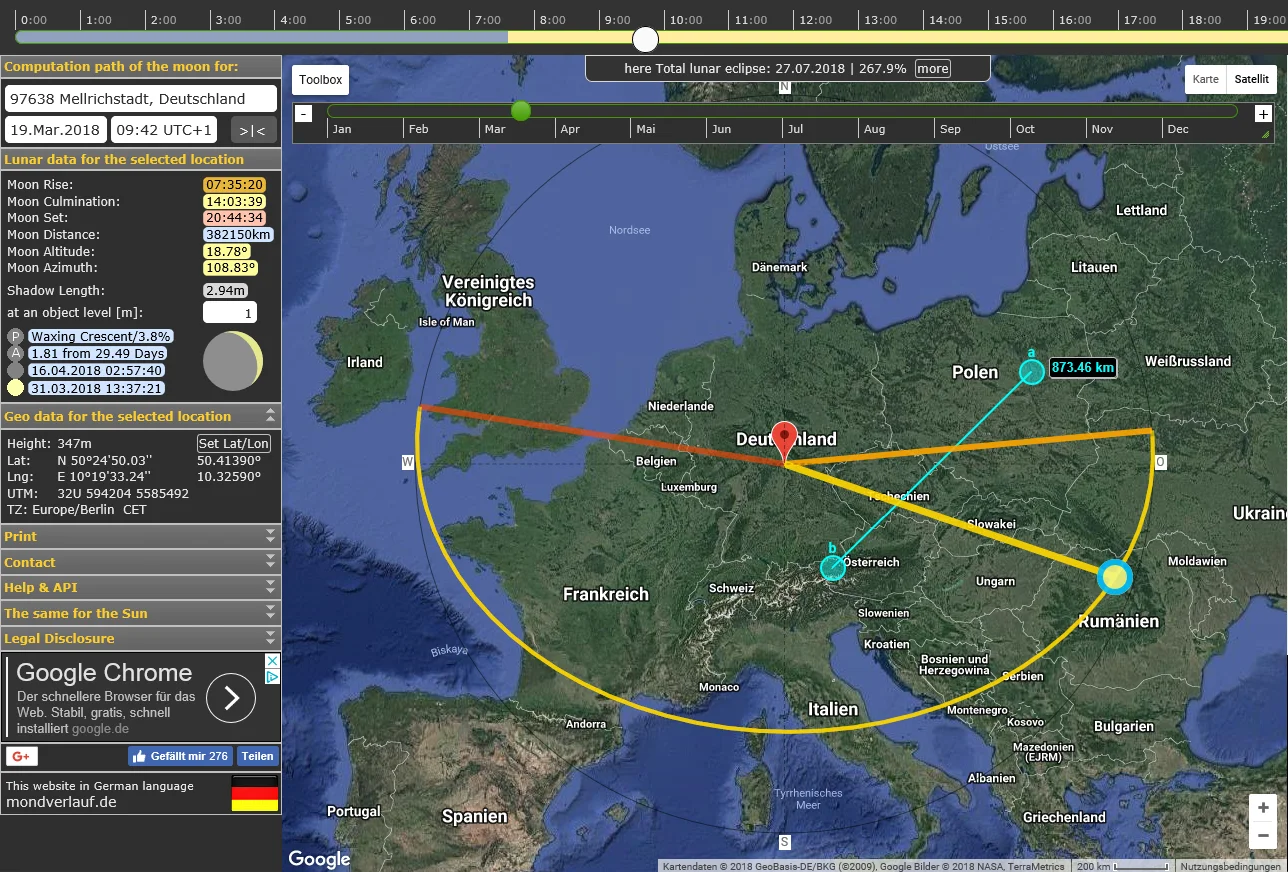
MoonCalc is a comprehensive online tool for determining the position and behavior of the Moon at any given time and place on Earth. Using an interactive map, users can pinpoint a location and instantly retrieve detailed lunar data including moon rise time, moon culmination, moon set time, distance, altitude, azimuth, and shadow length relative to object height. The app also computes advanced astronomical values such as Julian Day Ephemeris (JDE), Delta T, Greenwich Mean Sidereal Time (GMST), Greenwich Hour Angle (GHA), declination, right ascension, and the next Perigee and Apogee dates. A color-coded time-slider shows moonlight intensity throughout the day, and the yellow trajectory curve on the map illustrates the moon's path — its proximity to center indicates height above the horizon. Users can run live tracking or manually scrub through time using mouse or keyboard controls. MoonCalc supports reverse calculations (finding the time from a known altitude/azimuth), period calculations over 3–12 month windows, and a full Moon Calendar view. Historical date support spans from 1999 BCE to 3000 CE, making it invaluable for historical and archaeological research. The tool is free to use, maintained by developer Torsten Hoffmann, and is part of a suite that includes SunCalc, PlanetsCalc, and OrbTrack for comprehensive celestial navigation.
Key Features
- Interactive Map-Based Location Selection: Click anywhere on the embedded interactive map to instantly compute lunar data for that geographic location, with support for manual Lat/Lon and UTM input.
- Comprehensive Lunar Data Dashboard: Displays moon rise, culmination, set, distance, altitude, azimuth, shadow length, JDE, Delta T, GMST, GHA, declination, right ascension, and next Perigee/Apogee.
- Moon Phase & Trajectory Visualization: A color-coded time slider and yellow trajectory curve on the map show the moon's path across the sky and moonlight intensity throughout the day.
- Extended Historical & Future Date Range: Supports date calculations from 1999 BCE all the way to 3000 CE, making it suitable for historical research, archaeology, and long-range planning.
- Reverse Calculation & Period Analysis: Calculate the time at which the moon reaches a specific altitude and azimuth, and generate lunar calendars over 3, 6, or 12-month periods.
Use Cases
- Landscape and astrophotographers planning shoots around optimal moonrise, moonset, and full moon positions for a specific location.
- Historians and archaeologists investigating the lunar conditions on specific historical dates to contextualize ancient events or calendars.
- Amateur astronomers tracking the moon's trajectory, phase, and distance to plan observation sessions.
- Educators and students using the lunar calendar and trajectory visualizations to teach or learn celestial mechanics.
- Developers and researchers embedding or referencing MoonCalc data to enrich astronomy-related applications or websites.
Pros
- Completely Free to Use: MoonCalc is available at no cost with no login or subscription required, supported only by optional donations.
- Exceptional Date Range: Coverage from 1999 BCE to 3000 CE sets it apart from most tools, enabling historical, archaeological, and long-range astronomical research.
- Rich Astronomical Detail: Goes beyond basic phase information to provide professional-grade data like JDE, GMST, GHA, declination, and Perigee/Apogee predictions.
- Developer-Friendly: Includes instructions for linking and integrating MoonCalc into third-party websites and developer projects.
Cons
- Dated User Interface: The UI is functional but visually basic, lacking the modern design polish found in newer astronomy apps.
- No Mobile App: MoonCalc is web-only with no dedicated iOS or Android app, which limits usability in the field without a browser.
- Limited Data Export Options: Users can print current data or the map, but there is no built-in CSV, JSON, or API export for bulk data retrieval.
Frequently Asked Questions
What information does MoonCalc provide?
MoonCalc provides moon rise, culmination, and set times; moon distance, altitude, and azimuth; shadow length; phase visualization; and advanced values like JDE, Delta T, GMST, GHA, declination, right ascension, and next Perigee/Apogee for any selected location and date.
How do I select a location in MoonCalc?
You can click directly on the interactive map to select a location, or manually enter latitude, longitude, and height values. UTM coordinates are also supported.
Can MoonCalc calculate lunar data for historical dates?
Yes. MoonCalc supports dates ranging from 1999 BCE to 3000 CE, making it suitable for historical research, archaeological studies, and ancient astronomy.
What is the reverse calculation feature?
The reverse calculation lets you input a specific moon altitude (0°–90°) and azimuth (0°–360°) to find the time at which the moon will be at that exact position in the sky for your chosen location.
Is MoonCalc free to use?
Yes, MoonCalc is completely free. The site is maintained by developer Torsten Hoffmann and sustained by optional PayPal donations from users who find it valuable.