
About
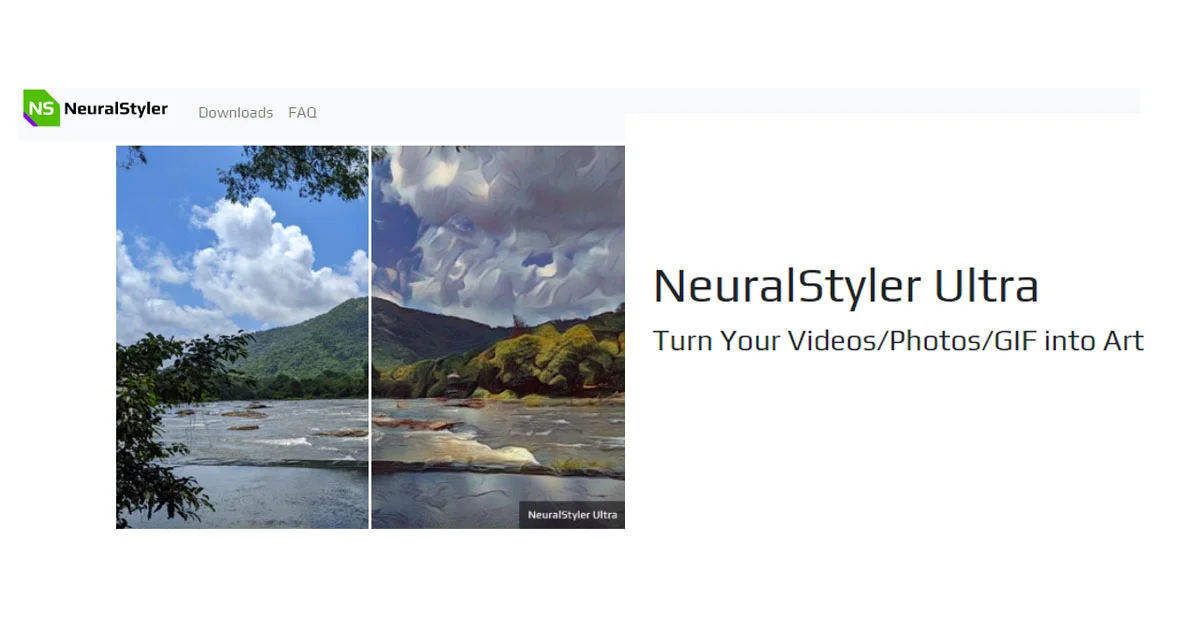
NeuralStyler is a powerful AI-driven style transfer desktop application designed for artists, content creators, and digital enthusiasts who want to transform their media into visually stunning artwork. Using cutting-edge fast neural style transfer technology, the software can stylize images, videos, and GIFs by applying the aesthetic of any painting or artwork — no neural network training required. All processing happens entirely offline on your machine, supporting both CPU and recent NVIDIA CUDA-capable GPUs for accelerated performance. Key capabilities include the ability to select any style image as a reference, control the strength of the applied style, trim video segments before processing, and export results at resolutions up to 4K. Users can also opt to preserve the original colors of their media while applying a style, giving fine-grained creative control. The free demo version includes a watermark, while the paid single-user license ($100 on offer, regularly $250) removes the watermark entirely. NeuralStyler is ideal for digital artists looking to add painterly effects to their work, musicians creating stylized music videos, social media creators producing eye-catching visual content, and hobbyists experimenting with AI art. Its offline-first architecture makes it suitable for users who prioritize data privacy or work without reliable internet access.
Key Features
- Neural Style Transfer: Apply the visual style of any painting or artwork to your photos, videos, or GIFs without training a neural network — just select a style image.
- Offline & Private Processing: All stylization runs locally on your machine; no media is ever uploaded to a server, ensuring complete privacy and reliability.
- GPU-Accelerated Performance: Leverage NVIDIA CUDA-capable GPUs for significantly faster style transfer, in addition to standard CPU processing.
- Up to 4K Resolution Support: Export stylized images and videos at resolutions up to 4K with options to control aspect ratio and disable scaling.
- Style Strength & Color Control: Fine-tune how strongly the style is applied and optionally preserve the original colors of your source media for a more natural look.
Use Cases
- A musician creates a stylized music video by applying Van Gogh's Starry Night aesthetic to their footage using NeuralStyler.
- A digital artist transforms personal photographs into painterly artwork inspired by Impressionist masters for gallery prints.
- A social media content creator produces eye-catching, artistically styled GIFs and short video clips for Instagram and TikTok.
- A hobbyist experimenter applies different artistic styles to travel photos and videos to create unique visual memories.
- A graphic designer uses NeuralStyler offline to batch-stylize product imagery for a brand campaign without sharing assets online.
Pros
- Fully Offline: No internet connection or cloud uploads required — all processing is local, ensuring speed, privacy, and no recurring subscription fees.
- Supports Multiple Media Types: Works with images, videos, and GIFs in a single tool, making it versatile for a wide range of creative projects.
- Any Style Image: Users can use any painting or artwork as a style reference, offering virtually unlimited creative possibilities without needing to retrain models.
- High-Resolution Output: Support for up to 4K resolution makes the output suitable for professional and commercial creative work.
Cons
- One-Time Paid License Required: The full-featured version costs $100–$250 as a one-time purchase, which may be a barrier for casual users compared to free online alternatives.
- Desktop-Only: NeuralStyler is a downloadable desktop application with no web-based interface, limiting accessibility for users on unsupported operating systems.
- GPU Requirement for Best Performance: While CPU processing is supported, fast results depend on an NVIDIA CUDA-capable GPU, which not all users may have.
Frequently Asked Questions
Does NeuralStyler require an internet connection?
No. NeuralStyler processes all images and videos locally on your computer with no internet connection or media uploads required.
What is the difference between the demo and the paid version?
The demo version is free to download and use but adds a watermark to all styled outputs. The paid single-user license ($100 on offer, regularly $250) removes the watermark entirely.
What file types does NeuralStyler support?
NeuralStyler supports images (photos), video files, and GIFs as input media for style transfer.
Do I need a GPU to use NeuralStyler?
No, NeuralStyler supports both CPU and GPU processing. However, using a recent NVIDIA CUDA-capable GPU will significantly speed up the style transfer process.
Can I use any painting or artwork as a style?
Yes. You can select any image as your style reference — there is no need to train a neural network. The software transfers the visual style of your chosen artwork onto your media.