

About
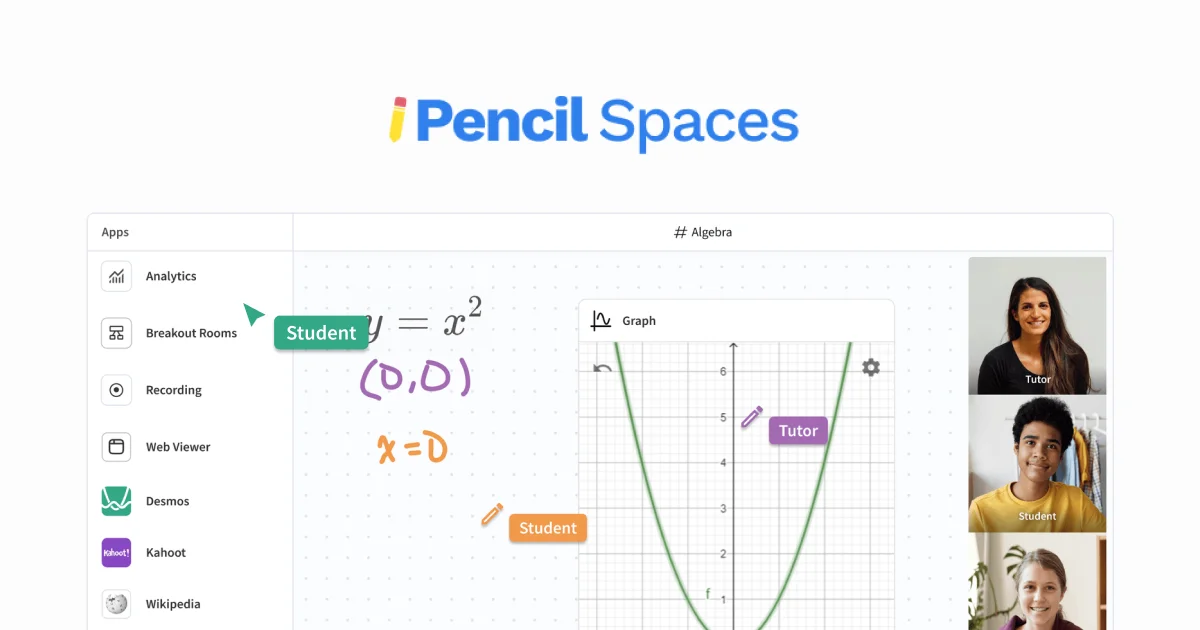
Pencil Spaces is an all-in-one intelligent virtual classroom platform built specifically for educators, tutors, and learning organizations. Rather than juggling multiple disconnected tools, Pencil Spaces brings video calling, an infinite collaborative whiteboard, documents, interactive quizzes, and 1,000+ teaching resources together in a single browser tab — eliminating friction and keeping students fully engaged. The platform's Advanced Scheduling suite automates the operational side of tutoring businesses, handling session booking, attendance tracking, and performance analytics so educators can focus on teaching rather than administration. Its award-winning virtual classroom environment supports annotation over any content, real-time collaboration, and a rich integration ecosystem that connects with educators' existing platforms. Pencil Spaces is trusted by prominent educational organizations like Teach For America and the Augustine Literacy Project, demonstrating its reliability at scale. The platform targets a broad audience: individual tutors, tutoring companies, nonprofit education programs, and corporate training teams alike. Developer APIs are also available for organizations that want to embed or extend Pencil Spaces functionality within their own workflows. Key use cases include live one-on-one tutoring, group classroom instruction, literacy and skills development programs, employee training, and interactive student assessments. Its built-in safety and compliance features make it suitable for K-12 and higher-education contexts where data protection and moderated environments are essential.
Key Features
- Collaborative Infinite Whiteboard: Teach on an infinite whiteboard where instructors can add, annotate, and draw over any content in real time alongside students.
- Integrated Video Calling: Built-in video communication eliminates the need for external conferencing tools, keeping all teaching activity in one unified tab.
- Advanced Scheduling & Attendance: Automate session booking, track attendance, and generate analytics reports to streamline tutoring and education operations.
- Interactive Quizzes & 1,000+ Resources: Access a rich library of interactive quizzes and teaching tools purpose-built to boost student engagement and comprehension.
- Platform Integrations & Developer API: Connect with popular education and productivity platforms and extend functionality through a dedicated developer API.
Use Cases
- Live one-on-one or group tutoring sessions with integrated video, whiteboard, and quizzes in a single tab
- K-12 and higher-education virtual classroom instruction with interactive and annotatable lesson content
- Literacy and skills development programs for nonprofits serving underserved student populations
- Corporate and employee training sessions requiring structured scheduling, attendance tracking, and performance analytics
- Tutoring businesses automating their scheduling, billing workflows, and operational reporting through one platform
Pros
- True All-in-One Platform: Combines every tool an educator needs — video, whiteboard, documents, quizzes, and scheduling — in a single browser tab, reducing context-switching.
- Purpose-Built for Education: Unlike generic video tools, Pencil Spaces is designed from the ground up for teaching, with safety, compliance, and pedagogical workflows in mind.
- Operational Automation: Advanced scheduling and analytics save tutoring businesses hours of administrative work each week.
- Trusted at Scale: Used by leading organizations like Teach For America, demonstrating proven reliability for large educational programs.
Cons
- Pricing Lacks Transparency: Enterprise and advanced plans require contacting sales, making it difficult to compare costs without a discovery call.
- Overkill for Casual Users: The breadth of features may feel overwhelming for individuals or small tutors who only need basic video and whiteboard functionality.
- Primarily Web-Based: As a browser-first platform, performance depends on a stable internet connection and may be less suitable for low-bandwidth environments.
Frequently Asked Questions
What is Pencil Spaces?
Pencil Spaces is an intelligent virtual classroom platform that combines video calling, collaborative whiteboards, interactive quizzes, document tools, and advanced scheduling into a single browser tab, purpose-built for educators and tutoring organizations.
Who is Pencil Spaces designed for?
It is designed for individual tutors, tutoring businesses, nonprofit education programs, K-12 and higher-education institutions, and corporate training teams that need a comprehensive online teaching environment.
Does Pencil Spaces integrate with other platforms?
Yes, Pencil Spaces integrates with a wide range of popular education and productivity platforms. It also offers developer APIs for custom integrations and embedding the classroom experience into third-party workflows.
Is there a free trial available?
Yes, Pencil Spaces offers a way to try the platform for free. Users can get started directly from the website, with paid or enterprise plans available for organizations with advanced needs.
How does Pencil Spaces handle safety and compliance?
Pencil Spaces includes built-in safety and compliance features suitable for K-12 and regulated educational environments, ensuring student data protection and moderated classroom interactions.