
About
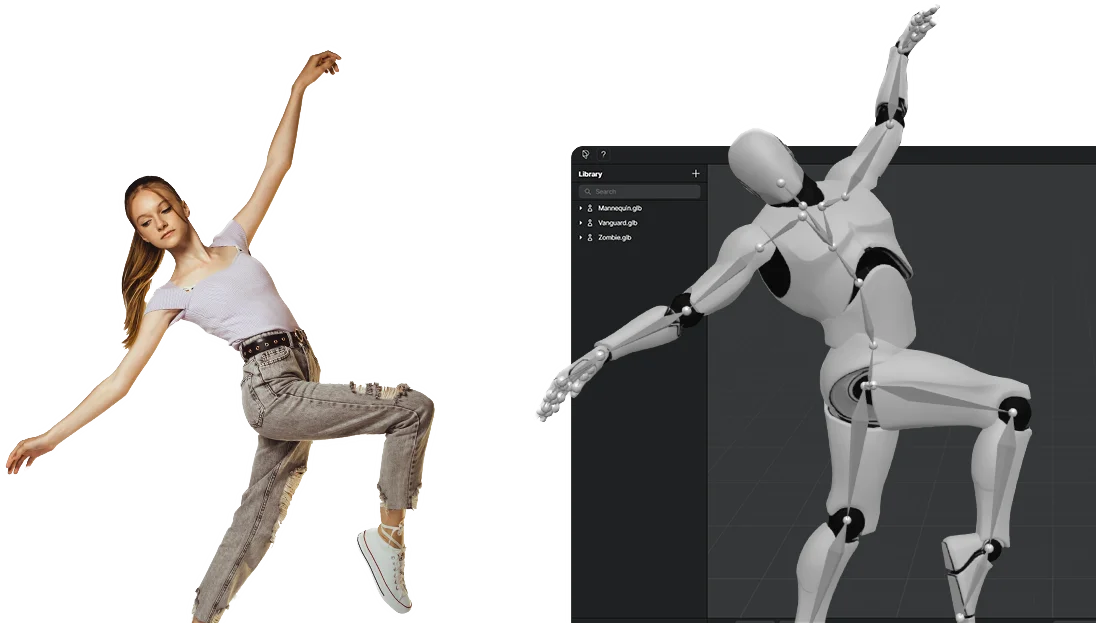
Plask Motion is a browser-based AI animation tool that uses advanced motion capture technology to extract skeletal movement data from any video source — from smartphone clips to professional footage — and apply it to 3D character models. The platform eliminates the need for expensive motion capture suits or studios, democratizing high-quality animation for game developers, filmmakers, VTubers, and content creators. Users can upload videos, import their own 3D characters (including MMD and VRM models), and let Plask's AI automatically extract and apply motion data. The platform also includes AI-assisted cinematography tools for lighting and camera control, along with Hollywood-grade post-processing effects such as motion blur, depth-of-field, vignettes, and tone mapping. Finished animations can be exported in formats compatible with Unreal Engine, Unity, Maya, and Blender. Key highlights include best-in-class single-camera body animation accuracy, support for blinking and physics simulations, and a custom TikTok/dance video creation service delivered within 24 hours. Plask is ideal for indie game developers, animation studios, virtual content creators, and marketing teams looking to produce studio-quality 3D animations quickly and affordably without a steep learning curve.
Key Features
- AI Motion Capture from Video: Extracts precise body motion data from any single-camera video source with best-in-class accuracy, ready for games, films, and virtual content.
- 3D Character Model Support: Import your own 3D characters including MMD and VRM models, with support for blinking and physics-based animation.
- AI-Assisted Cinematography: Automated lighting and camera controls with cinematic post-processing effects like motion blur, depth-of-field, and tone mapping.
- Seamless Industry Tool Export: Export animations in formats compatible with Unreal Engine, Unity, Maya, and Blender after extensive compatibility testing.
- Custom Dance & TikTok Video Service: A done-for-you service that creates custom TikTok-style viral dance animations within 24 hours from a description.
Use Cases
- Indie game developers creating character animations without access to a professional motion capture studio.
- VTubers and virtual content creators animating avatars using simple smartphone or webcam recordings.
- Marketing and social media teams producing viral TikTok-style dance videos and branded animated content.
- Film and animation students learning 3D animation workflows with realistic motion data on a limited budget.
- Professional animation studios rapidly prototyping character movement before committing to full production.
Pros
- No Special Equipment Required: Achieves professional-grade motion capture using only a standard video — no suits, markers, or dedicated cameras needed.
- Broad Software Compatibility: Exports to major industry tools (Unreal, Unity, Maya, Blender), fitting easily into existing professional pipelines.
- Beginner-Friendly Interface: Intuitive four-step workflow makes high-quality 3D animation accessible to users with little to no animation experience.
- Free Tier Available: Users can get started at no cost, lowering the barrier to entry for indie creators and students.
Cons
- Limited to Body Motion: Finger tracking is limited, and fine facial or hand animation may require manual cleanup in external tools.
- Video Quality Dependency: Capture accuracy is dependent on input video quality, lighting, and camera angle, which can affect results with low-quality footage.
- Advanced Features Behind Paywall: Some higher-end rendering, export, and multi-person extraction features are only available on paid plans.
Frequently Asked Questions
How much does it cost to use Plask?
Plask offers a free tier to get started. Paid plans are available with additional features such as advanced exports, higher quality renders, and more processing credits. Check the Pricing page on plask.ai for current plan details.
Can I use my Plask animations for commercial use?
Yes, Plask animations can be used for commercial purposes, though the specific terms may depend on your subscription plan. Review Plask's licensing terms for full details.
Can I upload my own 3D model?
Yes, Plask supports importing custom 3D character models, including popular formats used by MMD and VRM models, with physics and blinking support.
What software can I export my animations to?
Plask animations can be exported to industry-standard tools including Unreal Engine, Unity, Maya, and Blender. The platform has undergone extensive compatibility testing with these tools.
What is the difference between MoCap V1 and V2?
MoCap V2 is an upgraded motion AI model offering improved accuracy and more natural movement extraction compared to V1. Plask continues to refine its motion capture pipeline with each version.