
About
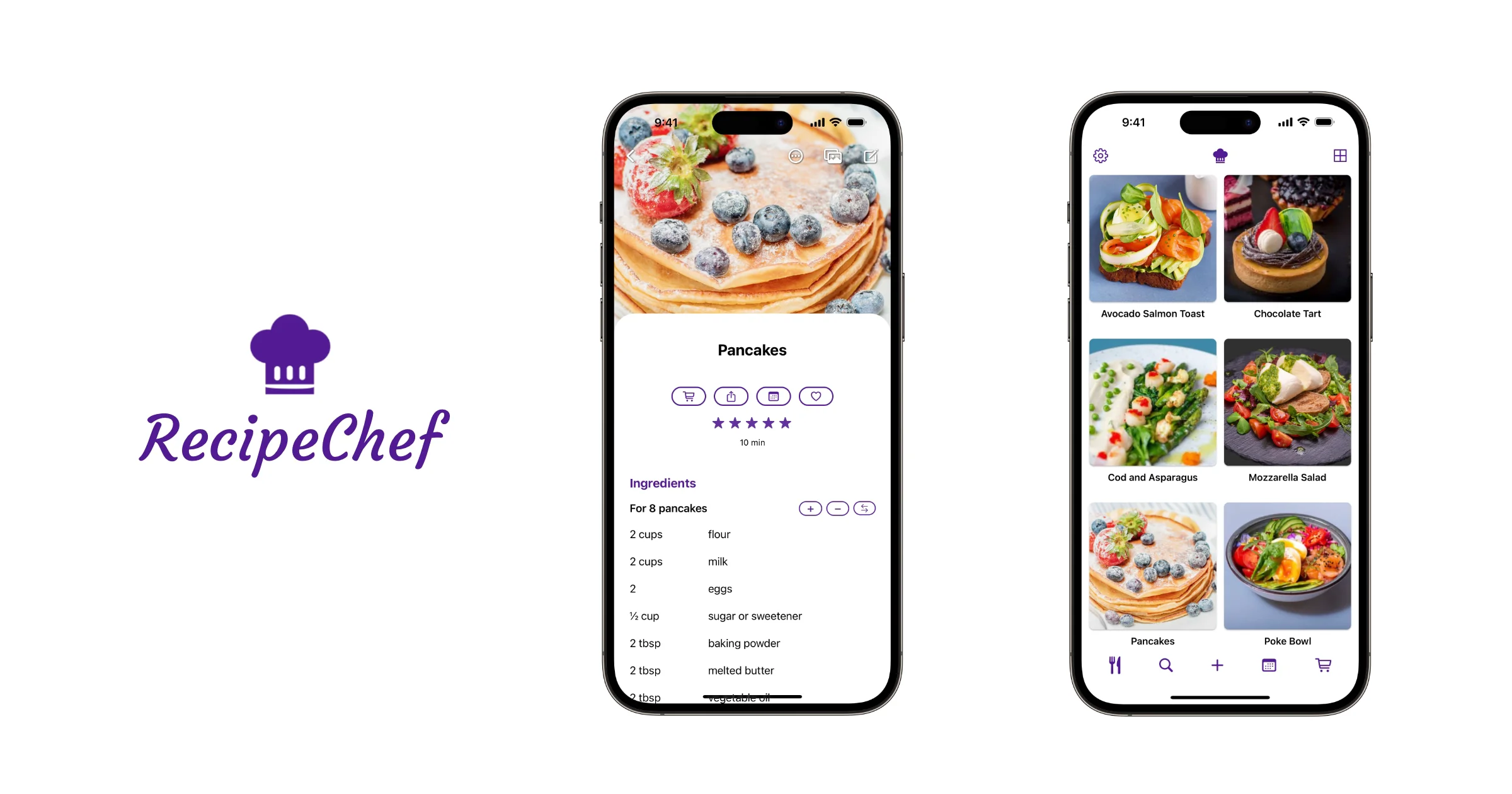
RecipeChef is a feature-rich recipe management app designed exclusively for iPhone and iPad. It acts as your all-in-one digital cookbook, allowing you to add recipes complete with ingredients, step-by-step directions, prep time, nutritional information, ratings, and up to 50 photos per recipe. You can import recipes from supported websites or directly from the iOS Notes app, making it easy to consolidate existing collections. The smart shopping list automatically categorizes over 1,500 grocery items — vegetables, fruit, meat, seafood, condiments, and more — so you can navigate the store faster. Quantities can be adjusted per recipe serving size, and entire meal plan selections can be added to the list in one tap. Non-grocery items like toiletries can be added manually. RecipeChef's meal planner offers daily, weekly, and monthly calendar views with intuitive drag-and-drop rescheduling. You can plan the week's meals and batch-generate a shopping list from all planned dishes at once. Powerful search and discovery features include filtering by ingredient, prep time, calorie count, and ingredient count. "Inspire Me" suggests random recipes, while "Not Recently Cooked" helps you rediscover forgotten favorites. The app syncs recipes and shopping lists across multiple iPhones and iPads in the same household, making it perfect for families who cook together.
Key Features
- Personal Digital Cookbook: Add your own recipes with ingredients, directions, prep time, nutritional info, ratings, and up to 50 photos. Import from supported websites or the iOS Notes app.
- Smart Shopping List: Automatically sorts 1,500+ grocery items by category. Add recipe ingredients in one tap with serving-size adjustments, and rearrange categories to match your store's aisle layout.
- Drag-and-Drop Meal Planner: Plan meals across daily, weekly, or monthly calendar views. Drag recipes between days and batch-add all planned meals to your shopping list at once.
- Powerful Search & Discovery: Filter recipes by ingredient, prep time, calorie count, or ingredient count. Use 'Inspire Me' for random picks or 'Not Recently Cooked' to rediscover forgotten favorites.
- Multi-Device Household Sync: Sync recipes and shopping lists seamlessly across multiple iPhones and iPads within the same household.
Use Cases
- Home cooks consolidating recipes from handwritten cards, bookmarked websites, and the Notes app into one organized digital cookbook.
- Families planning weekly meals and generating a unified, auto-sorted grocery list that can be shared across household iPhones and iPads.
- Health-conscious individuals filtering their recipe collection by calorie count or number of ingredients to maintain a balanced, goal-oriented diet.
- Busy cooks discovering quick meal ideas by filtering for recipes that take 15 minutes or less to prepare.
- Households looking to reduce food waste by using the ingredient-based search to cook meals around what they already have in the fridge.
Pros
- All-in-One Kitchen Hub: Combines recipe storage, meal planning, and grocery list management in a single app, eliminating the need for multiple tools.
- Intelligent Shopping List: Auto-categorization and a database of over 1,500 items make building and navigating grocery lists fast and intuitive, even when adding non-recipe items.
- Flexible Recipe Discovery: Multiple search filters and smart suggestions make it easy to find the right recipe based on available ingredients, time constraints, or health goals.
- Family-Friendly Sync: Household sync across multiple iOS devices ensures everyone in the family stays on the same page with shared recipes and shopping lists.
Cons
- iOS Only: RecipeChef is exclusively available for iPhone and iPad — there is no Android, web browser, or desktop version, limiting accessibility for non-Apple users.
- Partial Website Import: Recipe import is supported only for select websites, which may frustrate users who regularly save recipes from a wide variety of sources.
- No Social or Sharing Features: Sharing recipes or shopping lists outside the household (e.g., with friends or across different Apple IDs) is not mentioned, limiting collaborative cooking use cases.
Frequently Asked Questions
What devices does RecipeChef support?
RecipeChef is available for iPhone and iPad running iOS. It syncs recipes and shopping lists across multiple iOS devices within the same household.
Can I import recipes from websites or other apps?
Yes. RecipeChef supports importing recipes from select websites and can import recipes stored in the iOS Notes app. After importing, you can add notes, photos, and nutritional information.
How does the shopping list work?
Open any recipe, adjust the serving quantity, and tap to add all ingredients to your shopping list. Items are auto-sorted into categories like produce, meat, and condiments. You can also add non-grocery items manually and rearrange categories to match your store's layout.
What does the meal planner include?
The meal planner provides daily, weekly, and monthly calendar views. You can assign recipes to specific days using drag and drop, reorder dishes within a meal, and batch-add all planned recipes to your shopping list in a single step.
How many photos can I add to a recipe?
RecipeChef supports up to 50 photos per recipe, so you can document every step or variation of your dish.