

About
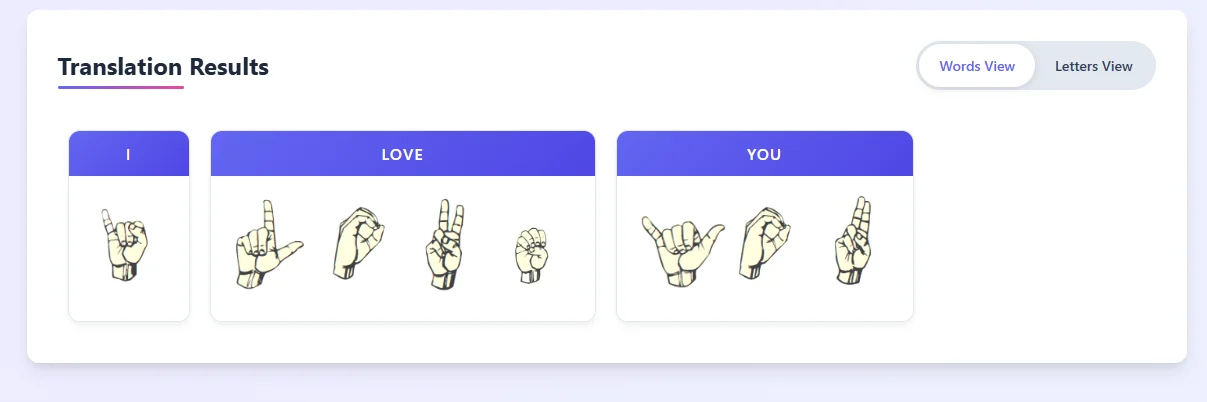
SL Translator (SLTranslator.com) is a free, browser-based sign language translation tool that converts written text into visual hand-sign representations. It primarily focuses on American Sign Language (ASL) — one of the most widely used sign languages in the world — while also supporting British, Chinese, French, Mexican, Spanish, Australian, German, and Japanese sign languages. Users simply type or paste text into the input box and click the convert button to instantly generate sign language visuals on screen. The tool offers flexible customization options including adjustable sign size, capital letter highlighting, and two viewing modes: Words View (for full word translations) and Letters View (for individual fingerspelling). A built-in ASL alphabet reference chart is also available for quick lookup. SL Translator is particularly useful for students completing sign language assignments, teachers demonstrating signs in educational settings, and anyone looking to learn or communicate using sign language. Its on-screen visual format allows learners to follow hand movements at their own pace, making it an effective self-study resource. Because it requires no login, installation, or payment, the tool is immediately accessible to anyone with a web browser. Whether you're a first-time learner exploring the ASL alphabet or a professional seeking a quick translation aid, SL Translator provides a straightforward and visual way to bridge communication gaps between hearing and deaf communities.
Key Features
- Text-to-Sign Language Conversion: Instantly converts typed or pasted English text into visual hand-sign representations for ASL and other sign languages.
- Multi-Language Sign Support: Supports 9 sign languages including ASL, British (BSL), Chinese, French, Mexican, Spanish, Australian, German, and Japanese.
- Words View & Letters View Modes: Offers two display modes — full word translations or individual letter fingerspelling — to suit different learning styles.
- Customizable Display Options: Adjust sign size, highlight capital letters, and reference the full ASL alphabet chart for a tailored learning experience.
- Mobile & Desktop Friendly: Fully accessible on both desktop browsers and mobile devices with no installation or login required.
Use Cases
- Students completing sign language assignments can generate accurate visual hand-sign answers using the translator.
- Teachers and educators can use the tool to demonstrate ASL signs in classrooms or online learning environments.
- Deaf and hard-of-hearing individuals can use the tool to quickly visualize text-based messages in their native sign language.
- Hearing individuals looking to learn basic ASL or other sign languages can use the tool as a self-study reference.
- Content creators and advocates for deaf accessibility can use the tool to verify or illustrate sign language content for social media or educational materials.
Pros
- Completely Free: No subscription, registration, or payment required — fully accessible to anyone with a browser.
- Broad Sign Language Coverage: Supports 9 different sign languages, making it useful beyond just ASL learners.
- Great for Education: Ideal for students and teachers as a visual learning aid for sign language assignments and classroom instruction.
- Instant & Visual Results: Real-time on-screen display of hand signs allows learners to study at their own pace without external resources.
Cons
- No Audio or Video Output: The tool only displays static hand-sign images; it does not provide animated or video demonstrations of signs.
- Limited to Fingerspelling: Primarily translates text letter-by-letter or common words; it may not capture the full grammar and syntax of natural sign language.
- No Reverse Translation: While advertised as bidirectional, the core functionality is text-to-sign; true sign-to-English translation (e.g., via camera) is not supported.
Frequently Asked Questions
Is SL Translator free to use?
Yes, SL Translator is completely free. There is no registration, subscription, or payment required to use any feature on the site.
Which sign languages does SL Translator support?
SL Translator supports American Sign Language (ASL), British Sign Language (BSL), Chinese, French, Mexican, Spanish, Australian, German, and Japanese sign languages.
How do I translate text to ASL?
Type or paste your text into the input box, select your desired sign language (ASL is the default), and click the 'Convert to ASL Sign Language' button to view the hand-sign visuals.
Can I use SL Translator on my phone?
Yes, SL Translator is fully responsive and works on both desktop and mobile browsers without any app download.
Is SL Translator suitable for students learning sign language?
Absolutely. The tool is designed with learners in mind — it provides visual hand-sign references, an ASL alphabet chart, and adjustable display sizes to help students practice at their own pace.