R
About
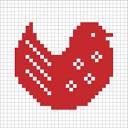
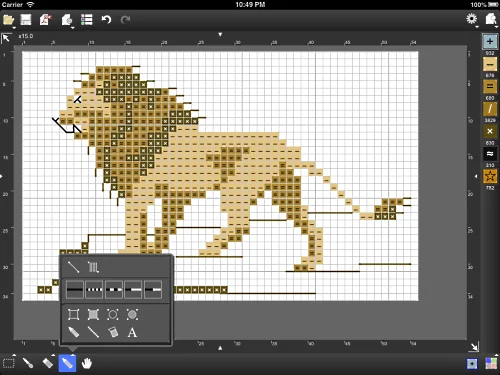
StitchSketch by Mozusystems is a dedicated iOS app for crafters and artists who want to create, plan, and visualize charts for cross stitch, bead weaving, iron beads (Perler® Beads), knitting patterns, color knitting, and pixel art. Designed for use on iPad and other iOS devices, it leverages touch and stylus input to make chart design feel natural and portable. The app supports chart sizes up to 250×250 cells (full version) and includes a comprehensive set of drawing tools: pencil, rectangle, ellipse, and flood fill. Users can select, cut, copy, paste, rotate, and flip sections of their chart. A real-view simulation lets you preview the finished piece before committing to fabric or beads. StitchSketch includes full color palette libraries for major craft brands including DMC®, Anchor, Olympus, DFT, COSMO, Delica, Toho Best, and Perler® Beads (full version). It also supports vector drawing modes for backstitches, fractional stitches, and Hardanger techniques, as well as JIS knitting symbols for pattern design. Charts can be saved in native format, exported as PNG images, or generated as printable PDFs. Dropbox integration is available for cloud storage and sharing. The app also supports photo-to-chart conversion, making it easy to turn any image into a stitchable grid. Ideal for hobbyist crafters, fiber artists, and pixel art enthusiasts seeking a portable, full-featured chart design tool.
Key Features
- Multi-Craft Chart Design: Supports cross stitch, bead weaving, iron beads, knitting patterns, and pixel art in a single app.
- Brand Color Palettes: Full version includes color libraries for DMC®, Anchor, Olympus, Delica, Perler® Beads, and more.
- Photo-to-Chart Conversion: Import any photo and automatically convert it into a stitchable grid chart.
- PDF & PNG Export: Export finished charts as print-ready PDFs or PNG images, or share them via email and Dropbox.
- Rich Drawing Toolset: Pencil, rectangle, ellipse, flood fill, and selection tools with undo/redo and cut/copy/paste support.
Use Cases
- A fiber artist designing a custom cross stitch pattern from a personal photograph on their iPad.
- A bead weaver planning a detailed Delica bead project using the built-in brand color palettes.
- A pixel art hobbyist creating low-resolution icon designs using the grid-based drawing tools.
- A knitting designer drafting a color knitting or cable pattern using JIS knitting symbols.
- A crafter exporting a chart as a PDF to print and follow at their crafting table.
Pros
- Portable Design on iPad: Touch and stylus input makes chart design intuitive and usable anywhere without a desktop computer.
- Extensive Craft Brand Support: Built-in palettes for all major thread and bead brands eliminate manual color matching.
- Versatile Export Options: PDF, PNG, Dropbox, and email export options make it easy to print or share charts.
Cons
- iOS Only: The app is limited to iOS devices and is not available on Android or desktop platforms.
- Legacy App Status: StitchSketch is officially marked as a legacy app, meaning active development and long-term support may be limited.
- Full Features Require Purchase: Key capabilities like large chart sizes and brand color palettes are locked behind the paid full version.
Frequently Asked Questions
What crafts can I design charts for with StitchSketch?
StitchSketch supports cross stitch, bead weaving, iron beads (Perler® Beads), knitting patterns, color knitting, and pixel art.
What is the maximum chart size?
The full version supports charts up to 250×250 cells. The free version may have smaller size limits.
Which color palettes are included?
The full version includes color palettes for DMC®, Anchor, Olympus, DFT, COSMO, Delica, Toho Best, and Perler® Beads.
Can I convert a photo into a chart?
Yes, StitchSketch includes a feature to convert a photo into a grid-based chart suitable for stitching or beading.
How can I save or share my charts?
Charts can be saved in the app's native format, exported as PNG images, generated as PDFs for printing, or synced via Dropbox and shared by email.