
About
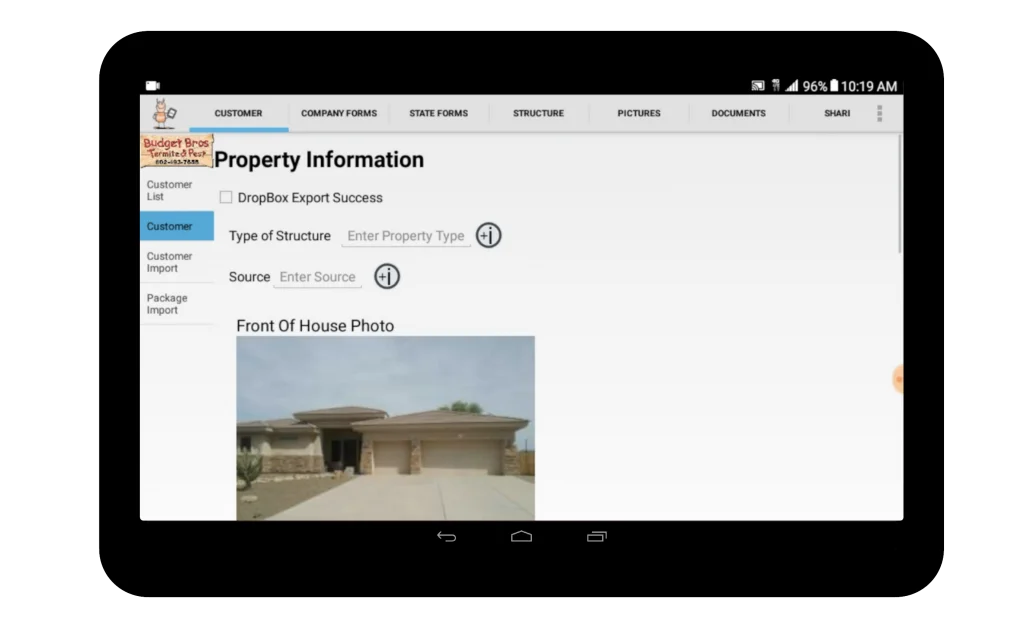
TermitePro is a purpose-built mobile inspection software developed by Tx3Tech for termite and pest control companies operating in Arizona. The application conforms to the Arizona WDIIR (Wood Destroying Insect Inspection Report) format published by the Arizona Structural Pest Control Commission, ensuring regulatory compliance on every job. Designed for use on Android tablets (with primary support for Samsung Galaxy Tablets), TermitePro enables inspectors to complete the entire inspection workflow in the field — gathering customer data, taking up to 24 property photos, drawing findings on a property sketch using intuitive drop-in icons, capturing digital signatures, and instantly emailing or uploading a finished PDF report to cloud storage. The built-in customer database automatically stores all WDIIR data, proposals, drawings, and photos per client, eliminating manual file management. Company branding, inspector credentials, and business license details are pre-loaded and auto-inserted into every report. Voice-to-text capability, dropdown fields with pre-set verbiage, and a graphical date picker further reduce data entry time in the field. TermitePro also supports round-trip data file transfers between inspectors and applicators, cutting duplication of effort across teams. A Basic edition is available for smaller companies seeking a lower-cost option without custom form design. Custom back-office client management solutions can also be integrated. For pest control companies that do not perform termite inspections, Tx3Tech offers a separate pest-control-only software variant.
Key Features
- On-Site WDIIR Report Generation: Generates Arizona-compliant Wood Destroying Insect Inspection Reports pre-filled with company and inspector credentials, ensuring regulatory compliance on every inspection.
- Photo & Drawing Documentation: Capture up to 24 problem-area photos and use the built-in drawing tool with drop-in findings/treatment icons to visually document and communicate inspection results.
- Digital Signatures: Capture inspector and customer signatures directly within the app on-site, eliminating paper sign-offs and speeding up the documentation process.
- Instant Report Delivery: Generate PDFs and immediately email or upload completed reports to cloud storage from the inspection site, with no back-office processing required.
- Automated Customer Database: Automatically stores all WDIIR data, proposals, drawings, and photos per customer, with no manual file management needed.
Use Cases
- Termite inspectors completing Arizona WDIIR inspections in the field and emailing finished PDF reports to clients immediately upon completion.
- Pest control companies standardizing inspection reports across multiple field inspectors to ensure consistent, professional output on every job.
- Inspectors documenting property findings with annotated photos and drawings to support detailed treatment proposals.
- Field teams transferring round-trip inspection data files to applicators, eliminating duplicate data entry between inspection and treatment stages.
- Small pest control businesses using TermitePro Basic to digitize their inspection workflow at a lower cost without investing in fully custom form design.
Pros
- End-to-End Field Workflow: Covers the entire inspection process — data entry, photo capture, drawing, signing, and report delivery — all from a single tablet app without returning to the office.
- Regulatory Compliance Built In: Conforms to the Arizona WDIIR standard out of the box, reducing compliance risk for pest control companies operating in Arizona.
- Consistent Inspector Output: Structured templates ensure all inspectors produce uniform, professional reports regardless of individual variation, strengthening company reputation.
- Reduces Paperwork and Duplication: Voice-to-text, auto-filled forms, and round-trip data transfers between inspectors and applicators significantly cut manual data re-entry.
Cons
- Android/Galaxy Tablet Only: Currently only supports Samsung Galaxy tablets running Android, limiting device flexibility for companies already invested in other hardware.
- Arizona-Specific Compliance Format: The WDIIR report format is specific to Arizona, so pest control companies in other states may require additional customization or a different product.
- Upfront Cost May Be High for Solo Operators: The $750 one-time price point may be a barrier for very small or independent inspectors, although a lower-cost Basic edition is available.
Frequently Asked Questions
What is TermitePro used for?
TermitePro is a mobile tablet application for termite and pest control inspectors to perform inspections, document findings with photos and drawings, capture digital signatures, and instantly generate and deliver Arizona WDIIR-compliant inspection reports from the field.
What devices does TermitePro support?
TermitePro currently supports Samsung Galaxy tablets running Android 3.x (Honeycomb) through Android 5.x (Lollipop). At this time, only Galaxy Tablets are officially supported.
Does TermitePro comply with Arizona state regulations?
Yes. TermitePro conforms to the Arizona WDIIR (Wood Destroying Insect Inspection Report) as published by the Arizona Structural Pest Control Commission, ensuring your reports meet state requirements.
What is the difference between TermitePro and TermitePro Basic?
TermitePro Basic is a lower-cost edition that uses pre-designed (non-custom) proposal, warranty, and invoice forms with selectable color schemes. The full TermitePro allows Tx3Tech to build fully custom forms tailored to your company's branding and specific workflow needs.
Can TermitePro be used by pest control companies that don't do termite inspections?
Yes. Tx3Tech also designs pest-control-only software for companies that do not perform termite inspections. You can contact them at [email protected] for more information about this option.