

About
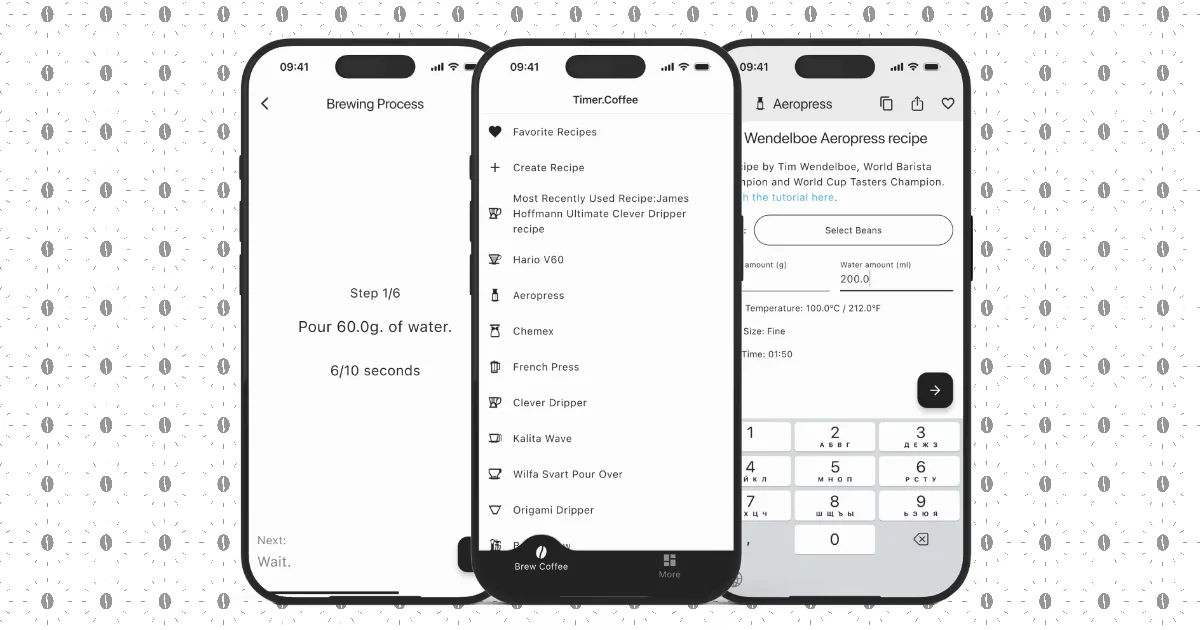
Timer.Coffee is a free, open-source coffee brewing companion app that helps users brew exceptional coffee every time. Supporting over 20 brewing methods — including AeroPress, V60, Clever Dripper, French Press, and more — the app provides 40+ expert-curated recipes from coffee professionals and enthusiasts around the world. The app features step-by-step guided timers with precise instructions for pouring, blooming, and steeping, so no step is ever missed. Users can adjust coffee-to-water ratios on the fly and the recipe scales instantly to match any desired volume. A powerful bean collection manager lets users log beans, track remaining weight, sort by roast date, attach photos, and use AI to scan bag labels automatically. Every brewing session is automatically logged the moment it's completed, allowing users to add tasting notes and attach beans for future reference. The timer continues running in the background and surfaces on the Lock Screen and Dynamic Island, so you never have to unlock your phone mid-brew. A unique 'Pulse' feature shows live brewing activity from coffee lovers around the world in real time. The app is fully localized in 22 languages and is completely free with no ads. Its open-source codebase is available on GitHub, making it a community-driven project trusted by coffee enthusiasts globally.
Key Features
- 40+ Expert Recipes for 20+ Methods: Access curated brewing recipes for AeroPress, V60, French Press, Clever Dripper, and many more methods crafted by coffee professionals.
- Step-by-Step Guided Timers: Follow precise, timed instructions for every pour, bloom, and steep phase — timer runs in the background and on the Lock Screen.
- Automatic Brew Diary: Every session is logged automatically when you finish brewing. Add tasting notes, attach beans, or log manual brews for a full history.
- AI Bean Bag Label Scanner: Use AI-powered computer vision to scan coffee bag labels instantly and populate your bean collection without manual data entry.
- Live Global Brew Pulse: See what coffee lovers around the world are brewing in real time, updated live down to the country level.
Use Cases
- Home baristas following expert pour-over or AeroPress recipes with precise step-by-step timers.
- Coffee enthusiasts tracking their bean collection, logging brews, and adding tasting notes to refine their craft over time.
- Beginners learning manual brewing methods through guided instructions without needing to memorize ratios or timing.
- Coffee lovers scanning bag labels with AI to quickly log new beans and manage their inventory by roast date.
- Curious drinkers exploring the global Pulse feature to discover what brewing methods are trending worldwide in real time.
Pros
- Completely Free with No Ads: Timer.Coffee is fully free to use and open-source with no advertisements, making it accessible to everyone without compromise.
- Wide Brewing Method Support: Covers 20+ brewing methods with expert recipes, making it suitable for beginners exploring new techniques and seasoned home baristas alike.
- Cross-Platform with Background Timer: Available on iOS, Android, and web; the timer persists on the Lock Screen and Dynamic Island so brewing is never interrupted.
- Multilingual — 22 Languages: Fully localized in 22 languages, making it accessible to a global audience of coffee enthusiasts.
Cons
- Niche Use Case: Designed exclusively for coffee brewing, so its utility is limited to users with an interest in manual coffee preparation methods.
- No Advanced Community Features: While recipes can be shared with the community, social and discovery features for connecting with other brewers remain limited.
- AI Features Require Camera Access: The AI-powered bean label scanning requires camera permissions and may vary in accuracy depending on bag label design and print quality.
Frequently Asked Questions
Is Timer.Coffee really free?
Yes, Timer.Coffee is completely free to use with no ads, no subscriptions, and no paywalled features. It is also open-source and available on GitHub.
Which brewing methods does Timer.Coffee support?
Timer.Coffee supports 20+ brewing methods including AeroPress, Hario V60, Clever Dripper, French Press, pour-over, and more, with 40+ expert-curated recipes.
How does the AI bean label scanner work?
The AI scanner uses your device camera to read coffee bag labels and automatically populate bean details — such as origin, roast level, and roast date — in your bean collection.
Does the timer keep running if I leave the app?
Yes, the timer continues running in the background. You can follow your current brew step on the Lock Screen and Dynamic Island without unlocking your device.
Can I create and share my own recipes?
Yes, Timer.Coffee lets you design custom brewing recipes and share them with the Timer.Coffee community, allowing others to discover and use your methods.