

About
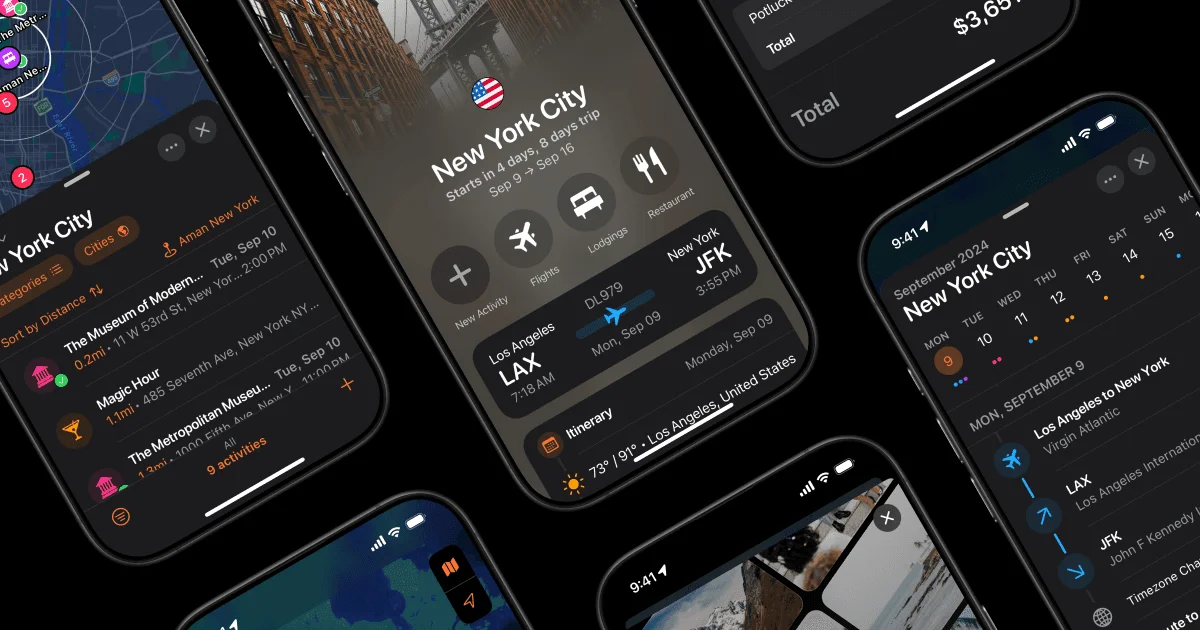
Tripsy is a comprehensive travel planning app designed to eliminate the chaos of scattered booking confirmations, notes, and map searches. Simply forward your reservation emails to Tripsy and it automatically parses your flights, hotel stays, and activities into a clean, structured itinerary—no manual data entry required. The app keeps travelers informed with real-time flight notifications covering delays, gate changes, and baggage information, so you're never caught off guard at the airport. A built-in calendar sync feature lets you overlay your travel plans alongside meetings and personal events, giving you a unified view of your schedule. Tripsy makes group travel effortless with flexible sharing controls. Invite collaborators who can edit the itinerary, add guests, and manage expenses, or share a view-only link for friends and family who just need to check hotel addresses or flight times. You can even designate favorite guests to be auto-added to future trips. Expense tracking with multi-currency support ensures you stay on budget across international trips. All your travel documents—passports, vouchers, confirmations—can be stored directly in the trip for easy offline access. Tripsy is ideal for solo travelers, couples, families, and business travelers who want a single source of truth for every journey. Available on iOS and Android, it's the go-to solution for anyone tired of juggling multiple apps, emails, and spreadsheets when planning travel.
Key Features
- Email-to-Itinerary Parsing: Forward reservation confirmation emails and Tripsy automatically extracts your flights, hotels, and activities into a structured itinerary—no manual entry needed.
- Real-Time Flight Updates: Receive instant push notifications about flight delays, gate changes, and baggage carousel information so you can travel with confidence.
- Calendar Sync: Connect your itinerary to your calendar to view flights, hotel check-ins, and activities alongside your meetings and daily events in one unified schedule.
- Trip Sharing with Granular Permissions: Invite guests as collaborators (who can edit) or view-only participants, with fine-grained control over whether they can see documents and expense data.
- Multi-Currency Expense Tracking: Log and monitor travel expenses in any currency, with support for managing multiple currencies within a single trip for international travel.
Use Cases
- Planning a family vacation with shared itineraries so all members can view hotel addresses, flight times, and daily activities.
- Managing business travel by consolidating flight confirmations, hotel bookings, and meeting schedules in one accessible app.
- Organizing a multi-destination trip across several countries, tracking expenses in local currencies throughout.
- Coordinating group travel for friends by assigning collaborator roles to co-planners while keeping finances private.
- Storing travel documents like visas, e-tickets, and insurance policies alongside the itinerary for quick offline access.
Pros
- Automatic Itinerary Building: Forwarding reservation emails to auto-populate trip details saves significant time and reduces manual data entry errors.
- Flexible Collaboration Controls: Granular guest permissions make it easy to share trips with family, friends, or co-travelers without compromising privacy on expenses or sensitive documents.
- All-in-One Organization: Consolidates flights, accommodation, activities, documents, and expenses in a single app, eliminating the need to juggle multiple tools.
- Real-Time Flight Alerts: Proactive notifications for delays and gate changes help travelers stay ahead of disruptions without constantly checking airline apps.
Cons
- Travel-Specific Scope: Tripsy is purpose-built for travel planning and does not serve as a general-purpose productivity or project management tool.
- Email Parsing Dependence: The auto-build feature relies on correctly formatted reservation emails; unusual formats from certain airlines or hotels may require manual correction.
- Limited Free Tier Details: The extent of features available on the free plan versus paid tiers is not fully transparent without visiting the pricing page.
Frequently Asked Questions
How does the email-to-itinerary feature work?
You forward your booking confirmation emails (flights, hotels, car rentals, etc.) to a Tripsy email address, and the app automatically parses the details and adds them to your trip itinerary.
Can I share my trip with people who don't have Tripsy?
Yes, you can invite guests to view your trip. They can access it with a Tripsy account, and you control whether they can edit the itinerary or only view it.
Does Tripsy support multiple currencies for expense tracking?
Yes, Tripsy supports multiple currencies within a single trip, making it ideal for international travel where you may spend in different currencies.
Is Tripsy available on iPhone and Android?
Tripsy is primarily a mobile app available on iOS (iPhone/iPad). Check the App Store or Tripsy's website for the latest platform availability.
Can I sync Tripsy with Google Calendar or Apple Calendar?
Yes, Tripsy supports calendar sync so you can view your flights, hotel check-ins, and activities alongside your existing calendar events.