
About
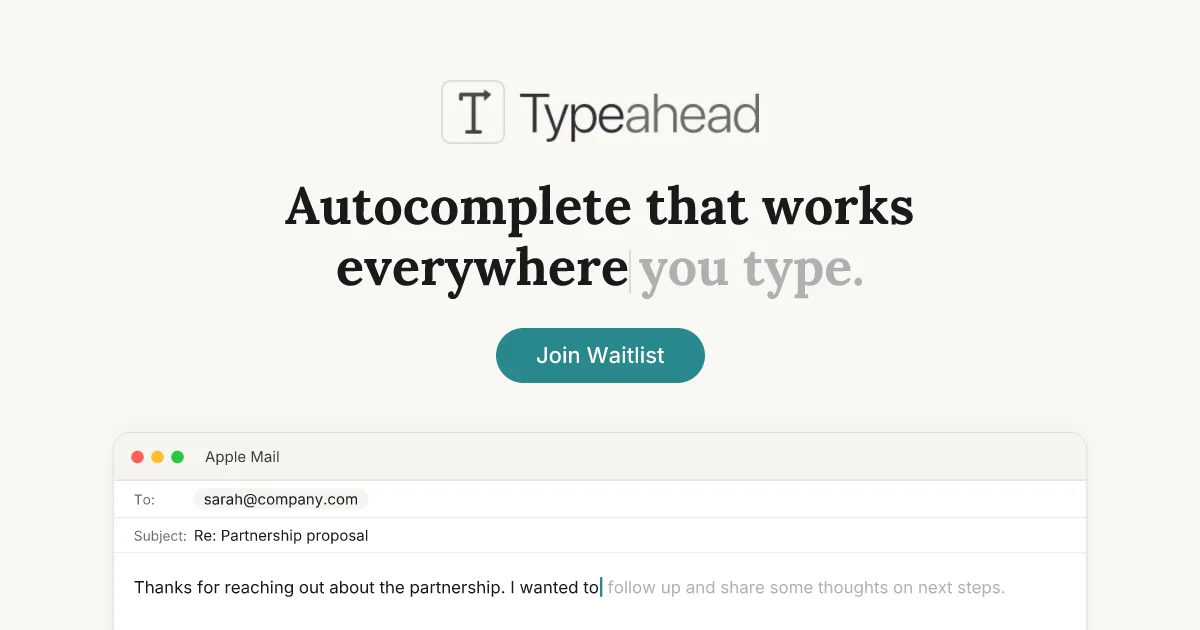
Typeahead is a system-wide AI autocomplete tool built exclusively for macOS. Unlike browser-based writing assistants or IDE-specific code completers, Typeahead works across every app on your Mac — from email clients and Slack to Notion, code editors, and beyond. Simply start typing and intelligent suggestions appear inline; press Tab to accept them instantly. What sets Typeahead apart is its uncompromising privacy model. All AI inference runs locally on your machine using GPU-accelerated models optimized for Apple Silicon and Intel Macs. There are no servers involved in text processing, no accounts required, no telemetry, and no cloud uploads — your words never leave your computer. Over time, Typeahead adapts to your personal writing style, so suggestions begin to sound like you rather than a generic AI. This makes it especially valuable for high-volume email senders, developers writing documentation and PR descriptions, writers maintaining a consistent voice, and non-native speakers seeking fluency and confidence. Typeahead is sold as a one-time purchase with free lifetime updates and unlimited usage — no caps, no quotas, no monthly fees. It requires macOS 14 or later, 8 GB of RAM, and approximately 3 GB of disk space for the local AI model. The app currently operates a waitlist ahead of its public launch.
Key Features
- System-Wide Autocomplete: Inline text suggestions appear in every Mac app — email, Slack, Notion, code editors, and more. Press Tab to instantly accept any suggestion.
- 100% Local Processing: All AI inference runs on your Mac using GPU-accelerated local models. No servers, no cloud uploads, no network activity for text processing.
- Learns Your Writing Voice: After a few days of use, Typeahead adapts to your personal writing style so suggestions sound like you, not a generic AI assistant.
- One-Time Purchase: Pay once and own Typeahead forever. Includes all language models, unlimited usage, and free updates for life — no subscription required.
- Lightning Fast & Lightweight: GPU-accelerated inference delivers zero-lag suggestions. Built as a native Mac app and optimized for Apple Silicon for maximum performance.
Use Cases
- High-volume email senders who repeatedly write similar openers and phrases — Typeahead completes them before they finish typing, saving hours each week.
- Developers who spend significant time on non-code writing like Slack messages, pull request descriptions, and issue write-ups outside their IDE.
- Writers and bloggers who want AI-powered suggestions that adapt to their unique voice and style without compromising their creative output.
- Non-native English speakers who want real-time fluency assistance across all apps to write with confidence and reduce second-guessing.
- Privacy-conscious professionals in legal, medical, or finance sectors who need AI writing assistance but cannot send sensitive data to the cloud.
Pros
- Absolute Privacy by Design: Your text is never sent to any server. With no cloud processing and no telemetry, it's the most private AI writing assistant available.
- Works Everywhere on Mac: Unlike Grammarly (browser-only) or GitHub Copilot (IDE-only), Typeahead works in every app you can type in — no integrations needed.
- No Subscription, Own It Forever: A single one-time payment gives you unlimited use, all models, and lifetime free updates with no ongoing costs.
- Offline Capable: Because everything runs locally, Typeahead works without an internet connection — useful on planes or in low-connectivity environments.
Cons
- Mac Only: Typeahead is exclusively a macOS app and is not available for Windows, Linux, iOS, or Android users.
- Hardware Requirements: Requires macOS 14+, at least 8 GB of RAM, and ~3 GB of free disk space for the local AI model, which may exclude older or lower-spec Macs.
- Currently Waitlist-Only: Typeahead has not yet launched publicly. Interested users must join a waitlist and wait for an invite before they can purchase or use the app.
Frequently Asked Questions
When will Typeahead be available?
Typeahead is currently in a waitlist phase ahead of its public launch. You can join the waitlist on their website and will be notified when it becomes available.
How is Typeahead different from Grammarly or GitHub Copilot?
Grammarly focuses on grammar correction and works primarily in browsers. GitHub Copilot completes code inside your IDE. Typeahead completes any text in every Mac app and runs entirely locally — it's a different category of tool.
Does Typeahead work offline?
Yes. All AI processing happens on your Mac, so Typeahead works fully offline. The only network activity is license activation on startup and optional update checks.
Is my writing data private?
Yes, completely. Your text never leaves your Mac. There is no cloud processing, no user accounts, and no telemetry. The only data transmitted is a license verification ping.
What Mac hardware does Typeahead require?
Typeahead requires macOS 14 or later, works on both Apple Silicon and Intel Macs, needs at least 8 GB of RAM, and requires approximately 3 GB of free disk space for the local AI model.