M
About
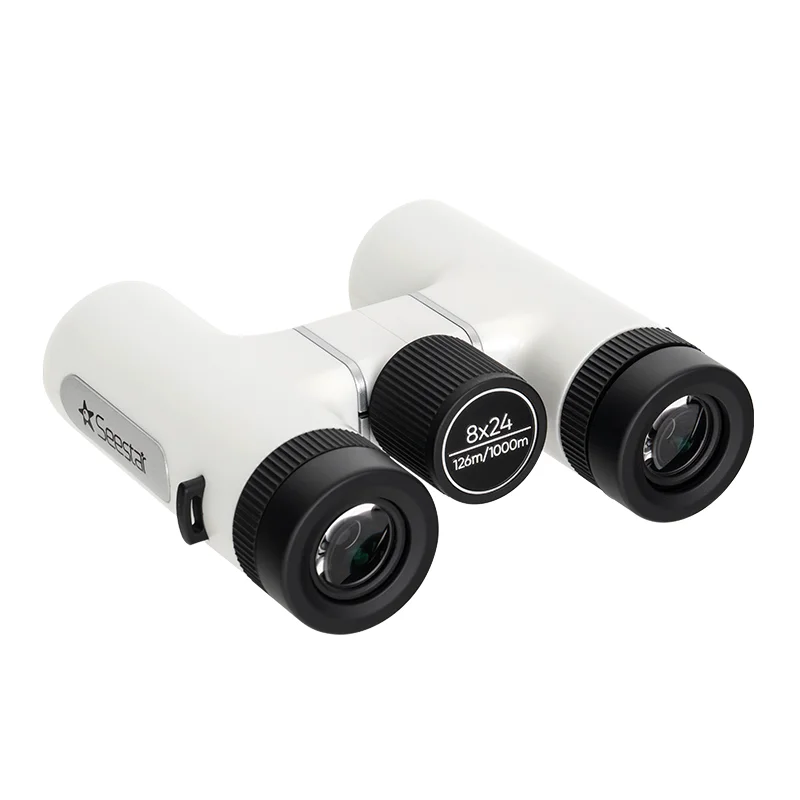
The ZWO Seestar App is the intelligent control center for ZWO's lineup of Seestar smart telescopes (S30, S30 Pro, S50), turning complex astrophotography into a simple, tap-driven experience. Designed for both beginners and seasoned stargazers, the app leverages AI-assisted plate solving and auto-alignment to automatically identify and center celestial targets — no manual star-hopping required. Users can browse a built-in sky atlas, select a deep-sky object, planet, or lunar feature, and have the telescope slew and begin capturing within seconds. Live stacking technology progressively combines incoming frames in real time, gradually revealing faint nebulae, galaxies, and star clusters on your phone screen. The app supports one-tap lunar photography, producing detailed, high-resolution images without any manual exposure adjustments. Advanced users can fine-tune gain, exposure, and filter settings for more creative control. Images are automatically saved to the device and can be shared directly to social platforms or exported for further processing. The Seestar ecosystem extends beyond imaging: paired with the Seestar Binoculars (available standalone or bundled), users get a compact, portable astronomy kit perfect for travel, star parties, and family outings. The app is available on iOS and Android and requires a compatible Seestar smart telescope connected via Wi-Fi. It is free to download, with the primary cost being the telescope hardware itself.
Key Features
- AI-Assisted Auto-Alignment & Plate Solving: Automatically identifies the night sky and aligns the telescope to your chosen target using AI-powered plate solving — no manual star alignment needed.
- One-Tap Astrophotography: Select any object from the built-in sky atlas and start capturing with a single tap; the app handles exposure, focus, and framing automatically.
- Real-Time Live Stacking: Progressively stacks incoming frames in real time so you can watch faint galaxies and nebulae emerge on your phone screen as the session continues.
- Built-In Sky Atlas: Browse thousands of deep-sky objects, planets, and lunar features directly in the app, with detailed information and one-tap slewing to any target.
- Seestar Binoculars Integration: Pairs seamlessly with the Seestar Binoculars for a complete portable astronomy kit — smart imaging plus real-time visual observation in one travel-friendly bundle.
Use Cases
- Beginners capturing their first deep-sky images of nebulae and galaxies with minimal setup using AI-guided auto-alignment and one-tap imaging.
- Families and casual stargazers using the app at star parties or campsites to explore the night sky interactively on a smartphone screen.
- Educators using the Seestar telescope and app to introduce students to astronomy and astrophotography in a classroom or outdoor setting.
- Travel photographers and adventurers packing a compact smart telescope and binoculars for spontaneous night-sky sessions on the road.
- Hobbyist astrophotographers using live stacking to progressively capture and preview galaxy or nebula details during a single imaging session.
Pros
- Beginner-Friendly: Fully automated alignment and one-tap capture remove the steep learning curve of traditional astrophotography, making it accessible to newcomers.
- Real-Time Feedback: Live stacking lets users see results building on-screen during the session, making the experience engaging and immediately rewarding.
- Portable Ecosystem: The lightweight Seestar hardware paired with a free app creates a highly portable, all-in-one astronomy solution ideal for travel and spontaneous use.
- Free to Download: The app itself costs nothing; the investment is in the telescope hardware, which offers strong value for the capabilities provided.
Cons
- Requires ZWO Seestar Hardware: The app is only functional with a compatible Seestar telescope; it has no standalone utility without the proprietary hardware.
- Limited Advanced Controls: Experienced astrophotographers may find the automation-first approach limits granular control over imaging parameters compared to dedicated capture software.
- Wi-Fi Dependent: The connection between app and telescope relies on a local Wi-Fi hotspot, which can be a limitation in remote dark-sky locations with connectivity challenges.
Frequently Asked Questions
Is the ZWO Seestar App free?
Yes, the app is free to download on iOS and Android. The cost is associated with purchasing a compatible Seestar smart telescope (S30, S30 Pro, or S50).
Which telescopes are compatible with the Seestar App?
The app is designed to work with the ZWO Seestar S30, Seestar S30 Pro, and Seestar S50 smart telescopes.
Do I need astronomy experience to use the app?
No. The app is designed for all skill levels. AI-assisted auto-alignment and one-tap target selection handle the technical aspects automatically.
What is live stacking?
Live stacking is a technique where the app continuously combines new frames with previous ones in real time, progressively reducing noise and revealing faint details of deep-sky objects on your phone screen as you image.
Can the Seestar App be used with the Seestar Binoculars?
The Seestar Binoculars are a standalone optical accessory and do not connect to the app. However, they are sold as a bundle companion to the smart telescope for a complete astronomy experience — the app controls the telescope while the binoculars provide real-time visual observation.