
About
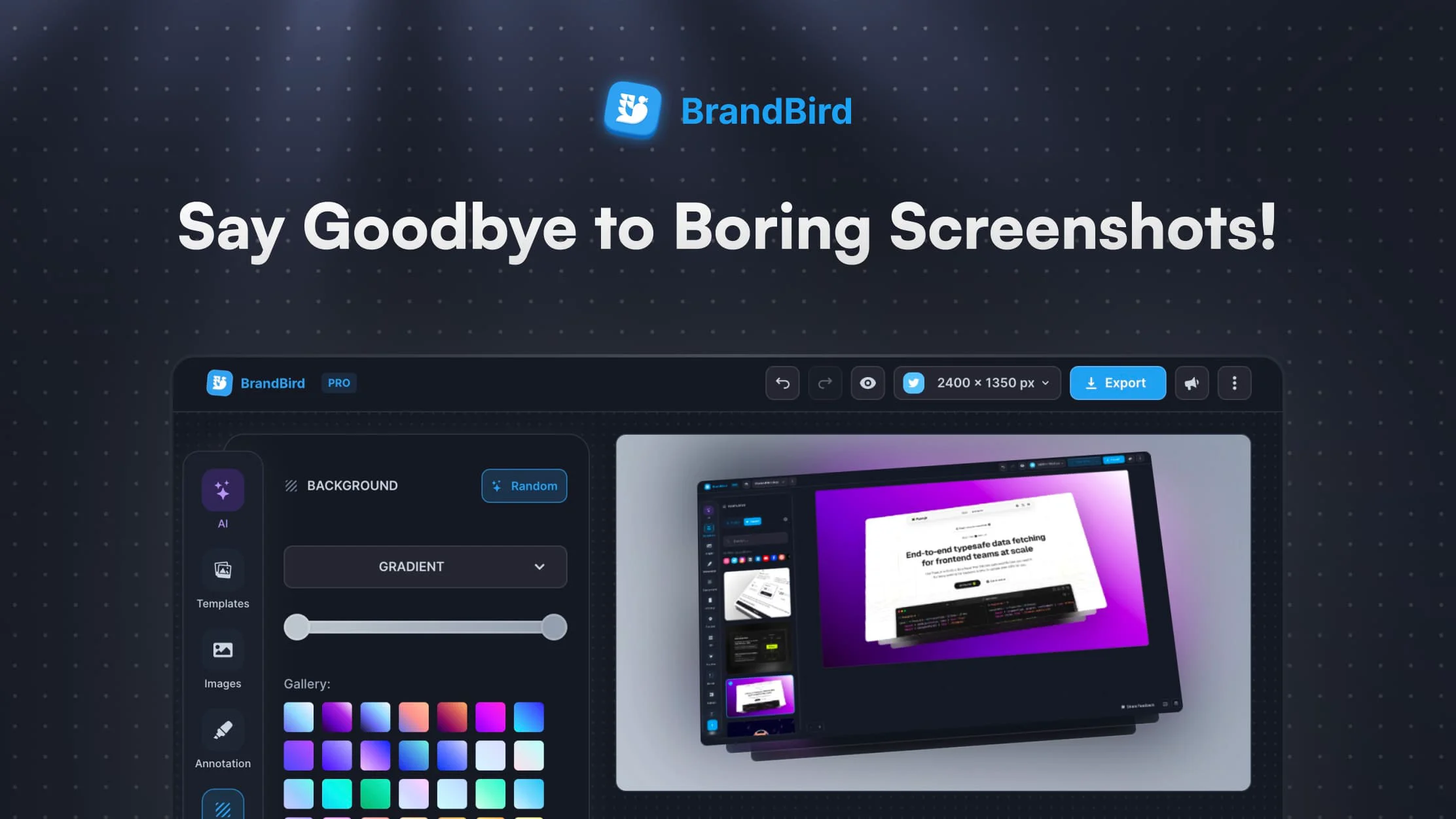
BrandBird is an intuitive, feature-rich image and screenshot editor tailored for entrepreneurs, SaaS founders, content creators, and marketers who want to produce professional-grade visuals without a steep learning curve. Starting from any screenshot or image, users can apply gradient backgrounds, 3D perspective effects, real device mockups, and annotation overlays—all in just a couple of clicks. The tool ships with a library of ready-to-use templates optimized for Twitter/X graphics, LinkedIn posts, blog articles, newsletters, changelogs, and landing pages. Its annotation suite lets you add arrows, emojis, headings, and rectangles to highlight key features or guide the viewer's eye. Watermark support ensures your visuals stay on-brand across every channel. BrandBird is loved by over 10,000 users from modern companies who report dramatic increases in social media engagement—some seeing Twitter impressions rise up to 7×. The tool is available for free with a paid upgrade for advanced features, and offers a Chrome extension for quick access. It has effectively replaced Canva and dedicated design services for many teams, significantly reducing the time spent creating marketing assets while delivering results that look polished and professional.
Key Features
- 3D Image Effects: Rotate and tilt any image in three-dimensional space to create eye-catching 3D perspective visuals with a single click.
- Device Mockups: Wrap screenshots inside realistic device frames (phones, laptops, browsers) to present your UI or product professionally.
- Annotation Tools: Add arrows, emojis, text headings, and rectangles to highlight features and guide viewers' attention within your visuals.
- Branded Watermarks: Create, upload, and save custom watermarks to keep all your exported graphics consistently on-brand.
- Ready-to-Use Templates: Access a growing library of templates optimized for Twitter/X, LinkedIn, blog posts, newsletters, and landing pages.
Use Cases
- Creating branded Twitter/X and LinkedIn post graphics from product screenshots to boost social media engagement
- Generating professional device mockup visuals for SaaS landing pages and product showcases
- Designing eye-catching header images for blog articles and email newsletters
- Annotating UI screenshots with arrows and callouts to highlight features in changelogs or tutorials
- Producing consistent, watermarked marketing assets that replace expensive freelance design services
Pros
- Extremely Fast Workflow: Go from a raw screenshot to a publish-ready graphic in seconds using one-click presets and background pickers.
- Free to Start: Core features are available at no cost, lowering the barrier for indie hackers and early-stage founders.
- Replaces Multiple Tools: Users report dropping Canva and expensive design services entirely, consolidating their visual workflow into one app.
- Boosts Social Engagement: Polished branded visuals have helped users achieve significantly higher impressions and engagement on platforms like Twitter and LinkedIn.
Cons
- Niche Use Case Focus: BrandBird is optimized for screenshots and mockups; it is not a full-featured vector or illustration design tool.
- Advanced Features Behind Paywall: Some templates, effects, and export options require a paid subscription to unlock.
- Limited Collaboration Features: The tool is primarily designed for individual creators and may lack robust team collaboration or asset management workflows.
Frequently Asked Questions
Is BrandBird free to use?
Yes, BrandBird offers a free plan with access to core features. A paid subscription unlocks additional templates, effects, and advanced capabilities.
What types of graphics can I create with BrandBird?
You can create social media posts (Twitter/X, LinkedIn), blog and newsletter headers, landing page assets, changelog images, and product UI showcases—all starting from a screenshot or image.
Does BrandBird have a browser extension?
Yes, BrandBird offers a browser extension that allows you to capture and edit screenshots directly without leaving your current workflow.
Who is BrandBird best suited for?
BrandBird is ideal for SaaS founders, indie hackers, content creators, marketers, and designers who want to produce professional-quality visuals quickly without deep design expertise.
Can I add my own branding to exported graphics?
Yes, BrandBird supports custom watermarks that you can create, upload, and save within the app to maintain consistent branding across all your visuals.