

About
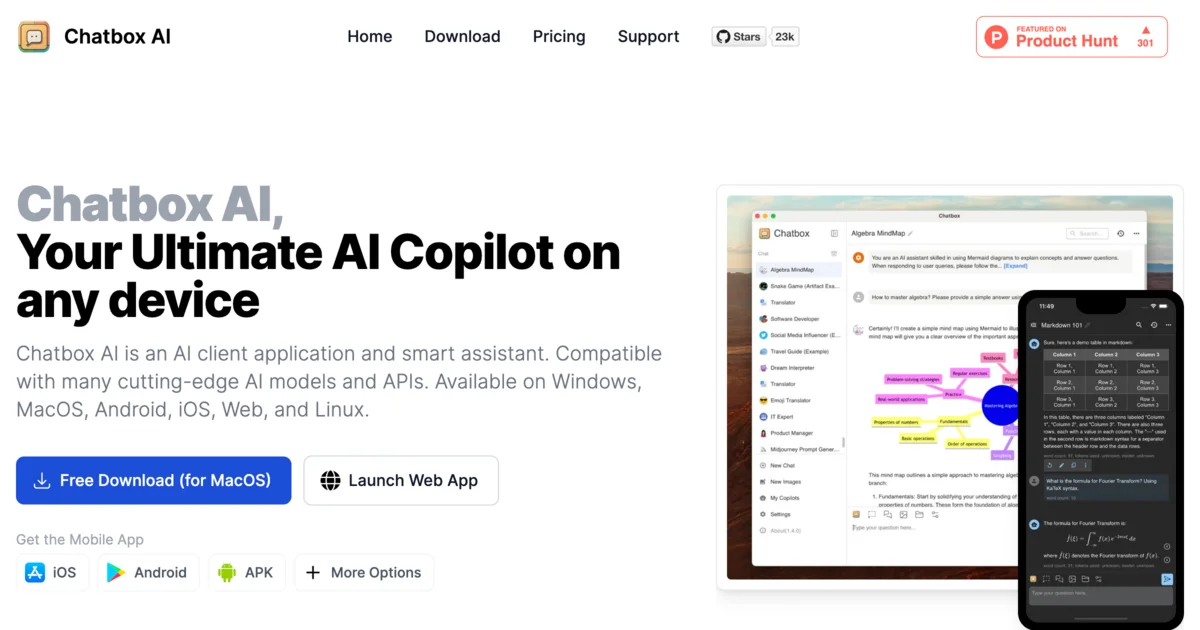
Chatbox AI is a versatile AI client application that acts as your personal AI copilot across every major platform — Windows, macOS, Linux, Android, iOS, and the web. It connects to a wide range of leading AI models and APIs, giving users a unified interface to interact with the best AI has to offer. Key capabilities include chatting with documents and images (PDFs, Word files, spreadsheets, code, and even handwritten or scanned PDFs), an AI-powered coding assistant with code generation, syntax highlighting, refactoring, debugging, and security checks, and a real-time web search feature that fetches current news, facts, and data. Chatbox also supports AI-generated charts for data visualization, text-to-image creation, and LaTeX/Markdown rendering for academic writing and math equations. A standout feature is its privacy-first approach: all conversation histories, settings, and personal data are stored locally on your device rather than on remote servers. Users also benefit from built-in data backup, export features, and fast message history search. With over 21,700 GitHub stars and a 4.9/5 rating on Product Hunt, Chatbox AI is trusted by students, developers, researchers, and professionals worldwide who want a powerful, private, and flexible AI assistant that works everywhere.
Key Features
- Chat with Documents & Images: Upload PDFs, Word docs, spreadsheets, images, and code files to get AI-powered intelligent responses, including support for scanned and handwritten PDFs.
- AI-Powered Coding Assistant: Generate, preview, review, refactor, and debug code with syntax highlighting, smart documentation, optimization tips, and security checks built in.
- Real-Time Web Search & Browsing: Access up-to-date information, news, and data from across the internet directly within your AI conversations, including URL analysis and fact-checking.
- Local-First Privacy Storage: All conversation histories, settings, and personal data are stored locally on your device, with built-in backup and export tools for full user control.
- AI Image Generation & Data Visualization: Transform text descriptions into images and generate AI-powered charts to visualize complex data, trends, and statistics directly in conversations.
Use Cases
- Developers using AI to generate, debug, review, and refactor code across multiple programming languages within a unified desktop or mobile interface.
- Students and academics leveraging LaTeX and Markdown rendering to assist with math equations, research writing, and understanding complex academic topics.
- Professionals chatting with PDFs, Word documents, and spreadsheets to quickly extract insights, summarize content, and get intelligent answers from their files.
- Researchers and knowledge workers using real-time web search to gather current data, verify facts, and stay updated on the latest news within their AI conversations.
- Privacy-conscious users who need a powerful AI assistant but want all their data kept locally on their device rather than stored in the cloud.
Pros
- True Cross-Platform Support: Available on Windows, macOS, Linux, Android, iOS, and web — one consistent AI assistant experience across all your devices.
- Privacy by Design: Data is stored locally rather than on remote servers, giving users full control over their conversations and settings.
- Wide AI Model Compatibility: Connects to multiple leading AI models and APIs, so users are never locked into a single provider.
- Rich Feature Set: Combines document chat, coding tools, web search, image generation, LaTeX rendering, and data visualization in a single application.
Cons
- Requires API Keys for Advanced Models: To use the most powerful AI models, users typically need to supply their own API keys, which may be a barrier for non-technical users.
- Freemium Limitations: Some advanced features and higher usage tiers require a paid plan, limiting free users on heavy workloads.
- Local Storage Means No Cross-Device Sync by Default: The privacy-first local storage approach means conversation history does not automatically sync across multiple devices without manual backup/export.
Frequently Asked Questions
What AI models does Chatbox AI support?
Chatbox AI is compatible with a wide range of cutting-edge AI models and APIs, including models from leading providers. Users can connect their own API keys to access specific models.
Is Chatbox AI free to use?
Yes, Chatbox AI offers a free download and a free tier. Additional features and higher usage limits are available through paid plans.
Is Chatbox AI open source?
Yes, Chatbox AI has an open-source component with over 21,700 stars on GitHub, allowing developers to inspect and contribute to the codebase.
Where is my data stored in Chatbox AI?
All your data — including conversation histories and personal settings — is stored locally on your device. Nothing is sent to Chatbox's servers, ensuring your privacy.
Which platforms does Chatbox AI support?
Chatbox AI is available on Windows, macOS, Linux, Android, iOS, and as a web application, making it accessible on virtually any device.