

About
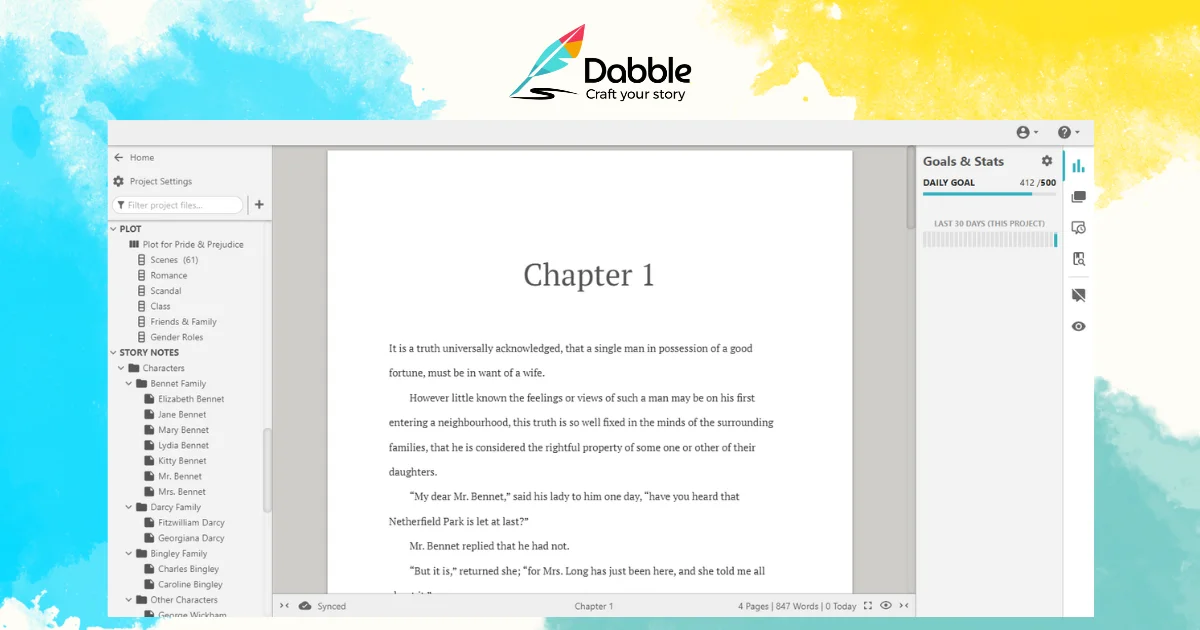
Dabble is a purpose-built book-writing platform that positions itself as the ideal middle ground between the simplicity of Google Docs and the overwhelming complexity of Scrivener. Designed exclusively for fiction authors — from beginners to seasoned novelists — Dabble provides everything needed to take a story from first idea to polished manuscript. The platform is organized around three core workflows: Plot, Write, and Edit. In the Plot phase, authors can use the visual Plot Grid to map out story arcs, create rich Character Profiles, build a Worldbuilding Bible for lore and settings, and tag scenes with Plot Labels for tracking POV, themes, and tension. The Write experience offers auto-numbered chapters and scenes, daily word count goals, a clean Focus Mode, and drag-and-drop organization for easy manuscript restructuring. In the Edit phase, authors can add sticky notes, inline comments, and leverage advanced grammar and style checks. Dabble runs in the browser and on mobile, meaning writers can continue their work anywhere — whether at a desk, on a phone in a waiting room, or on a hike. A live community (DabbleU Campus), free learning resources (DabbleU Academy), and a curated library of writing tools round out the ecosystem. Dabble is ideal for fiction writers who want a focused, feature-complete environment without the steep learning curve of traditional manuscript software.
Key Features
- Visual Plot Grid: Map out your entire story arc with a flexible, visual plot grid that lets you plan as little or as much as you want before writing.
- Character Profiles & Worldbuilding Bible: Build detailed character bios and store lore, maps, history, and world rules in an organized reference space accessible while you write.
- Focus Mode & Word Count Goals: Write in a clean, distraction-free interface with daily word count goals and auto-numbered scenes and chapters to keep momentum.
- Drag-and-Drop Manuscript Organization: Effortlessly restructure your manuscript by dragging and dropping chapters and scenes without any copy-paste hassle.
- Advanced Editing Tools: Refine your manuscript with sticky notes, inline comments, and advanced grammar and style checks to polish every sentence.
Use Cases
- A first-time novelist organizing plot threads, character arcs, and world-building details in one place before drafting their debut book.
- A published author managing a multi-book series by sharing characters, locations, and lore across projects within the same platform.
- A writer with a busy schedule using mobile apps to log scenes and hit daily word count goals from anywhere throughout the day.
- An author revising their manuscript using sticky notes, inline comments, and grammar checks to prepare a clean draft for submission.
- A writing group member participating in challenges and live events through DabbleU Campus to stay motivated and accountable.
Pros
- Designed exclusively for fiction: Unlike general-purpose tools, every feature in Dabble is purpose-built for novel writing, reducing friction and cognitive overhead for authors.
- Write anywhere: Full cross-device support — browser, iOS, and Android — means your manuscript is always accessible and in sync wherever inspiration strikes.
- Intuitive, beginner-friendly interface: Dabble hits the sweet spot between bare-bones text editors and overwhelming tools like Scrivener, making it easy to learn without sacrificing power.
- All-in-one creative workspace: Plot notes, character profiles, world-building details, and the manuscript itself live in one place, eliminating scattered files and context-switching.
Cons
- Fiction-only focus: Dabble is optimized for novel and fiction writing; users working on non-fiction, screenplays, or academic writing may find it lacking relevant features.
- Subscription-based pricing: Full access requires a paid subscription, which may be a barrier for hobbyist writers who only write occasionally.
- Limited offline support: As a primarily cloud-based tool, robust offline functionality may be limited compared to installed desktop software like Scrivener.
Frequently Asked Questions
Who is Dabble designed for?
Dabble is designed for aspiring and published fiction authors — anyone writing novels, short stories, or serialized fiction who wants a focused, easy-to-use writing environment.
How does Dabble compare to Scrivener or Google Docs?
Dabble sits between the two: it's more powerful than Google Docs for long-form fiction (with plot grids, character profiles, and scene organization) but far more intuitive and less overwhelming than Scrivener.
Can I use Dabble on my phone or tablet?
Yes. Dabble works on iOS and Android devices, as well as any modern web browser, so your manuscript stays synced and accessible across all your devices.
Does Dabble have community or learning resources?
Yes. Dabble offers DabbleU Campus (a free community with live events, discussions, and writing challenges) and DabbleU Academy (courses and workshops to develop writing skills).
Is there a free version of Dabble?
Dabble offers a freemium model with access to core writing features. A paid subscription unlocks the full suite of plotting, editing, and collaboration tools.