
About
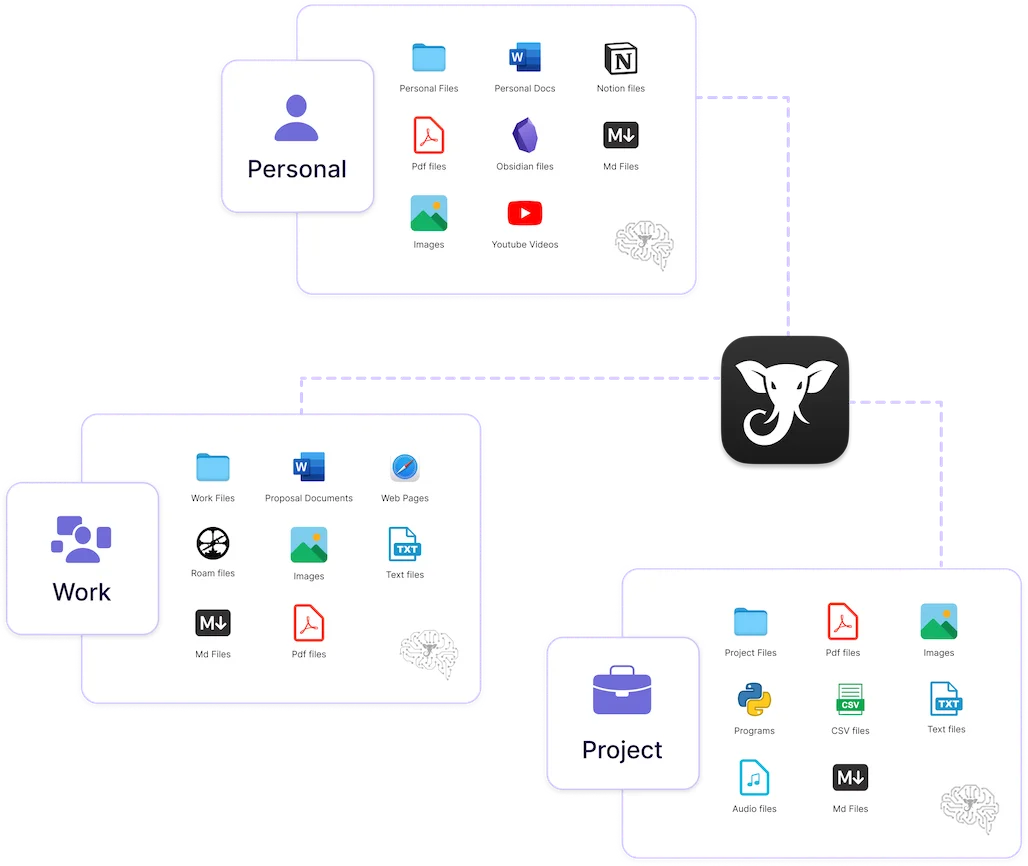
Elephas is an AI-powered personal knowledge assistant designed natively for Mac, iPhone, and iPad. It solves the common problem of knowledge fragmentation — where your insights are buried across PDFs, notes, emails, Notion pages, and Zoom transcripts — by letting you build organized 'Super Brains' that serve as a searchable, intelligent layer over everything you've created. Once you import your documents and sync your note-taking apps (Apple Notes, Notion, Obsidian, DEVONthink), Elephas lets you ask questions in plain English and returns answers with direct citations to the source file and page. This eliminates AI hallucinations by grounding every response in your own verified content. Key capabilities include multi-source ingestion (PDFs, Word, Excel, Markdown, YouTube, voice notes, web pages), multiple isolated Brains for different projects or clients, and a system-wide Super Command (⌘+Space) that summons the AI in any app — letting you write, summarize, reply to emails, or save snippets to your Brain without switching context. Eléphas supports GPT-5, Claude, and Gemini and offers a 100% offline mode for privacy-sensitive workflows. Trusted by 3,000+ professionals and rated 4.6/5 on Capterra, it's ideal for executives, engineers, researchers, and knowledge workers who need instant recall of their accumulated expertise.
Key Features
- Super Brains: Create multiple isolated AI knowledge bases ('Super Brains') from your documents, notes, and media — organized by project, client, or domain.
- Cited, Hallucination-Free Answers: Every answer links back to the source file and page number, so you can verify responses rather than trust AI guesses.
- Universal Source Ingestion: Import PDFs, Word, Excel, Markdown, Apple Notes, Notion, Obsidian, Zoom transcripts, YouTube videos, voice notes, and web pages.
- System-Wide Super Command: Press ⌘+Space from any app to instantly access your AI assistant — write, summarize, reply to emails, or capture content to your Brain without switching windows.
- 100% Offline Mode & Multi-Model Support: Run entirely offline for full privacy, or connect to GPT-5, Claude, or Gemini — your choice of AI model with no data leaving your device if needed.
Use Cases
- A consultant uploads client reports and meeting notes into a dedicated Brain, then instantly retrieves past decisions and recommendations during client calls without manual searching.
- A researcher imports academic PDFs and research notes to query across years of literature, getting cited answers that link directly to the source paper and page.
- An executive captures Bloomberg articles and board meeting transcripts, then asks follow-up questions weeks later to recall key facts and decisions with exact source references.
- A fiction writer organizes world-building notes, character sheets, and draft chapters into a Brain to maintain consistency and quickly cross-reference details across a long project.
- A product manager syncs Notion documents, Zoom transcripts, and spreadsheets into a unified Brain to answer questions about past feature decisions and roadmap discussions instantly.
Pros
- Grounded in your own knowledge: Answers come with citations to your actual files, eliminating hallucinations and letting you trust the output for professional or research use.
- Deep Mac/iOS native integration: Seamlessly syncs with Apple Notes, works system-wide via a global shortcut, and supports offline use — a rare combination for AI tools.
- Flexible multi-Brain organization: Create separate Brains per project or client, keeping different knowledge domains clean and contextually isolated.
- Wide source compatibility: Ingests virtually every common file type and third-party note-taking app, reducing friction for professionals with complex workflows.
Cons
- Mac/iOS only: There is no Windows, Linux, or web app, limiting its use to Apple ecosystem users.
- Advanced features require paid plan: The free tier provides limited Brain capacity and features; heavier use cases require a paid subscription.
- Initial setup time: Getting full value requires importing and organizing existing documents, which can be time-consuming for users with large archives.
Frequently Asked Questions
What types of files can I import into Elephas?
Elephas supports PDFs, Word and Pages documents, Excel and CSV spreadsheets, Markdown files, code files, Apple Notes, Notion, Obsidian, DEVONthink, Zoom meeting transcripts, YouTube videos, voice notes, and web pages.
Does Elephas work offline?
Yes. Elephas offers a 100% offline mode, allowing you to query your Super Brains without an internet connection and without sending your data to external servers.
Which AI models does Elephas support?
Elephas supports GPT-5, Claude, and Gemini. You can choose your preferred model depending on your needs and privacy preferences.
How does Elephas prevent AI hallucinations?
Every answer Elephas generates is grounded in your own imported documents. Responses include citations with the source file name and page number, so you can verify any claim directly.
Is Elephas available on iPhone and iPad?
Yes. In addition to the Mac desktop app, Elephas is available on iOS for iPhone and iPad via the App Store, keeping your knowledge accessible across all your Apple devices.