
About
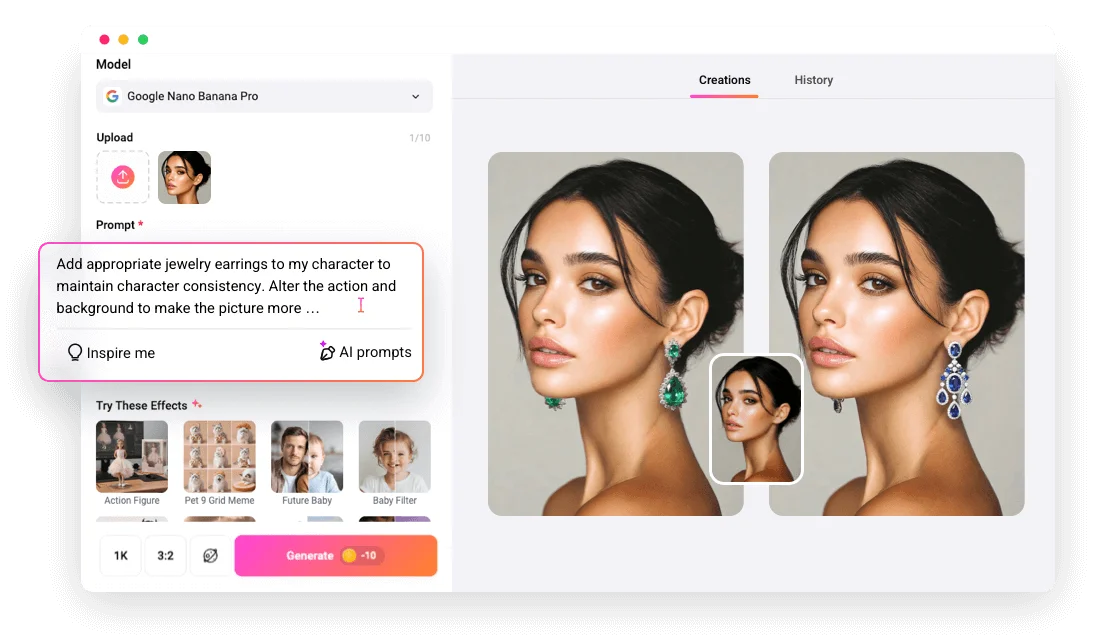
FlexClip AI Virtual Jewelry Try-On is a cutting-edge AI-powered tool that enables users to experience realistic, true-to-life jewelry try-on without physically wearing any piece. By simply uploading a portrait or body part photo and either entering a descriptive prompt or uploading a specific jewelry image, the tool intelligently places the jewelry onto the photo while preserving natural skin tones, lighting, and proportions. Designed for both everyday consumers and e-commerce businesses, this tool eliminates the need for expensive jewelry photoshoots or manual photo editing. Merchants can transform flat product images into professional model shots with ease, helping customers visualize how jewelry looks in real-life scenarios before making a purchase decision. Key capabilities include support for a wide variety of accessories (not just jewelry), rapid AI-generated results in seconds, and high-quality output suitable for product listings or social media. The tool integrates seamlessly into the broader FlexClip platform, which also offers AI video generation, image editing, text-to-speech, and more. FlexClip's AI Virtual Jewelry Try-On is ideal for online jewelry retailers wanting to reduce photography costs, fashion content creators looking for compelling visuals, and shoppers who want to preview pieces before buying. Its intuitive interface requires no design or editing experience, making it accessible to everyone.
Key Features
- AI-Powered Jewelry Placement: Automatically places jewelry onto uploaded portrait or body photos while preserving natural lighting, skin tones, and proportions for a seamless look.
- Text Prompt & Image Upload Support: Describe desired jewelry via text prompt or upload a specific jewelry image to generate an accurate virtual try-on result.
- Professional Product Photography Alternative: Transform flat jewelry product photos into high-quality model shots without expensive photoshoots or manual editing.
- Wide Accessory Support: Beyond jewelry, the tool supports virtual try-on for a broad range of accessories, giving users and merchants versatile styling options.
- Rapid Results: Generates realistic try-on images in seconds using cutting-edge AI, saving significant time compared to traditional photo editing workflows.
Use Cases
- Online shoppers previewing how a necklace, ring, or bracelet will look on them before making a purchase decision.
- E-commerce jewelry merchants creating professional model shots from flat product photos without hiring photographers.
- Fashion and lifestyle content creators generating styled jewelry visuals for social media posts and campaigns.
- Jewelry brands running digital marketing campaigns that showcase products on diverse models without costly production.
- Individual users exploring different jewelry styles and aesthetics virtually before attending events or occasions.
Pros
- No Design Skills Needed: The intuitive interface allows anyone to generate professional-quality jewelry try-on images without any editing experience.
- Cost-Effective for Merchants: Eliminates the need for costly jewelry photoshoots, making professional product imagery accessible to businesses of all sizes.
- Realistic & Natural Results: AI ensures jewelry is placed naturally on photos with correct lighting and proportions, producing convincing and appealing visuals.
- Part of a Broader Creative Platform: Integrated within FlexClip's extensive suite of AI video, image, and audio tools, offering users a one-stop creative workspace.
Cons
- Web-Only Access: Currently available only as a web-based tool with no dedicated mobile app, which may limit on-the-go usage.
- Result Quality Depends on Input Photo: The quality of the virtual try-on image is heavily influenced by the resolution and clarity of the uploaded portrait photo.
- Limited Customization Beyond Prompts: Advanced manual adjustments to jewelry placement or sizing may not be available, leaving some users with less control over fine details.
Frequently Asked Questions
How does FlexClip's AI Virtual Jewelry Try-On work?
You upload a portrait or body part photo, then either type a text prompt describing your desired jewelry or upload a jewelry image. The AI then realistically places the jewelry onto your photo, preserving natural lighting and proportions.
Is FlexClip's AI Jewelry Try-On free to use?
FlexClip operates on a freemium model. You can access the virtual jewelry try-on tool for free with certain limitations; premium plans unlock higher usage and additional features.
Can e-commerce merchants use this tool for product listings?
Yes, merchants can use this tool to transform flat jewelry photos into professional model shots, creating high-quality product imagery without expensive photoshoots.
What types of jewelry and accessories can I try on?
FlexClip supports a wide range of jewelry and accessories, including necklaces, rings, earrings, bracelets, and more. The tool is not limited to just jewelry.
Do I need any design or editing experience to use this tool?
No experience is required. The tool is designed to be easy for everyone — simply upload your photo, enter a prompt or upload a jewelry image, and get results in seconds.