

About
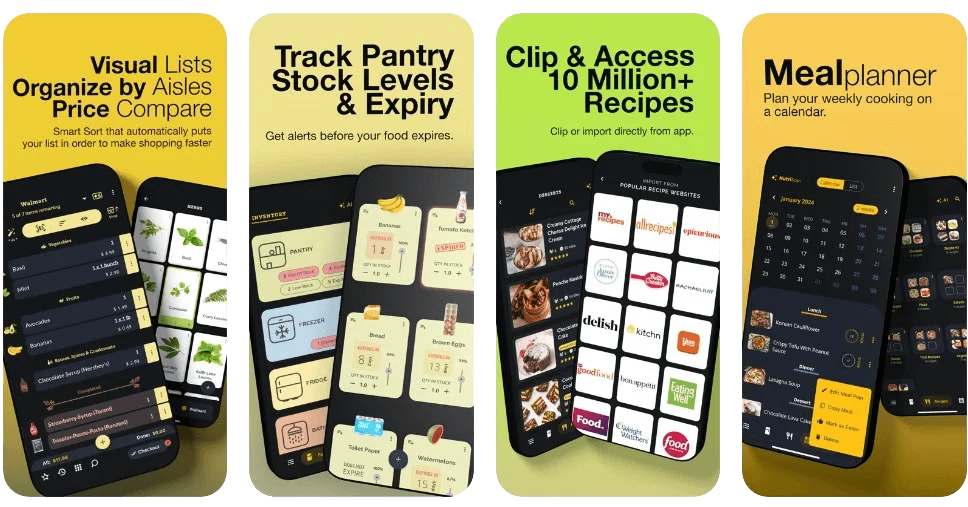
Grocery AI is a comprehensive AI-driven platform built for modern households that want to take the hassle out of grocery shopping and home food management. At its core, the app offers four AI-powered capabilities: Smart Lists, Intelligent Inventory, AI-Crafted Recipes, and an Efficient Meal Planner. Using computer vision, users can snap a photo of any dish to get its full recipe and nutrition breakdown, photograph pantry items to auto-generate a shopping list, scan a paper receipt to import purchases, or photograph a recipe book page to clip it directly into the app. Shopping lists are visual and feature over 2,000 pre-built grocery items, barcode scanning across 150+ million products with nationwide pricing, real-time family sharing, voice input, aisle grouping, and direct transfer to online retailers. The inventory module supports 18 built-in home locations plus unlimited custom ones, with expiry alerts, low-stock notifications, and deep integration with the recipe engine so users always know what meals they can cook right now. The recipe manager taps into 10 million+ recipes from popular websites, supports URL clipping, color-coded step-by-step directions with integrated timers, and ingredient-to-shopping-list transfers. The meal planner ties everything together for weekly food prep efficiency. Grocery AI is ideal for busy families, meal-prep enthusiasts, home cooks, and anyone seeking to reduce food waste while saving time and money on groceries.
Key Features
- AI Photo Recognition: Snap photos of dishes, recipe books, receipts, or pantry items to instantly generate recipes, import shopping lists, or log inventory using computer vision.
- Smart Shopping Lists: Build visual grocery lists with 2,000+ pre-loaded items, barcode scanning across 150M+ products, real-time family sharing, voice input, aisle grouping, and online cart transfer.
- Intelligent Inventory Management: Track your home pantry across 18+ built-in and unlimited custom locations with expiry alerts, low-stock notifications, and real-time stock visibility.
- World-Class Recipe Manager: Access 10M+ recipes, clip from favorite websites via URL, view color-coded step-by-step directions with integrated cooking timers, and check ingredient availability against your inventory.
- Meal Planner: Plan weekly meals efficiently with deep integration into your inventory and recipe library, ensuring you always know what you can cook and what to buy.
Use Cases
- Busy families managing weekly grocery runs with real-time shared lists and automatic price comparisons across stores.
- Home cooks tracking pantry inventory to reduce food waste and get instant suggestions for meals they can cook with on-hand ingredients.
- Meal-prep enthusiasts planning the week's menu in advance, with automatic shopping list generation based on missing ingredients.
- Households digitizing and organizing recipes from cookbooks, websites, and personal collections in one searchable library.
- Budget-conscious shoppers scanning receipts and using price tracking to monitor spending and find the best deals on everyday grocery items.
Pros
- Truly All-in-One: Combines shopping lists, pantry inventory, recipe discovery, and meal planning into a single cohesive app, eliminating the need for multiple separate tools.
- Powerful AI & Computer Vision: Photo-based import features for dishes, receipts, recipe books, and pantry items make data entry fast and nearly effortless.
- Massive Product & Recipe Database: Access to 150M+ products with pricing and 10M+ recipes gives users comprehensive coverage for both shopping and cooking needs.
- Real-Time Family Collaboration: Seamless list sharing and real-time syncing lets the whole household stay coordinated on grocery runs and meal prep without confusion.
Cons
- Primarily Apple-Ecosystem Focused: The app is marketed mainly for iPhone, iPad, and Mac, which may limit the experience for Android-first users.
- Pricing Unclear: The website does not prominently disclose which features are free versus premium, making it difficult to assess value before downloading.
- Feature Depth May Overwhelm Casual Users: The breadth of features — inventory locations, recipe imports, barcode scanning — could feel complex for users who only want a simple shopping list.
Frequently Asked Questions
What platforms is Grocery AI available on?
Grocery AI is available for iPhone, iPad, Mac, and tablets. It can be downloaded from the App Store for iOS and macOS devices.
How does the AI photo recognition feature work?
You can snap a photo of a dish, a recipe from a book, a grocery receipt, or items in your pantry. Grocery AI's computer vision AI analyzes the image and automatically generates recipes, imports shopping list items, or logs inventory entries accordingly.
Can I share my grocery lists with family members?
Yes. Grocery AI supports real-time list sharing and seamless collaboration, so multiple family members can view and edit the same shopping list simultaneously.
How many recipes are available in the app?
Grocery AI provides access to over 10 million recipes from popular recipe websites, plus the ability to import any recipe by pasting a URL or snapping a photo of a recipe book.
Does Grocery AI support barcode scanning for products?
Yes. The app supports barcode scanning to import items from a database of 150 million+ products, including nationwide pricing data, making it easy to add specific products to your shopping list or inventory.