

About
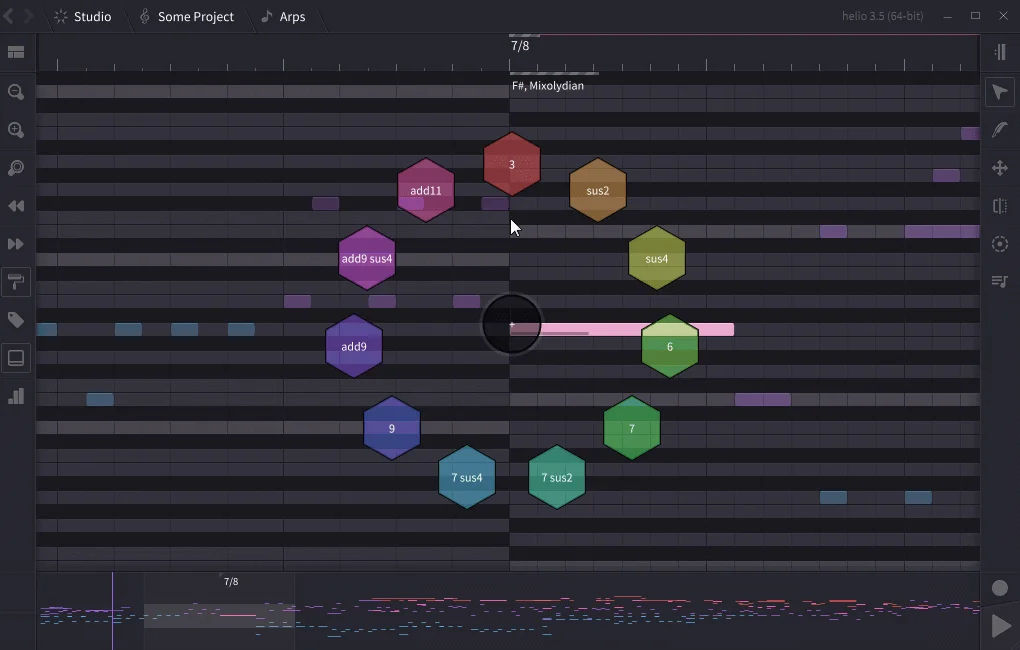
Helio is a free, open-source music sequencer that reimagines how composers interact with their tools. Its core philosophy is distraction-free creativity — the UI strips away complexity to keep you in a flow state and focused on your musical ideas rather than navigating menus. Helio supports a wide range of professional plugin formats including VST, VST3, LV2, and AudioUnit, as well as SoundFont playback. Audio engine compatibility is equally broad, running on CoreAudio (macOS), ASIO and DirectSound (Windows), ALSA and JACK (Linux), and OpenSLES (Android). Projects can be exported to MIDI, WAV, and FLAC. One of Helio's standout capabilities is its support for microtonal temperaments, making it a go-to tool for composers exploring non-standard tuning systems. The built-in visual layout helps demystify music theory, making it useful as both a production tool and a learning aid for growing composers. The app is cross-platform in the truest sense — stable builds are available for macOS, Windows (installer and portable), multiple Linux distributions (AppImage, .deb, tarball), iOS (App Store), and Android (F-Droid and direct APK). Development builds are also publicly available for early adopters. Being fully open source and libre-licensed, Helio is free to use, modify, and distribute, making it an excellent choice for independent musicians, students, and hobbyist composers who want a professional-grade sequencer without a subscription fee.
Key Features
- Distraction-Free Interface: A lightweight, minimalist UI designed to keep composers in a creative flow state without cluttered menus or unnecessary complexity.
- Broad Plugin Support: Hosts VST, VST3, LV2, and AudioUnit plugins, as well as SoundFonts, compatible with the most popular plugin ecosystems across all major platforms.
- Microtonal Temperament Support: Built-in support for microtonal and alternative tuning systems, enabling composers to explore non-standard scales and experimental music theory.
- Cross-Platform Availability: Runs natively on macOS, Windows, Linux, iOS, and Android, with stable and development builds publicly available for all platforms.
- Flexible Export Options: Export your compositions to MIDI, WAV, or FLAC, and run across major audio backends including CoreAudio, ASIO, JACK, and ALSA.
Use Cases
- Composing original music in a distraction-free environment without expensive DAW subscriptions.
- Exploring microtonal and alternative tuning systems for experimental or world music compositions.
- Learning music composition and theory through a visual, transparent sequencer interface.
- Producing and arranging music on multiple devices, seamlessly switching between desktop and mobile.
- Building MIDI-based compositions using professional VST or AU instrument plugins.
Pros
- Completely Free and Open Source: Helio is libre-licensed with no subscription fees, paywalls, or feature locks — the full experience is available to everyone at no cost.
- True Cross-Platform Support: One of the few sequencers that runs natively on desktop and mobile alike, including iOS and Android alongside macOS, Windows, and Linux.
- Microtonal and Advanced Composition Support: Supports non-standard tuning systems out of the box, making it ideal for composers interested in world music, experimental, or avant-garde styles.
- Lightweight and Focused: The streamlined interface reduces cognitive load, helping composers stay focused on ideas rather than fighting the software.
Cons
- Smaller Ecosystem and Community: As an indie open-source project, Helio has a smaller user base and fewer tutorials or third-party resources compared to commercial DAWs like Ableton or FL Studio.
- Not a Full DAW: Helio is a sequencer, not a full digital audio workstation — users needing advanced mixing, mastering, or audio recording features will need supplementary tools.
- Learning Curve for Non-Traditional UI: The rethought interface, while intentionally clean, may feel unfamiliar to users accustomed to traditional piano-roll DAW layouts.
Frequently Asked Questions
Is Helio really free to use?
Yes. Helio is fully free and open-source (libre-licensed). There are no paid tiers, subscriptions, or premium features — the entire application is available at no cost.
What plugin formats does Helio support?
Helio supports VST, VST3, LV2, and AudioUnit (AU) plugin formats, as well as SoundFont (SF2) files for instrument playback.
What platforms does Helio run on?
Helio is available for macOS, Windows (installer and portable), Linux (AppImage, .deb, and tarball), iOS (via the App Store), and Android (via F-Droid or direct APK).
Does Helio support microtonal music?
Yes. Helio has built-in support for microtonal temperaments, allowing composers to work with non-standard tuning systems beyond standard 12-tone equal temperament.
What file formats can I export from Helio?
You can export your projects as MIDI, WAV, or FLAC files. Helio also supports multiple audio backends depending on your platform (CoreAudio, ASIO, DirectSound, ALSA, JACK, OpenSLES).