
About
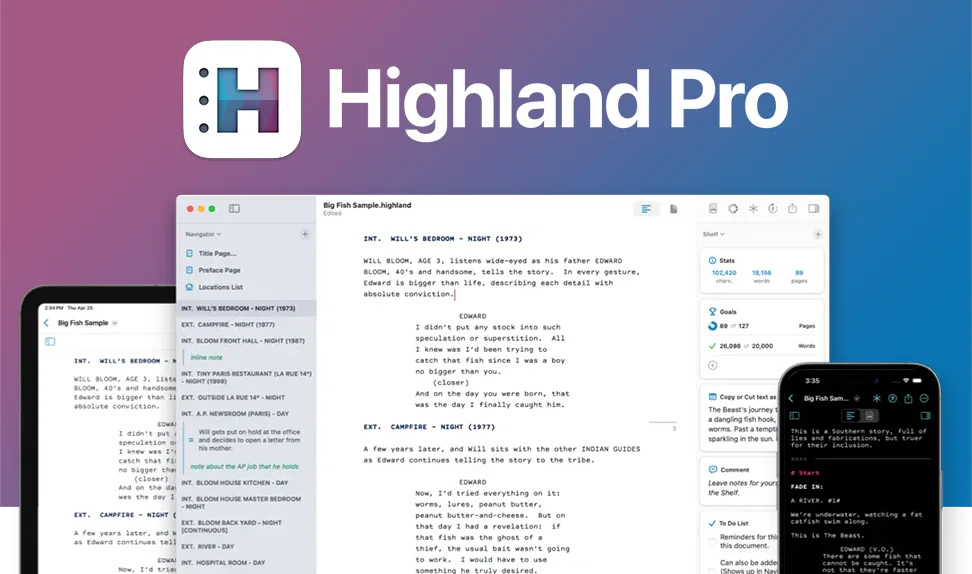
Highland Pro (formerly Highland 2) is a premium screenwriting and creative writing application built exclusively for Apple platforms — Mac, iPad, and iPhone. Developed by Oscar-nominated screenwriter John August and his team at Quote-Unquote Apps, Highland Pro has earned a devoted following among professional screenwriters, novelists, and content creators who demand speed and simplicity without sacrificing power. The app is built around a distraction-free writing environment with support for dark mode, fullscreen, and typewriter scrolling. It natively handles Fountain-formatted screenplays and exports to industry-standard formats including Final Draft (.fdx) and PDF. Writing sessions are enhanced by sprints, goal tracking, and a built-in /Lookup command that surfaces dictionary definitions, facts, and rhymes without leaving the app. Highland Pro includes professional screenplay tools such as a Navigator for scene and section mapping, a Title Page Builder, automatic Cast and Location list generation, Gender Analysis for speaking roles, and a drag-and-drop Header/Footer Builder. Revision Mode tracks changes in color-coded layers. Writers can also manage To-Do lists, inline Comments, and Snippets for moving chunks of content around. Automatic iCloud sync keeps work seamlessly up to date across all Apple devices. Highland Pro is available via a monthly or annual subscription, with a 30-day free trial.
Key Features
- Distraction-Free Writing Environment: Fullscreen mode, dark themes, typewriter scrolling, and a minimal UI keep writers focused on their work without visual clutter.
- Fountain & Final Draft Support: Natively reads and writes Fountain-formatted screenplays and exports to Final Draft (.fdx) and PDF, ensuring compatibility with industry-standard workflows.
- /Lookup Inline Research: Type a slash command to instantly look up definitions, facts, and rhymes without leaving the editor, maintaining creative flow.
- Writing Sprints & Goal Tracking: Built-in sprint timer and page/word/character goal tracking help writers stay productive and hit milestones during focused sessions.
- Professional Screenplay Tools: Includes a scene Navigator, Title Page Builder, auto-generated Cast and Location lists, Gender Analysis, Revision Mode with color-coded changes, and a Header/Footer Builder.
Use Cases
- A professional screenwriter drafting a feature film screenplay who needs industry-standard Fountain and Final Draft format support with a clean, fast interface.
- A novelist working across Mac and iPad who wants distraction-free writing sessions with sprint timers and word-count goals to stay on track.
- A TV writer keeping track of speaking roles and location breakdowns using Highland's auto-generated Cast and Location lists.
- A writing team collaborating on a script revision, using Revision Mode to color-code changes across multiple draft passes.
- An indie filmmaker or student screenwriter looking for an affordable, professional-quality alternative to Final Draft on macOS.
Pros
- Designed by Working Screenwriters: Created by John August and refined by professional writers, every feature is purpose-built around real-world storytelling workflows.
- Seamless Apple Ecosystem Integration: 100% native on Mac, iPad, and iPhone with automatic iCloud syncing so writers can move between devices without friction.
- Clean, Fast Performance: No bloat on screen or under the hood — Highland Pro is blazingly fast even with long documents like novels or feature-length scripts.
- Affordable Subscription with Free Trial: At $4.99/month billed annually, it's significantly cheaper than competing tools like Final Draft, with a 30-day trial to evaluate risk-free.
Cons
- Apple Platforms Only: Highland Pro is exclusive to Mac, iPad, and iPhone — there is no Windows, Android, or web app, limiting cross-platform accessibility.
- Subscription Required for Full Access: After the 30-day trial, continued use requires a paid subscription, which may not suit writers looking for a one-time purchase.
- Limited AI-Powered Writing Assistance: Compared to newer AI-integrated writing tools, Highland Pro focuses on the craft environment rather than generative AI features like auto-suggest or co-writing.
Frequently Asked Questions
What file formats does Highland Pro support?
Highland Pro natively uses the Fountain plain-text screenplay format and can import/export Final Draft (.fdx) files and PDF, making it compatible with industry-standard production workflows.
Can I use Highland Pro on my iPhone and iPad?
Yes. Highland Pro is 100% native on Mac, iPad, and iPhone, with automatic iCloud syncing so your documents stay up to date across all your Apple devices.
Is Highland Pro only for screenwriters?
No — while it's built with screenwriters in mind, Highland Pro also works beautifully for novelists, playwrights, and any writer who wants a clean, focused environment for long-form prose.
How much does Highland Pro cost?
Highland Pro costs $4.99/month billed annually ($59.99/year) or $9.99/month on a monthly plan. A 30-day free trial is available with no commitment required.
What is Revision Mode in Highland Pro?
Revision Mode tracks changes to your script using different ink colors per revision pass, with stars in the margin to mark edited lines — a system familiar to professional screenwriters used to working with WGA revision standards.