
About
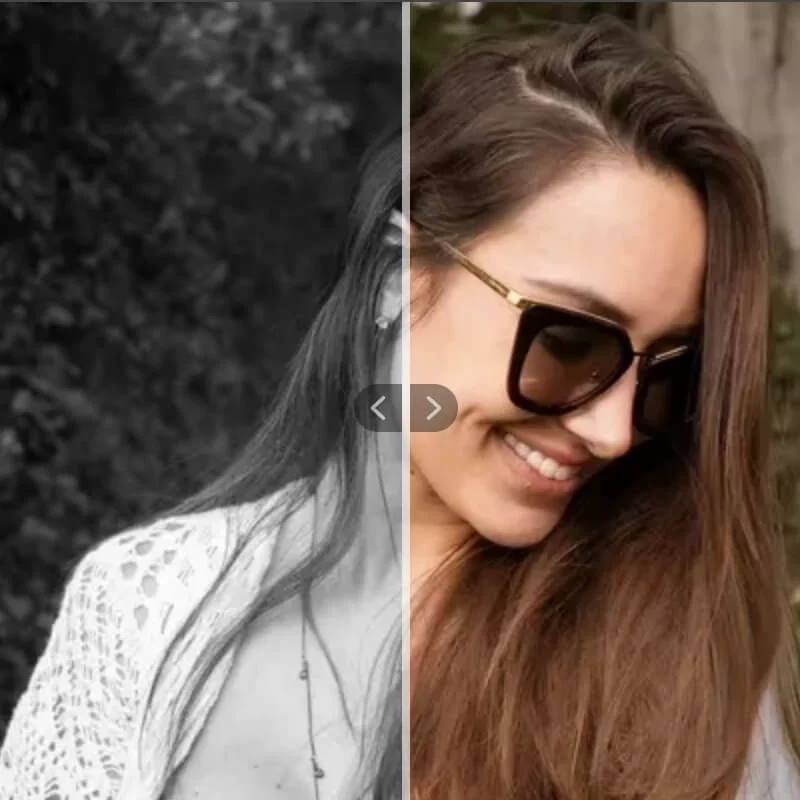
Kolorize is an advanced AI-driven photo colorization service that breathes new life into black-and-white and vintage photographs. Leveraging proprietary next-generation AI, Kolorize analyzes each image and applies statistically probable, natural-looking colors to every element — from skin tones and foliage to clothing and architecture — all within 3 to 8 seconds. The tool supports a wide range of image formats including JPEG, PNG, WebP, GIF, and AVIF, and handles images up to 4096×4096 pixels. Its intuitive three-step workflow — upload, AI colorization, preview and download — makes it accessible to users of any technical skill level. Kolorize also supports video colorization, extending its utility beyond still images. A standout aspect of Kolorize is its try-before-you-pay model: users can run unlimited colorization trials and only purchase a download when they are completely satisfied with the output. This removes risk and encourages experimentation with different photos. All files are transferred via 2048-bit encrypted connections and deleted after processing, ensuring strong data privacy and security. Kolorize is ideal for individuals looking to restore family photo albums, historians digitizing archival materials, genealogists, content creators, and photography enthusiasts who want to reimagine the past in color.
Key Features
- AI-Powered Colorization: Proprietary deep learning model analyzes photos and applies statistically accurate, natural-looking colors to monochrome and vintage images.
- Unlimited Free Trials: Run as many colorization attempts as needed at no cost. Payment is only required when downloading the final result.
- Fast Processing: Most photos are colorized in just 3 to 8 seconds, depending on image size and complexity.
- Sepia & Vintage Photo Support: Algorithms detect and handle photos with sepia, yellowish, or reddish tones, restoring or adding color accordingly.
- Secure File Handling: All uploads are transferred via 2048-bit encrypted connections and permanently deleted after processing.
Use Cases
- Restoring and colorizing old family photo albums to share with relatives and preserve generational memories.
- Historians and archivists digitizing and colorizing black-and-white historical photographs for educational or exhibition purposes.
- Genealogists adding color to ancestor portraits to create more vivid family history presentations.
- Content creators and social media users transforming vintage or monochrome photos into eye-catching colorful visuals.
- Photography enthusiasts experimenting with AI colorization to reimagine classic or film photography in a modern color palette.
Pros
- Risk-Free Try-Before-You-Pay Model: Unlimited free trials mean users can experiment freely and only purchase results they are genuinely happy with.
- High-Quality Output: Proprietary AI delivers vivid, detail-preserving colorization with zero quality compromise compared to traditional methods.
- Broad Format Support: Accepts JPEG, PNG, WebP, GIF, and AVIF formats, making it compatible with virtually any photo source.
- Strong Privacy & Security: 2048-bit encrypted transfers and automatic file deletion after processing protect user data effectively.
Cons
- Download Requires Payment: While colorization previews are free, users must pay to download the final high-quality colorized image.
- Resolution Cap at 4096×4096: Images larger than 4096×4096 pixels are downsampled, which may affect quality for very high-resolution originals.
- Colors Are AI-Estimated, Not Exact: Colorization is based on statistical probability rather than the original colors, so results may not perfectly match historical reality.
Frequently Asked Questions
Is Kolorize free to use?
Yes, Kolorize offers unlimited free colorization trials. You only pay when you want to download the final colorized image.
What image formats does Kolorize support?
Kolorize supports JPEG, PNG, WebP, GIF, and AVIF formats. Images larger than 4096×4096 pixels will be downsampled automatically. Downloaded files are saved in JPG format.
How long does it take to colorize a photo?
Kolorize typically processes a photo in 3 to 8 seconds, depending on the size and level of detail in the image.
Can Kolorize handle sepia or yellowish vintage photos?
Yes. The AI algorithms detect whether a photo was originally captured in black and white or color and apply colorization or color restoration accordingly, even for sepia-toned images.
Is my data safe when using Kolorize?
Absolutely. All file transfers use 2048-bit encrypted connections, and uploaded photos are deleted from Kolorize's servers after processing is complete.