
About
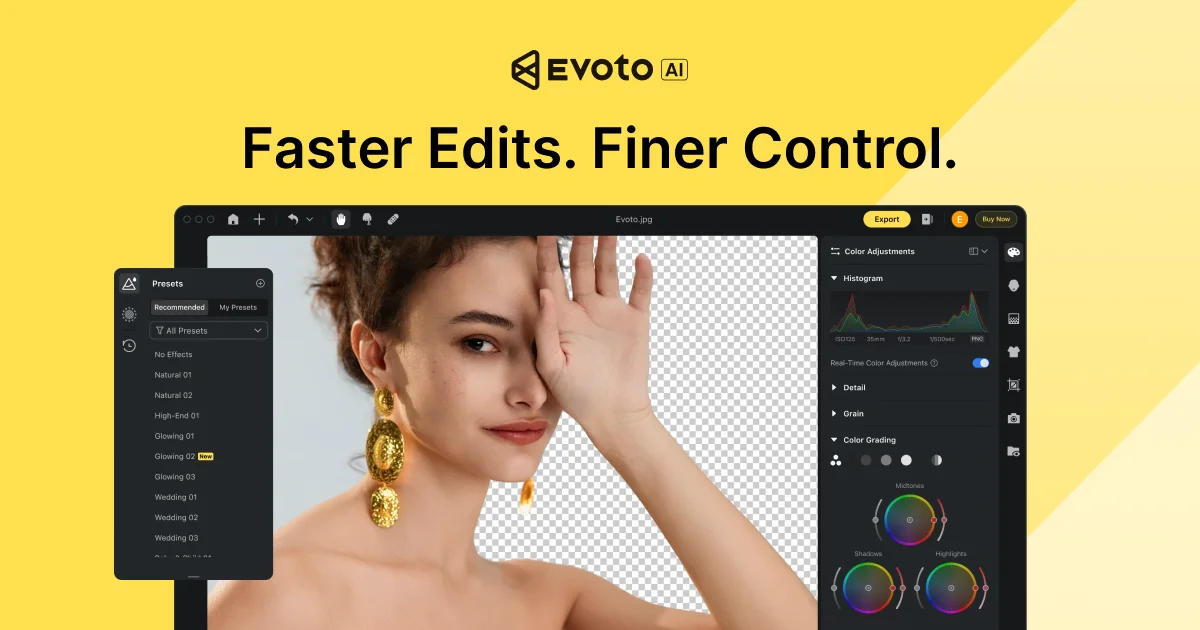
Evoto AI Photo Editor is a comprehensive, AI-driven photography workflow platform designed for professional photographers across wedding, headshot, event, newborn, maternity, and fashion shoots. It covers every stage of the post-production pipeline — from photo culling and color grading to advanced portrait retouching and gallery delivery. The platform's AI engine automates time-consuming tasks like skin smoothing, wrinkle removal on clothing, hairline cleanup, eye vein removal, and background adjustments, while preserving natural skin texture. Users can create and sync custom presets for recurring clients, ensuring consistent results across large batches of images with minimal manual effort. Evoto is available as a desktop application, mobile app, and iPad app, giving photographers flexibility to edit wherever they work. Its batch processing capabilities allow studios to handle high-volume events efficiently, with users reporting dramatic reductions in editing time and retouching costs. The intuitive interface makes it accessible to both seasoned retouchers and photographers new to post-processing, with a customizable workspace that adapts to individual workflows. Trusted by thousands of professional studios worldwide, Evoto continually releases updates that expand its AI toolset. Whether you're a solo portrait photographer or a high-volume event studio, Evoto AI Photo Editor is engineered to make every shot look its best — faster and more affordably than traditional editing workflows.
Key Features
- AI Portrait Retouching: Automatically smooths skin, removes eye veins, cleans up hairlines, and de-wrinkles clothing with precision and minimal manual input.
- Batch Processing: Apply AI edits and custom presets across hundreds of photos simultaneously, dramatically reducing turnaround time for high-volume shoots.
- Color Grading & Presets: Create, save, and sync custom color presets tied to specific lighting setups or client styles for consistent, repeatable results.
- Background Adjustments & Removal: Easily adjust or remove photo backgrounds with AI-powered detection, ideal for headshots, product photos, and portrait sessions.
- End-to-End Photography Workflow: Manage the full pipeline from photo culling and editing to gallery sharing and client delivery within a single platform.
Use Cases
- Wedding photographers editing hundreds of portraits with consistent skin retouching and color grading across full event galleries.
- Headshot photographers producing polished, client-ready portraits with automated background removal and skin cleanup.
- Commercial beauty and fashion studios applying uniform style presets and clothing wrinkle removal across product and model shoots.
- Newborn and maternity photographers achieving soft, natural-looking retouches quickly without manual layer-by-layer work.
- Photography studios managing high-volume event workflows from culling and editing through to client gallery delivery in a single platform.
Pros
- Massive Time Savings: AI automation handles repetitive retouching tasks in bulk, enabling photographers to process large event galleries in a fraction of the usual time.
- Professional-Grade Results: Maintains natural skin texture and tonal transitions while correcting imperfections, satisfying even experienced retouchers.
- Multi-Platform Availability: Available on desktop, mobile, and iPad, giving photographers a consistent editing experience across all their devices.
- Customizable Workflow: Client-specific presets and a fully customizable workspace allow studios to standardize and scale their editing process efficiently.
Cons
- Desktop-First Experience: The most powerful features are concentrated in the desktop app; mobile versions may offer a more limited feature set.
- Learning Curve for Advanced Features: While basic edits are straightforward, mastering preset management, syncing, and batch workflows takes time to configure optimally.
- Subscription Cost for Full Access: Full professional features require a paid plan; the free trial has limitations that may not fully reflect the platform's capabilities.
Frequently Asked Questions
What types of photography is Evoto best suited for?
Evoto is optimized for wedding, headshot, event, newborn, maternity, and beauty & fashion photography — any genre where high-volume portrait retouching and consistent color grading are required.
Can I try Evoto before purchasing?
Yes, Evoto offers a free trial that lets you explore its AI editing and retouching features before committing to a paid plan.
Does Evoto support batch editing?
Yes, batch processing is a core feature. You can apply AI retouching, color grades, and custom presets to large numbers of photos at once, saving significant editing time.
Is Evoto available on mobile devices?
Yes, Evoto offers dedicated apps for mobile (iOS) and iPad in addition to its primary desktop application, allowing editing across multiple devices.
Can I save and reuse editing presets for different clients?
Yes, Evoto allows you to create, save, and sync custom presets linked to specific lighting setups or client styles, ensuring consistent results for returning clients.