A
About
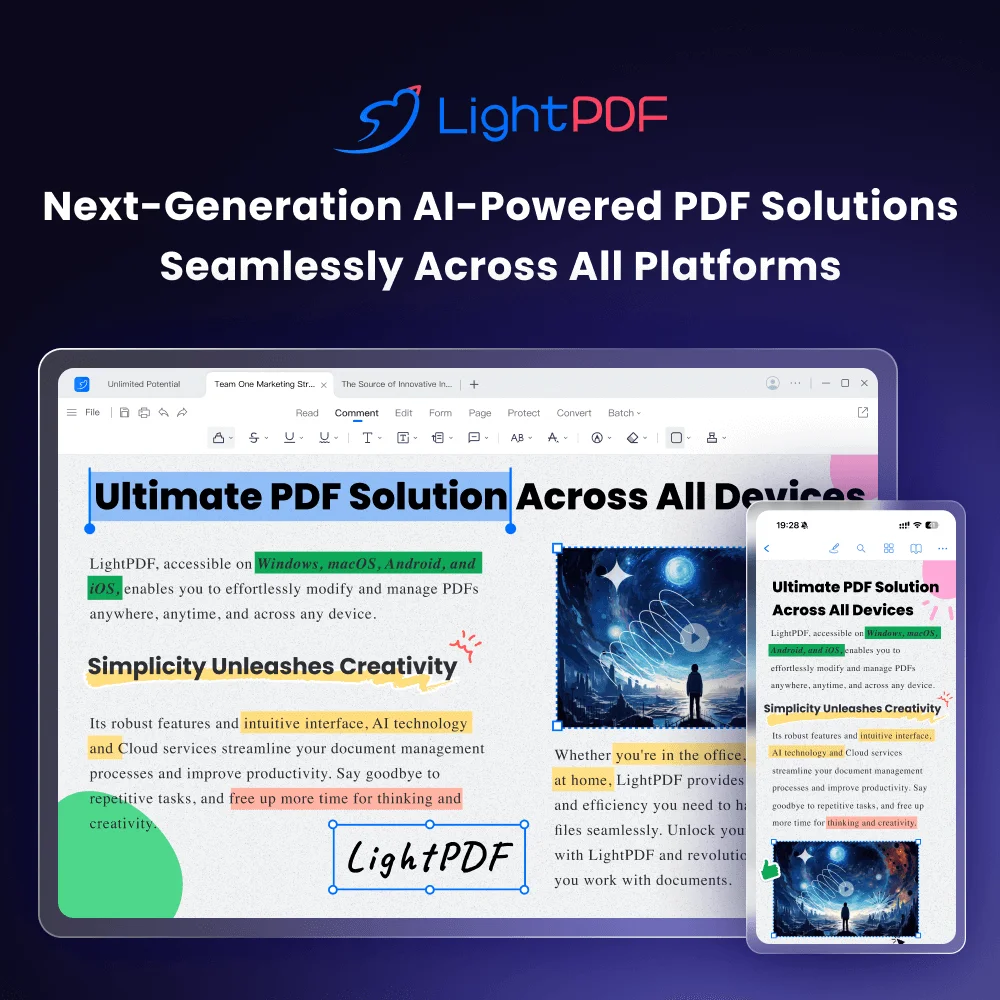
LightPDF is an AI-powered, cloud-based document management platform designed to handle virtually every PDF task with ease. At its core, LightPDF offers more than 25 free online tools for converting, editing, compressing, merging, signing, and annotating PDFs. Its standout AI Chat feature lets users upload documents or URLs and instantly ask questions, summarize content, extract key information, or get detailed explanations — dramatically cutting down document processing time. The platform's OCR (Optical Character Recognition) engine accurately extracts text from scanned PDFs and images, outputting results in Word, TXT, or editable PDF formats with multi-language recognition support. PDF conversion tools handle popular formats including Microsoft Office documents and various image types, supporting batch conversion for high-volume workflows. LightPDF provides complete cross-platform access — one account syncs files and settings across desktop apps (Windows and Mac), mobile apps (iOS and Android), and the web. Cloud storage keeps documents accessible from anywhere. Security is prioritized with digital and e-signature support, including signature validation and custom signature fields. For developers, LightPDF offers a professional-grade PDF API and SDK for embedding PDF processing capabilities directly into applications. Its combination of a generous free tier, powerful AI features, and broad platform support makes it a compelling alternative to Adobe Acrobat, suitable for students, professionals, and enterprise teams alike.
Key Features
- AI Chat with Documents: Upload PDFs or paste URLs and ask the AI to summarize, extract, explain, or analyze content — saving hours on manual document review.
- Advanced OCR Engine: Convert scanned PDFs and images into editable, searchable text with support for multiple languages and batch processing.
- Comprehensive PDF Editing: Modify text, images, links, and watermarks directly in PDFs; add or remove backgrounds and whiteout or delete content with ease.
- PDF Conversion & Compression: Convert PDFs to and from Word, Excel, PowerPoint, and images in high quality; compress files without noticeable quality loss.
- Cross-Platform Cloud Sync: Access and manage documents from a single account across web, Windows, Mac, iOS, and Android with automatic cloud synchronization.
Use Cases
- Students uploading research papers and using AI Chat to summarize key points or answer questions without reading the full document.
- Office professionals converting scanned contracts or invoices into editable Word documents using OCR.
- Remote teams collaborating on PDF documents by annotating, commenting, and signing from different devices and platforms.
- Developers integrating PDF conversion, compression, or OCR capabilities into their SaaS applications via the LightPDF API.
- Businesses managing high volumes of PDF forms by compressing, merging, and archiving documents in the cloud.
Pros
- Generous Free Tier: 25+ tools are available completely free, making LightPDF accessible to casual users and students without a subscription.
- All-in-One PDF Solution: Combines editing, conversion, OCR, signing, annotation, and AI chat in a single platform, eliminating the need for multiple tools.
- True Cross-Platform Access: A single account works across all major platforms and devices, with cloud sync ensuring files are always available.
- Developer-Friendly API: A professional PDF API and SDK allow developers to integrate PDF processing capabilities directly into their own applications.
Cons
- Pro Plan Required for Full Features: Advanced capabilities such as bulk conversions, higher file size limits, and premium AI features are locked behind a paid subscription.
- Cloud Dependency for Some Features: Core AI and conversion functions rely on cloud processing, which may be a concern for users working with highly sensitive or confidential documents.
- Occasional Feature Limitations on Free Tier: Free users may encounter daily usage caps or watermarks on certain outputs, requiring an upgrade for high-volume or professional workflows.
Frequently Asked Questions
Is LightPDF really free to use?
Yes. LightPDF offers 25+ free online PDF tools including conversion, OCR, compression, and merging. A Pro plan is available for advanced features, higher usage limits, and additional AI capabilities.
How does the AI Chat with PDF feature work?
You upload a PDF or paste a URL, and LightPDF's AI reads the document content. You can then ask questions, request summaries, extract specific data, or get explanations in natural language.
What file formats can LightPDF convert to and from?
LightPDF supports conversion between PDF and Microsoft Office formats (Word, Excel, PowerPoint), images (JPG, PNG), TXT, and more, with batch conversion available.
Does LightPDF support OCR for multiple languages?
Yes. LightPDF's OCR engine supports multi-language recognition and can process scanned PDFs and images, outputting results as Word documents, plain text, or editable PDFs.
Is there an API available for developers?
Yes. LightPDF provides a professional PDF API and SDK that allows developers to integrate PDF editing, conversion, and OCR capabilities into their own applications and workflows.