
About
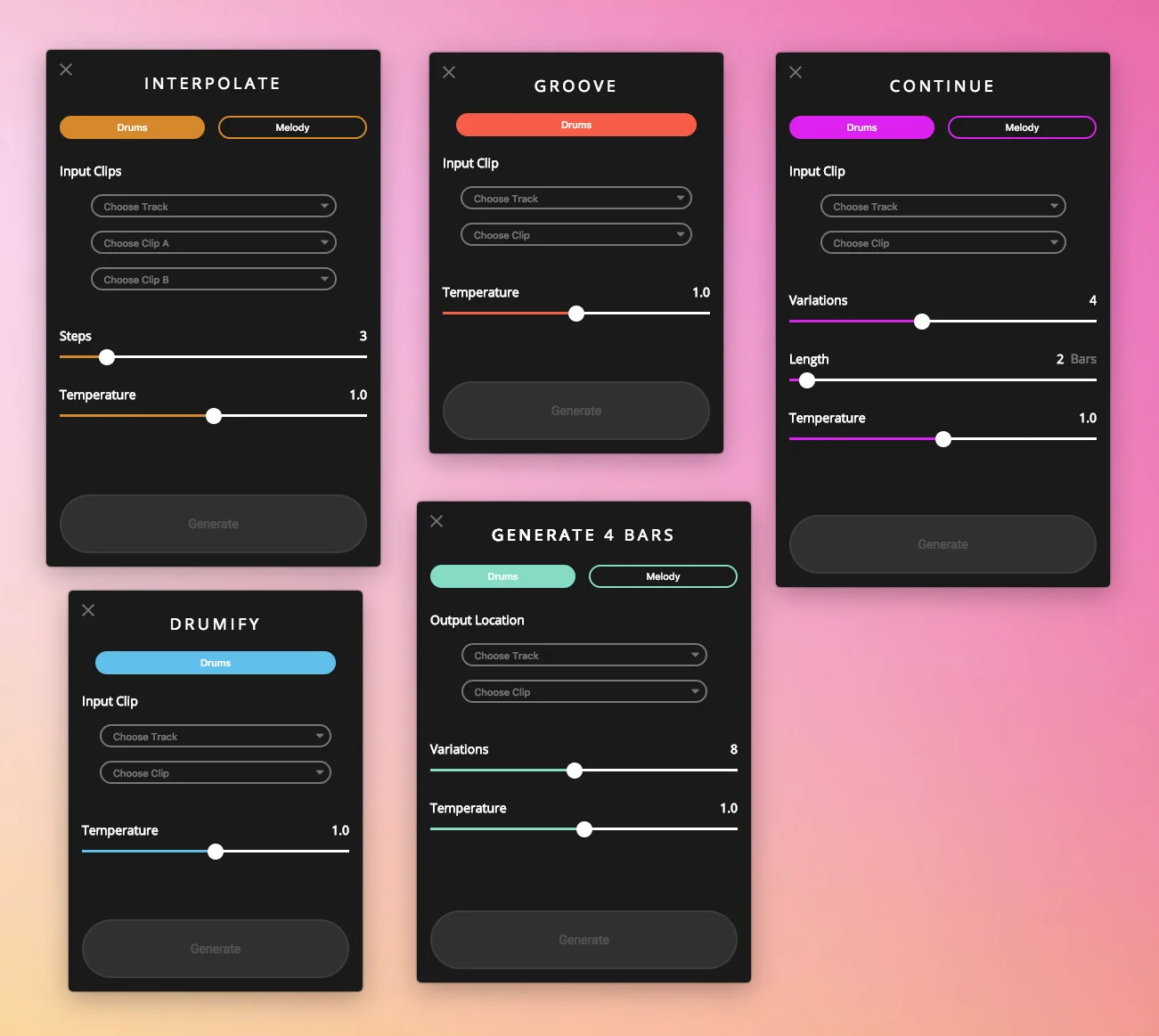
Magenta Studio is an Ableton Live MIDI plugin developed by Google's Magenta team, leveraging open-source machine learning models trained on vast collections of melodies and rhythms. It integrates directly into Ableton Live 10.1 Suite or later, offering five distinct AI-powered tools accessible from the Session View. The five tools are: **Continue**, which uses Recurrent Neural Networks (RNN) to predict and extend an existing drum beat or melody by up to 32 measures; **Generate**, which uses a Variational Autoencoder (VAE) to produce brand-new 4-bar phrases with no input required; **Interpolate**, which blends the qualities of two input clips into up to 16 transitional variations; **Groove**, which humanizes robotic MIDI rhythms by applying expressive timing and velocity patterns; and **Drumify**, which generates drum accompaniments from a melodic input. All tools include a temperature slider to control the randomness and creativity of AI outputs, making them flexible for both subtle variation and experimental music generation. Magenta Studio is ideal for music producers, composers, and sound designers looking to break creative blocks, explore new musical ideas, or add variation to existing tracks. Being open source, it also appeals to developers and researchers interested in music AI. The plugin is free to download and use with a compatible version of Ableton Live.
Key Features
- Continue: Uses RNN models to intelligently extend an existing melody or drum beat by up to 32 measures, picking up on key signatures, timing, and patterns.
- Generate: Creates brand-new 4-bar musical phrases from scratch using a Variational Autoencoder (VAE) trained on millions of melodies and rhythms — no input clip required.
- Interpolate: Takes two MIDI clips and generates up to 16 transitional clips that blend the musical qualities of both inputs, perfect for smooth arrangement transitions.
- Groove & Drumify: Groove humanizes robotic MIDI rhythms with expressive timing and velocity, while Drumify generates an accompanying drum pattern from a melodic input clip.
- Temperature Control: All tools feature a temperature slider that controls AI output randomness — from conservative and stylistically faithful to highly varied and experimental.
Use Cases
- Music producers using Ableton Live who want to quickly generate new melodic or rhythmic ideas to overcome creative blocks.
- Composers looking to extend existing MIDI loops or drum patterns with AI-generated variations that match the original style.
- Sound designers blending two distinct musical phrases into smooth interpolated transitions for film scoring or ambient music.
- Beatmakers humanizing programmed drum patterns using the Groove tool to add expressive, human-like timing and velocity nuances.
- AI/ML researchers and developers exploring practical applications of music generation models within a real-world DAW environment.
Pros
- Completely Free and Open Source: Magenta Studio is free to download and built on open-source Magenta models, making it accessible to all Ableton Live users without any subscription cost.
- Seamless DAW Integration: Works directly inside Ableton Live's Session View, fitting naturally into existing production workflows without switching between applications.
- Variety of Creative Tools: Five distinct AI tools cover a wide range of music generation needs — from extending loops to generating new ideas from scratch — catering to different creative scenarios.
Cons
- Ableton Live Only: The plugin is exclusively compatible with Ableton Live 10.1 Suite or higher, locking out users of other DAWs like Logic Pro, FL Studio, or Pro Tools.
- Limited Active Maintenance: The standalone v1 applications are no longer actively maintained, and the v2 plugin may see infrequent updates as the Magenta project evolves.
- Monophonic Melody Limitation: Melody input is limited to monophonic lines (one note at a time), which restricts use with chords or polyphonic MIDI content.
Frequently Asked Questions
What version of Ableton Live do I need to use Magenta Studio?
Magenta Studio v2 requires Ableton Live 10.1 Suite or greater. Earlier versions of Ableton Live may work with a separately installed version of Max 8.
Is Magenta Studio free to use?
Yes, Magenta Studio is completely free to download and use. It is built on Google's open-source Magenta project and is available on GitHub.
What does the temperature slider do?
The temperature slider controls the randomness of the AI's output. Higher values produce more variation and unpredictability, while lower values result in outputs that more closely follow the patterns of the input.
Can I use Magenta Studio with drum patterns and melodies?
Yes, most tools support both drum beats and melodies. Drums use a specific MIDI mapping covering 9 instruments, while melodies must be monophonic (one note at a time).
What AI models power Magenta Studio?
Magenta Studio uses Recurrent Neural Networks (RNN) for continuation tasks and Variational Autoencoders (VAE) for generation and interpolation, all trained on large datasets of MIDI music.