

About
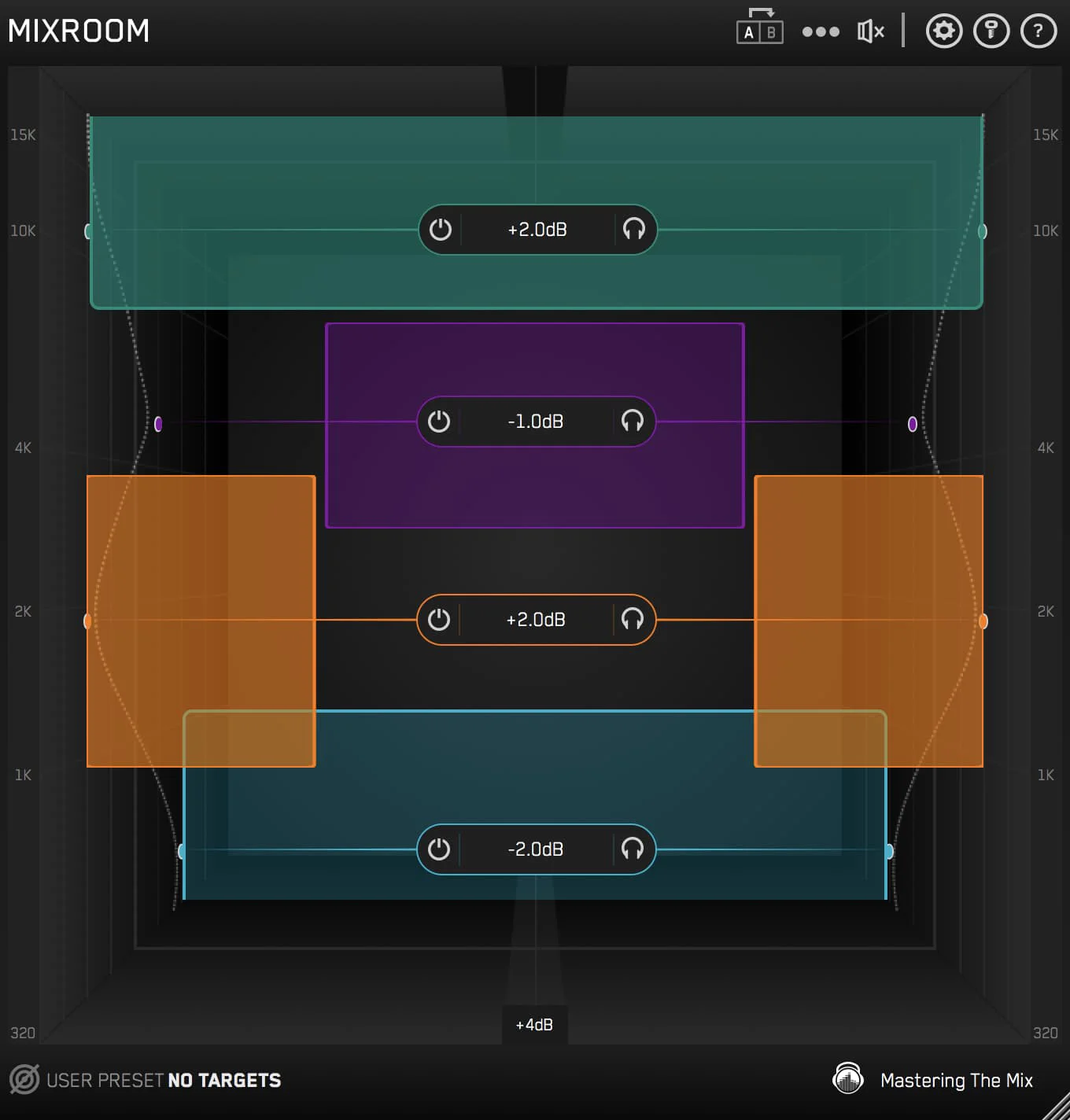
MIXROOM is an intelligent equalizer plugin designed to take the guesswork out of mixing and mastering. Developed by Mastering The Mix, it listens to your audio and uses spectral analysis to identify problematic frequency areas — whether your track sounds too harsh, dull, weak, or muddy — and then provides clear, actionable guidance on how to correct them. Unlike traditional EQs that require years of trained ears to use effectively, MIXROOM overlays intelligent suggestions onto a visual frequency display, making it accessible for beginners while still offering the depth that professional engineers expect. It's suitable for working on individual tracks such as vocals and synths, as well as full stereo masters. Key capabilities include real-time audio analysis, frequency-specific problem detection (harshness, mud, lack of presence, etc.), and an intuitive interface that highlights which bands need attention and by how much. This makes MIXROOM an excellent learning tool as well as a production workhorse. Ideal for music producers, mixing engineers, and artists who self-produce, MIXROOM integrates into any DAW as a VST, AU, or AAX plugin on macOS and Windows. Whether you're polishing a vocal take, thickening a synth pad, or putting the final sheen on a master, MIXROOM helps you achieve professional-sounding results with confidence and speed.
Key Features
- Real-Time Audio Analysis: MIXROOM continuously analyzes your audio signal to detect problematic frequency areas and display them visually in real time.
- Intelligent EQ Guidance: Rather than just showing a spectrum, MIXROOM tells you which frequencies to adjust and by how much to achieve clarity and richness.
- Multi-Purpose Application: Works effectively on individual elements like vocals and synths, as well as full stereo mixes and mastering chains.
- Problem Detection: Identifies specific tonal issues including harshness, muddiness, dullness, and weak presence, giving targeted corrective suggestions.
- DAW Integration: Ships as VST, AU, and AAX plugin formats, making it compatible with all major DAWs on macOS and Windows.
Use Cases
- Fixing harsh or overly bright vocal recordings to achieve a smoother, more professional sound
- Identifying and reducing muddy low-mid frequencies in dense, complex mixes
- Polishing a stereo master to achieve optimal clarity and richness before release
- Balancing synth pads or leads that sound thin, weak, or overbearing in a mix
- Learning to identify frequency problems by following MIXROOM's guided EQ suggestions over time
Pros
- Accessible for All Skill Levels: The guided approach lowers the barrier to professional-sounding EQ decisions, making it useful whether you're a beginner or a seasoned engineer.
- Speeds Up Workflow: By instantly identifying frequency problems, MIXROOM significantly reduces the time spent hunting for issues by ear alone.
- Educational Value: Using MIXROOM teaches users to recognize tonal problems over time, improving their mixing instincts alongside their results.
Cons
- Paid Only: There is no free tier or perpetual trial; users must purchase the plugin to use it in their projects.
- Desktop DAW Dependency: MIXROOM only works as a DAW plugin and has no standalone or web-based version, limiting accessibility outside a studio environment.
- Guidance May Not Suit Advanced Engineers: Highly experienced mixers may find the prescriptive approach limiting compared to fully manual EQ workflows.
Frequently Asked Questions
What is MIXROOM?
MIXROOM is an intelligent EQ plugin by Mastering The Mix that analyzes your audio and provides visual guidance on which frequencies to adjust to improve clarity, richness, and overall tonal balance.
What types of audio can MIXROOM be used on?
MIXROOM is designed for use on vocals, synths, instruments, and full stereo mixes or masters, making it a versatile tool throughout the entire production process.
How does MIXROOM's analysis work?
MIXROOM uses spectral analysis to listen to your audio in real time and identifies frequency bands that are causing issues such as harshness, muddiness, dullness, or lack of presence, then visually highlights corrective adjustments.
What DAWs and plugin formats does MIXROOM support?
MIXROOM is available as VST, AU, and AAX formats, making it compatible with popular DAWs such as Ableton Live, Logic Pro, Pro Tools, FL Studio, and more on macOS and Windows.
Is MIXROOM suitable for beginners?
Yes. MIXROOM's guided interface makes it especially valuable for beginners who are still developing their ear, while its depth and accuracy also satisfy the needs of professional mixing and mastering engineers.