
About
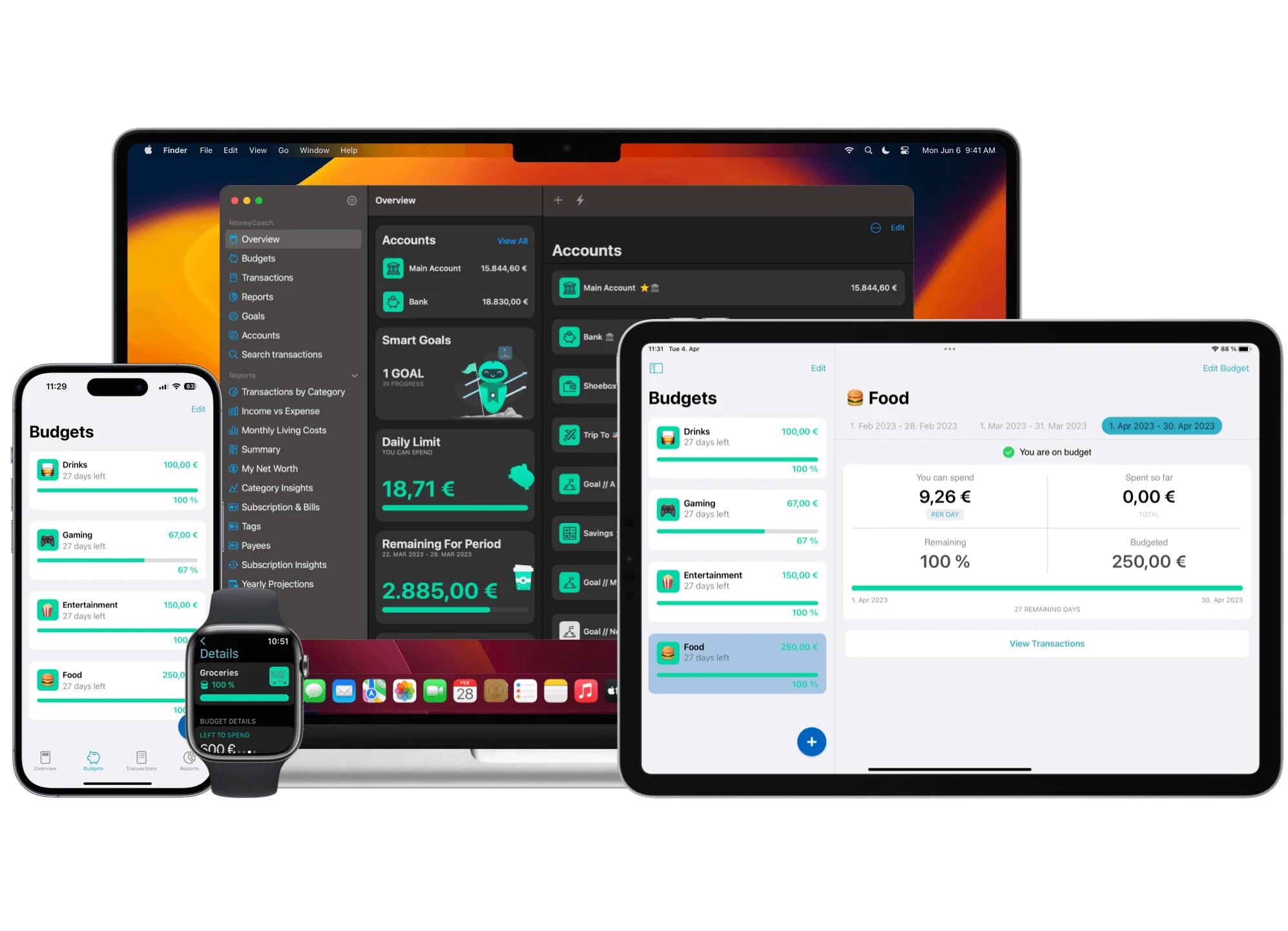
MoneyCoach is a comprehensive personal finance management app designed exclusively for the Apple ecosystem, including iPhone, iPad, Mac, Apple Watch, and Apple Vision Pro. It empowers users to take full control of their financial lives by tracking every expense, automating personalized budgets, monitoring savings goals, and providing a real-time overview of net worth. The app features intelligent 'envelope' budgeting that can save users up to €2,000 per year by tailoring spending limits to personal habits. Users can connect to over 2,800 European bank accounts for automatic transaction syncing, or manually manage offline accounts and cash. Smart Goals allow users to set savings targets—such as a vacation, gadget, or car—with daily progress indicators to stay on track. MoneyCoach also supports Apple Pay/Wallet transaction imports via Shortcuts Automation, Siri quick-add functionality, and an ultra-fast Quick Entry mode. Family Sync lets partners share accounts, budgets, and goals through iCloud while maintaining individual personalised dashboards. The visionOS version delivers an immersive financial overview experience on Apple Vision Pro. Ideal for individuals, couples, and families who want a native, privacy-focused, no-login budgeting tool that works seamlessly across all Apple devices.
Key Features
- Smart Envelope Budgeting: Create personalized 'envelope' budgets by category—food, travel, entertainment, and more—that adapt to your spending habits and can save up to €2,000 per year.
- Bank Account Sync: Connect to 2,800+ European bank accounts to automatically import and categorize transactions, giving you a unified view of all your finances in one place.
- Savings Goals Tracker: Set custom savings goals for anything—holidays, gadgets, a new car—and see exactly how much you need to save daily to reach your target on time.
- Family Sync via iCloud: Share accounts, budgets, and goals with a partner or family member securely through iCloud, with each user retaining a personalized overview.
- Apple Ecosystem Integration: Available on iPhone, iPad, Mac, Apple Watch, and Apple Vision Pro with Siri support, Shortcuts Automation for Apple Pay imports, and Quick Entry for logging transactions in seconds.
Use Cases
- Individuals tracking daily expenses across multiple bank accounts and cash to understand where their money goes each month.
- Couples or families using Family Sync to manage a shared household budget while maintaining individual financial overviews.
- Savers setting up Smart Goals to put aside money for a vacation, new device, or major purchase with daily progress tracking.
- Budget-conscious users creating envelope budgets by spending category to cut unnecessary expenses and save more each year.
- Apple power users leveraging Siri, Shortcuts, and Apple Watch integrations for fast, frictionless expense logging on the go.
Pros
- Deep Apple Ecosystem Integration: Natively built for all Apple platforms including visionOS, leveraging Siri, Shortcuts, iCloud, and Apple Pay for a seamless and fast user experience.
- Privacy-First Design: Family Sync uses iCloud with no separate login required, keeping financial data private and under the user's control rather than on third-party servers.
- Highly Rated & Trusted: Over 1 million downloads and 15,800+ positive App Store ratings, including recognition as Apple's App of the Day.
- Personalized Smart Budgets: The app tailors budget recommendations based on your average spending patterns, making it easy to set meaningful limits without manual configuration.
Cons
- Apple-Only Platform: MoneyCoach is exclusive to Apple devices (iOS, macOS, visionOS), making it inaccessible to Android or Windows users.
- European Bank Sync Focus: Online banking connectivity is currently limited to 2,800+ European banks, so users outside Europe must track accounts manually.
- Freemium Limitations: While free to download, some advanced features likely require a premium subscription, which may not be ideal for users seeking a fully free solution.
Frequently Asked Questions
Is MoneyCoach free to use?
MoneyCoach is free to download from the App Store and offers core budgeting and expense tracking features at no cost. A premium subscription unlocks additional advanced features.
Which devices does MoneyCoach support?
MoneyCoach is available on iPhone, iPad, Mac, Apple Watch, and Apple Vision Pro. It syncs seamlessly across all your Apple devices using iCloud.
Can I connect my bank account to MoneyCoach?
Yes. MoneyCoach supports online banking integration with 2,800+ European bank accounts, enabling automatic transaction imports. Users outside Europe can manually add and track accounts.
How does Family Sync work?
Family Sync uses iCloud to let you share accounts, budgets, and goals with a partner or family member. Each user keeps a personalized dashboard while seeing shared financial data—no separate login required.
Can I import Apple Pay transactions automatically?
Yes. MoneyCoach supports automatic Apple Pay/Wallet transaction imports via a Shortcuts Automation. You set it up once and all future Apple Pay payments are added to MoneyCoach automatically.