

About
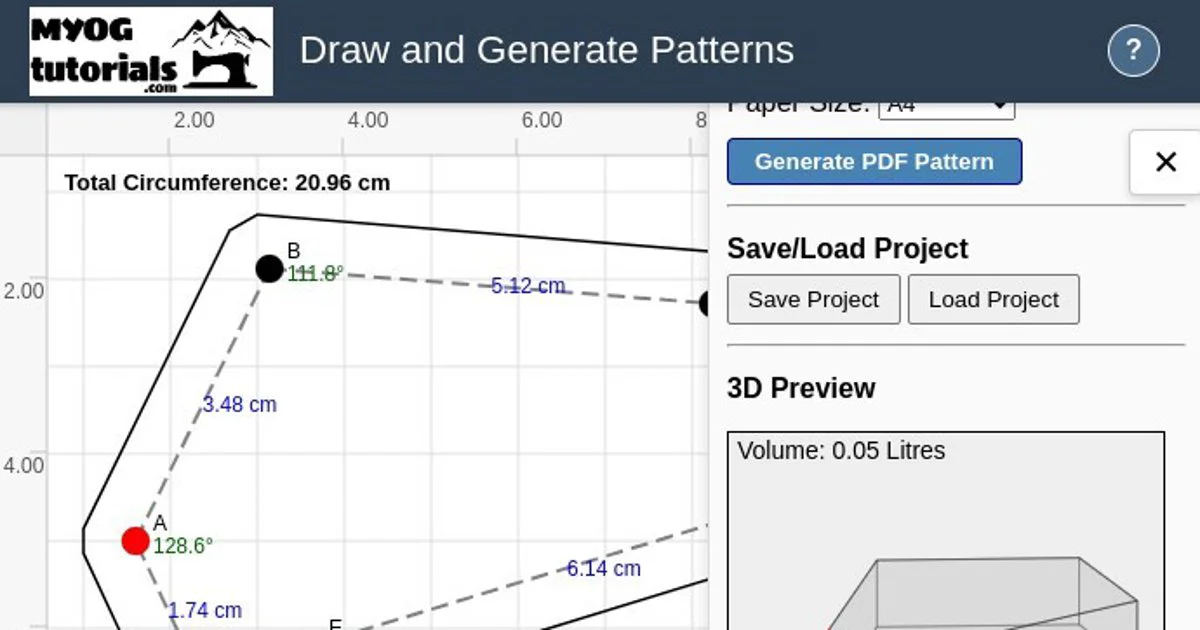
MYOG Pattern Generator (Make Your Own Gear) is a free, fully browser-based sewing pattern design tool created by Prickly Gorse Gear. It is designed for DIY gear makers, sewists, and outdoor enthusiasts who want to create custom bags, frame bags, laptop bags, pouches, backpacks, totes, and purses without needing advanced maths or expensive CAD software. The tool works by letting you draw any polygon shape on an interactive canvas — by clicking to place points, or by starting from preset circle and rectangle shapes. It then automatically calculates and generates the corresponding gusset (side panel) pattern piece, which is the trickiest part of bag construction. Version 2 (June 2025) is a complete rewrite with a fully interactive canvas, a refreshed UI inspired by familiar graphic design software, and 3D visualization of your design. Key capabilities include adding and moving points, creating bezier curves, specifying real-world dimensions for accurate scaling, adding seam allowances, marking gusset seam splits, and importing background images for tracing. Generated patterns are print-ready at 100% actual size with a built-in scale check box. All processing happens client-side — no files are uploaded, and no account is required. It is ideal for hobbyist gear makers, cyclists making custom frame bags, and anyone who wants to prototype sewn items quickly from paper models or scrap fabric before cutting into expensive materials.
Key Features
- Automatic Gusset Calculation: Draws any polygon shape and automatically calculates the matching gusset (middle panel) pattern piece — eliminating complex manual maths.
- Interactive Canvas Editor: Add, move, and delete points; create bezier curves; pan and zoom; and start from preset circle or rectangle shapes for faster design.
- 3D Visualization: A live 3D preview appears as you design, helping you visualize how your finished bag or pouch will look before generating the pattern.
- Seam Allowance & Scaling: Specify real-world dimensions per grid square or set a known line length to scale accurately, then add custom seam allowances before printing.
- Background Image Tracing: Import a reference image directly onto the canvas for tracing. All processing is local — no images are uploaded to any server.
Use Cases
- A cyclist designing a custom bike frame bag shaped to fit their specific frame geometry.
- A hobbyist gear maker prototyping a new backpack or pouch without manual pattern drafting.
- A sewist tracing an existing bag outline using the background image import feature to recreate or modify a pattern.
- A beginner learning bag construction who wants to skip complex gusset maths and focus on the sewing.
- A small gear maker creating multiple pattern variations quickly to test different bag widths and proportions.
Pros
- Completely Free & No Account Required: The tool is fully free to use with no sign-up, no subscription, and no software to install — just open it in a browser.
- Runs Locally on Your Device: All pattern generation and image processing happens client-side, ensuring privacy and offline-friendly performance.
- Print-Ready Output: Generated patterns include a scale check box and are formatted for printing at 100% actual size, ready to cut and sew immediately.
- Beginner-Friendly Workflow: Eliminates the intimidating geometry and maths of gusset calculation, making custom bag-making accessible to sewists at all skill levels.
Cons
- Curves Support Still Limited: Bezier curve support is experimental in V2; complex curved shapes may require adding many extra points to approximate smoothly.
- No Save File Compatibility Between Versions: V1 and V2 save files are not cross-compatible, which can be inconvenient for users upgrading from older projects.
- Potential Bugs in Active Development: The tool is a work in progress; users are advised to always test patterns with paper or scrap fabric before cutting expensive materials.
Frequently Asked Questions
What is a gusset and why does this tool help with it?
A gusset is the middle or side panel piece that connects the two face panels of a bag or pouch. Calculating its exact shape to match a custom drawn outline involves complex maths — MYOG Pattern Generator does this automatically from your drawn shape.
Do I need to install any software to use the pattern generator?
No. The tool runs entirely in your web browser on any device, including mobile. No downloads, installations, or accounts are required.
Is my data or uploaded image sent to a server?
No. All processing, including background image tracing, happens locally on your device. Nothing is uploaded to any external server.
What types of items can I make patterns for?
Any sewn item with a side panel and a gusset sewn around it — including frame bags, laptop bags, pouches, backpacks, totes, purses, and custom cycling bags.
How do I print the generated pattern at the correct size?
When printing, always select 100% or 'Actual Size' in your print settings. Use the scale box printed on the pattern to verify accuracy before cutting fabric.