V
About
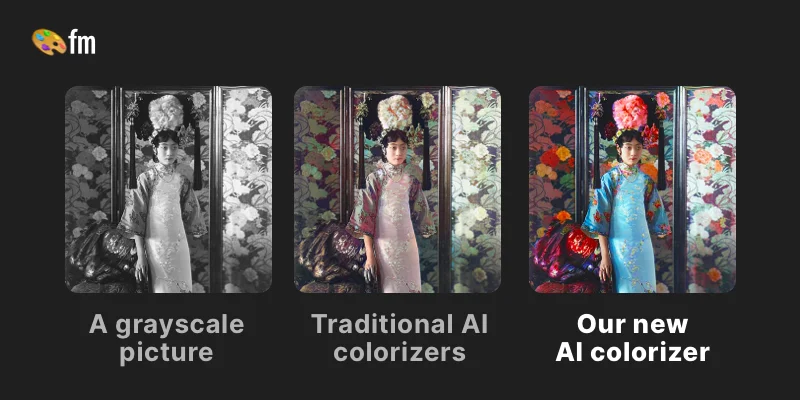
Palette.fm is a web-based AI photo colorization platform designed to breathe life into old black and white photographs. Leveraging years of deep learning research, the tool produces strikingly accurate and natural-looking color results — earning praise from renowned Photoshop educators and tech publications like Wired. The workflow is simple: upload a photo, choose from 21+ unique color filters, and optionally fine-tune the result using descriptive keywords before downloading. The free plan allows unlimited colorization previews at up to 500×500 pixels with a Palette watermark, making it easy to experiment without any sign-up required. For professional-grade results, users can purchase one-time credits (1 credit = 1 photo) to export watermark-free, full-resolution images up to 5000×5000 pixels — with no recurring subscription required. Palette.fm supports bulk uploads, enabling photographers and creators to process multiple images in a single session. An API is also available for developers and production pipelines. The platform is trusted in professional media productions and stands out for its lifelike skin tones, attention to fine details like hands and lips, and naturally rendered lighting — areas where competing tools commonly fall short.
Key Features
- 21+ AI Color Filters: Choose from over 21 unique color presets to apply different stylistic moods and tones to your colorized photo.
- Keyword-Based Color Customization: Fine-tune colorization results using descriptive keywords to guide the AI toward specific hues and styles.
- High-Resolution Exports: Download watermark-free, full-resolution images up to 5000×5000 pixels using a one-time credit system with no subscription required.
- Batch Photo Uploads: Upload multiple images at once to colorize entire photo collections efficiently in a single session.
- Developer API Access: Integrate Palette.fm's colorization engine into production workflows and third-party applications via its dedicated API.
Use Cases
- Restoring and colorizing old family photographs for personal archives or printed keepsakes.
- Bringing historical black and white archival images to life for documentaries, editorial content, or museum exhibits.
- Enabling photographers and creative agencies to offer photo colorization as part of their retouching services.
- Integrating automatic colorization into media production pipelines using the Palette.fm API.
- Creating vibrant social media content from vintage or monochrome imagery for brands and content creators.
Pros
- Highly Realistic Results: Praised by industry experts for accurate skin tones, natural lighting, and fine detail rendering — outperforming most competing tools.
- No Subscription Required: One-time credit purchases mean you only pay for what you use, with no recurring monthly fees.
- Free to Try, No Sign-Up Needed: Unlimited free previews are available without creating an account, lowering the barrier to entry significantly.
- Simple 3-Step Workflow: The intuitive upload → filter → download process makes it accessible to users of all skill levels.
Cons
- Free Plan Has Size & Watermark Limits: Free colorizations are capped at 500×500 pixels and include a Palette logo watermark, requiring a paid credit for professional use.
- Credit-Based Pricing Per Photo: High-volume users may find per-photo credit costs add up quickly compared to unlimited subscription alternatives.
- Limited Manual Editing Controls: Color customization relies on keyword hints rather than manual brush or zone-based tools, which may frustrate detail-oriented users.
Frequently Asked Questions
Is Palette.fm free to use?
Yes. The free plan offers unlimited color previews without sign-up. Images are resized to a maximum of 500×500 pixels and include a Palette watermark. You receive one free trial credit upon signing up for a watermark-free, full-resolution export.
How do I get watermark-free, high-resolution downloads?
Purchase credits — 1 credit equals 1 watermark-free colorization at up to 5000×5000 pixels. Credits are a one-time purchase with no recurring subscription.
Can I customize the colors applied to my photo?
Yes. After selecting a color filter, you can click the adjust icon and enter descriptive keywords to guide the AI toward specific colors or styles before re-colorizing.
Does Palette.fm support bulk photo uploads?
Yes, you can upload multiple photos at once and apply filters to all of them, making it efficient for processing large batches of historical or archival images.
Is there an API available for developers?
Yes. Palette.fm offers an API that developers can use to integrate AI colorization into their own applications, production pipelines, or media workflows.