About
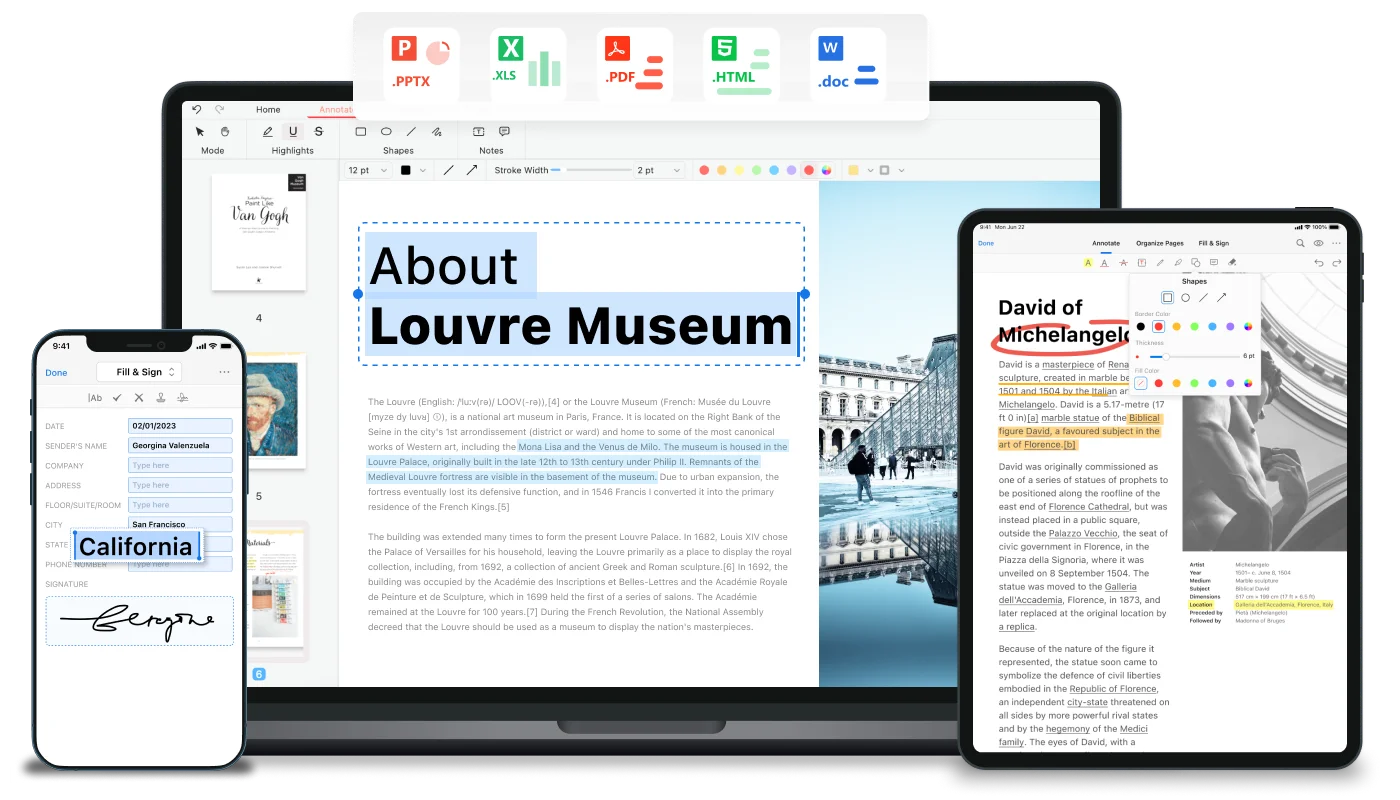
PDFgear is a world-class, entirely free PDF editor that combines comprehensive document management with cutting-edge AI technology. Available across Windows, Mac, iOS, Android, and the browser, PDFgear enables users to read, edit, convert, merge, split, sign, and annotate PDFs without any subscription fees or account creation. The integrated AI assistant — powered by ChatGPT — allows users to summarize lengthy documents, ask targeted questions about PDF content, and extract key information in seconds. The OCR engine supports 30+ languages and converts scanned or image-based PDFs into fully editable Word or plain text files. PDF conversion to and from Word, Excel, PowerPoint, JPG, and TXT is lossless and supports batch processing for efficiency. PDFgear's editing capabilities rival paid alternatives like Adobe Acrobat — users can freely modify text, images, shapes, hyperlinks, and fillable form fields. Annotation tools include highlights, underlines, strikethroughs, sticky notes, stamps, and shape overlays. With over 9,000 five-star reviews, PDFgear is trusted by students, professionals, content creators, and businesses who need a full-featured PDF toolkit without the cost.
Key Features
- AI Document Assistant: Built-in ChatGPT integration lets you summarize documents, ask questions about PDF content, and extract key information using natural language prompts.
- Full PDF Editing: Edit text, images, shapes, links, signatures, and fillable form fields directly in your PDF — as freely as in Microsoft Word.
- OCR Technology: Accurately extract text from scanned or image-based PDFs with support for 30+ languages, converting them into editable Word or TXT files.
- Lossless PDF Conversion: Convert between PDF and Word, Excel, PowerPoint, JPG, and TXT with no quality loss. Batch conversion mode handles multiple files simultaneously.
- Cross-Platform Access: Seamlessly switch between Windows, Mac, iOS, Android, and web browser — your PDF workflow travels with you across all devices.
Use Cases
- Edit and reformat business contracts or reports without purchasing expensive PDF software
- Summarize lengthy research papers, legal documents, or financial reports using the AI assistant
- Convert scanned invoices, forms, or handwritten notes into editable text via OCR
- Merge, split, reorder, or compress PDF pages for document organization and sharing
- Sign, annotate, and fill out PDF forms on any device while working remotely
Pros
- Completely Free with No Strings Attached: PDFgear requires no subscription, no account creation, and has no hidden fees — all features are genuinely free.
- AI Integration Built In: The ChatGPT-powered assistant for document summarization and Q&A is included out of the box, rivaling paid AI document tools.
- Broad Platform Support: Works natively on every major operating system and device type, making it highly versatile for teams and individuals alike.
- Feature-Rich Editing Suite: Editing, annotation, OCR, conversion, and signing capabilities rival premium tools like Adobe Acrobat at zero cost.
Cons
- No Native Cloud Storage: PDFgear lacks built-in cloud document storage or syncing, so users must manage their own file storage across devices.
- AI Features Require Internet: The ChatGPT-powered AI assistant depends on an internet connection and may not function in fully offline environments.
- Privacy Considerations for Sensitive Files: Users handling confidential documents should review PDFgear's privacy policy before uploading sensitive content to online tools.
Frequently Asked Questions
Is PDFgear really completely free?
Yes. PDFgear is 100% free with no subscription, no account requirement, and no hidden charges. All editing, conversion, and AI features are available at no cost.
How does the AI assistant in PDFgear work?
PDFgear integrates ChatGPT as an AI assistant, allowing you to ask questions about your PDF content, request summaries, or extract specific information using natural language.
What platforms does PDFgear support?
PDFgear is available as a desktop app for Windows and Mac, a mobile app for iOS and Android, and as a suite of online tools accessible from any web browser.
Can PDFgear handle scanned or image-based PDFs?
Yes. PDFgear includes an OCR engine that supports 30+ languages, enabling it to extract text from scanned documents and convert them into fully editable Word or TXT files.
How does PDFgear sustain itself without charging users?
PDFgear has published a transparency statement on their website explaining their business model and how they are able to offer all features for free. Visit their site to learn more.