

About
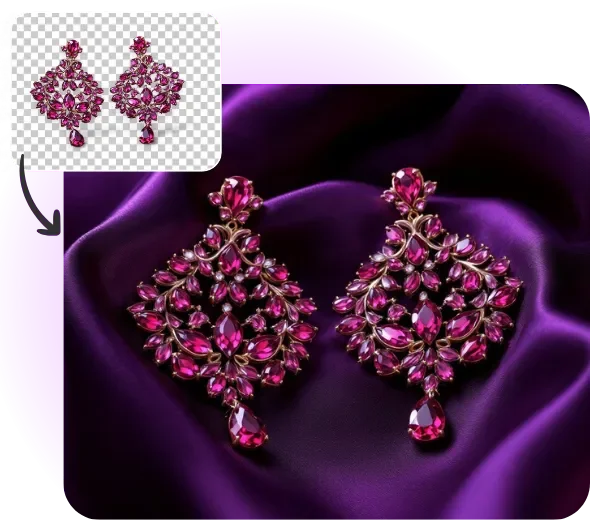
Phot.AI Jewelry is a specialized AI-powered photography solution designed to help online retailers, jewelry brands, and e-commerce sellers produce professional, studio-quality product images without the cost or complexity of traditional photography setups. Using a simple four-step workflow—upload your photo, add text or filters, apply AI tools, and export—users can transform raw jewelry images into polished, high-converting visuals in seconds. The platform includes a powerful AI background replacer that allows users to swap out plain or cluttered backdrops for stunning, on-brand environments. Users can choose from an infinite library of textures, countertops, color palettes, and AI-generated custom backgrounds by simply typing a descriptive prompt. The same jewelry image can be quickly repurposed across product listings, promotional ads, and social media posts by swapping styles with a few clicks. Phot.AI Jewelry is especially valuable for offline jewelry retailers looking to build or scale their online presence, offering a cost-effective alternative to professional photoshoots without sacrificing quality. The tool supports necklace photography, rings, bracelets, and other fine jewelry items, ensuring intricate details and natural shine are preserved. It also integrates with Phot.AI's broader suite of tools, including a watermark remover, making it a comprehensive solution for jewelry product visuals. With over 600,000 satisfied users and recognition as Product of the Day and Product of the Week, Phot.AI Jewelry is a trusted name in AI-driven product photography for the e-commerce and digital marketing space.
Key Features
- AI Background Replacement: Instantly swap jewelry photo backgrounds with studio-quality backdrops, themed environments, or AI-generated custom scenes from a simple text prompt.
- AI-Generated Custom Backdrops: Describe your desired background in natural language and generate unique, on-brand environments tailored to your jewelry style and campaign needs.
- Creative Filters & Text Elements: Enhance jewelry photos with curated filters, text overlays, and design elements to create high-converting product images for ads and social media.
- Infinite Texture & Color Library: Choose from a vast range of textures, countertops, color palettes, and tones to perfectly complement any jewelry piece.
- One-Click Export: Download high-resolution, polished jewelry product photos directly to your device once editing is complete—ready for e-commerce listings or marketing campaigns.
Use Cases
- E-commerce jewelry sellers creating high-quality product listing images without hiring a professional photographer.
- Offline jewelry retailers transitioning to online sales who need affordable, studio-quality product photography.
- Marketing teams repurposing the same jewelry image across multiple campaigns, social channels, and ad formats by swapping backgrounds.
- Jewelry brands creating scroll-stopping social media content with AI-generated, on-brand lifestyle backgrounds.
- Small jewelry businesses producing promotional materials, lookbooks, and seasonal campaign visuals at scale with minimal effort.
Pros
- Cost-Effective Alternative to Professional Photography: Delivers studio-quality results at a fraction of the cost of hiring professional photographers or setting up a dedicated jewelry photo studio.
- Simple 4-Step Workflow: The intuitive upload-edit-apply-export process makes it accessible to non-designers and small business owners with no technical expertise required.
- Highly Versatile for Multi-Channel Marketing: Repurpose the same jewelry image across product listings, social media posts, and promotional materials by switching backgrounds and styles in seconds.
- Large & Growing User Base: Trusted by over 600,000 users and recognized as Product of the Day and Product of the Week, reflecting strong community validation.
Cons
- Niche Focus on Jewelry: The tool is specialized for jewelry product photography, so users with broader product photography needs may require additional tools or platforms.
- Output Quality Depends on Source Image: Best results require a reasonably clear and well-lit source photo; very low-quality or blurry inputs may limit the final image quality.
- Limited Offline or API Access: The tool is primarily web-based with no clearly documented API or desktop app, which may restrict integration into automated workflows.
Frequently Asked Questions
What types of jewelry can I photograph with Phot.AI Jewelry?
Phot.AI Jewelry supports a wide range of jewelry items including necklaces, rings, bracelets, earrings, and other fine jewelry pieces. The AI is designed to preserve intricate details and natural shine across all types of ornaments.
Do I need professional photography equipment to use this tool?
No. Phot.AI Jewelry is designed to work with standard photos taken on a smartphone or camera. The AI enhances and transforms your existing images into professional-grade product photos without any specialized equipment.
Can I create custom backgrounds for my jewelry photos?
Yes. You can either choose from Phot.AI's built-in library of textures, colors, and backdrops, or generate completely custom backgrounds by typing a descriptive prompt. The AI will create a unique backdrop tailored to your description.
Is Phot.AI Jewelry suitable for e-commerce product listings?
Absolutely. The tool is specifically built for e-commerce use cases, producing high-resolution images optimized for product listings on platforms like Shopify, Amazon, Etsy, and more.
What is the pricing model for Phot.AI Jewelry?
Phot.AI Jewelry operates on a freemium model, allowing users to start creating and try the tool at no cost. Premium plans with additional features and export options are available for higher-volume users and professional brands.