
About
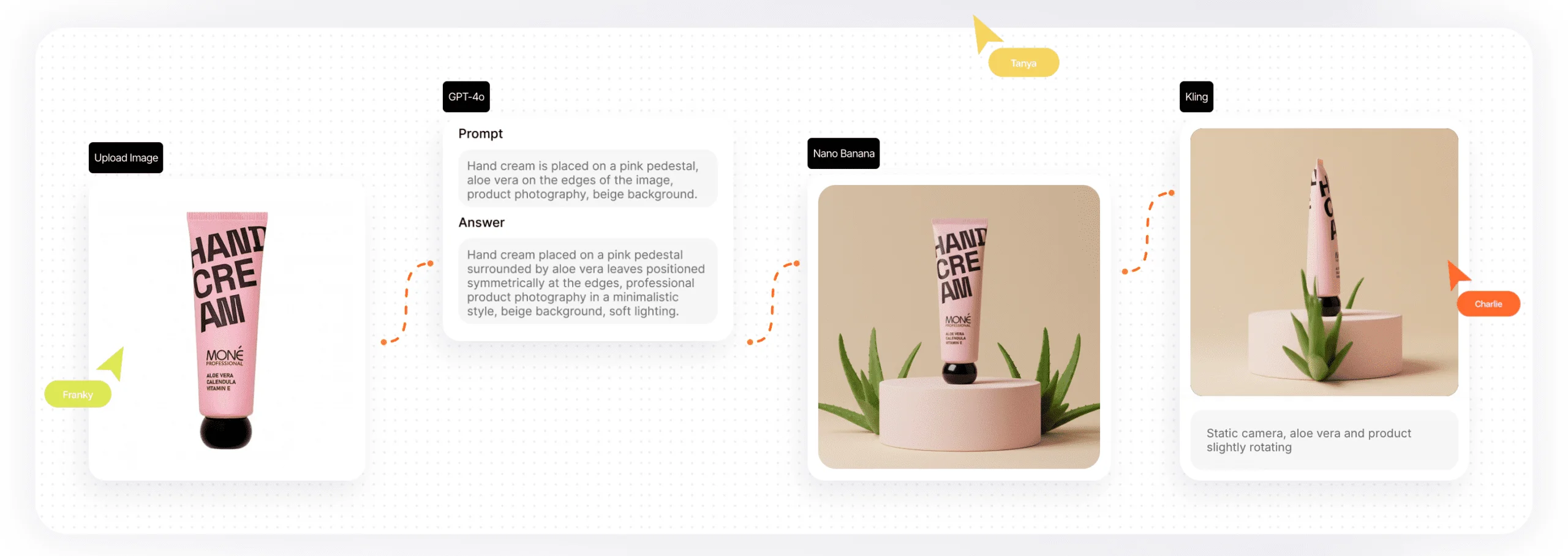
Phygital+ is a comprehensive AI-powered creative workspace designed to give individuals and teams full control over their visual content production. It consolidates more than 30 best-in-class AI models—spanning image generation (GPT Image, Flux, Ideogram, Recraft, MidJourney, Imagen 4), video generation (Sora 2, Veo 3.1, Kling 3, Wan 2.5, Seedance, Hailuo 2 Pro), animation, text-to-speech, and text-to-sound—into one unified interface. At the heart of Phygital+ is its Pipeline (node workflow) builder, which lets users link models, prompts, and assets into reusable automated workflows for batch production, style consistency, and multi-step creative processes. Ready-made templates cover popular content types including product mockups, try-on outfits, 3D rotations, animated banners, UGC content, and food photography—significantly reducing time-to-output. The platform is particularly well-suited for e-commerce teams needing consistent product visuals, creative agencies running high-volume campaigns, interior designers visualizing spaces, and marketing teams producing motion assets. Advanced tools like ControlNet, Inpaint/Outpaint, Topaz Video upscaling, FLUX Kontext context-aware editing, and style transfer round out the toolkit. Phygital+ combines the power of multiple frontier AI models with a collaborative, no-code workflow environment—enabling faster production, greater creative control, and brand consistency across all output.
Key Features
- 30+ Integrated AI Models: Access leading image and video AI models—including GPT-4o, Sora 2, Flux, Kling 3, MidJourney, Ideogram, Veo 3.1, and more—without switching platforms.
- Node-Based Pipeline Builder: Create reusable, automated workflows by linking models, prompts, and assets together for consistent batch production and multi-step creative processes.
- Ready-Made Creative Templates: Launch projects instantly with templates for product mockups, 3D rotations, animated banners, try-on outfits, UGC content, and food & lifestyle visuals.
- Advanced Image Editing: Fine-tune outputs with ControlNet, Inpaint/Outpaint, FLUX Kontext context-aware editing, upscaling, style transfer, and pan tools for precise creative control.
- Video & Animation Generation: Generate cinematic video, animate static images, create smooth transitions, and maintain character/style consistency across scenes using top-tier video models.
Use Cases
- E-commerce brands generating consistent product photography, 3D rotations, and try-on visuals at scale without a traditional photo studio.
- Creative agencies building automated content pipelines to produce high-volume campaign assets with consistent style and branding across clients.
- Interior designers and architects visualizing space concepts, furniture arrangements, and design schemes from sketches or reference images.
- Marketing teams creating animated banners, motion mockups, and social media video content using ready-made templates and AI video models.
- Content creators producing UGC-style videos, lifestyle imagery, and branded short-form content using a single platform with dozens of AI tools.
Pros
- All-in-One Creative Hub: Eliminates the need to juggle multiple AI subscriptions by consolidating 30+ leading models into a single workspace with a unified interface.
- Repeatable Pipeline Automation: The node-based pipeline builder enables teams to create reusable workflows, dramatically reducing time spent on repetitive production tasks.
- Wide Range of Use Cases: Covers e-commerce product photography, agency campaigns, interior visualization, marketing motion assets, and UGC content—making it versatile across industries.
- Collaborative Workspace: Designed for teams with shared assets, templates, and pipelines that support consistent brand output across multiple users.
Cons
- Potentially Overwhelming for Beginners: With 30+ models and a node-based pipeline builder, new users may face a steep learning curve before leveraging the platform's full potential.
- Cost at Scale: Heavy usage across multiple high-quality AI models can become expensive for smaller teams or solo creators operating on limited budgets.
- Web-Only Access: Currently available only as a web application, with no dedicated desktop app or mobile apps for on-the-go creative work.
Frequently Asked Questions
What AI models are available in Phygital+?
Phygital+ includes 30+ models such as GPT Image, Sora 2, Imagen 4, Gemini 2.5/3.0, Veo 3.1, Flux / Flux 2 Pro, Kling 3, MidJourney, Ideogram 3, Recraft V4, Wan 2.5, Seedream, Hailuo 2 Pro, Topaz Video, and more—all accessible from one workspace.
What is the Pipeline feature in Phygital+?
Pipelines are node-based visual workflows that let you connect AI models, prompts, and media assets together. They enable repeatable, automated production sequences for images, video, style consistency, and batch content creation.
Who is Phygital+ designed for?
Phygital+ is built for creative agencies, e-commerce teams, interior designers, marketing professionals, and content creators who need fast, consistent, high-quality AI-generated visual content.
Is there a free plan available?
Yes, Phygital+ offers a free trial so you can explore the platform before committing to a paid plan. Pricing tiers are available for individuals and teams with varying usage needs.
Can Phygital+ handle video generation as well as images?
Absolutely. Phygital+ supports cinematic video generation, image-to-video animation, scene transitions, and motion effects via models like Sora 2, Kling 3, Veo 3.1, Wan 2.5, and Hailuo 2 Pro, with controls for frame length, aspect ratio, and style consistency.