

About
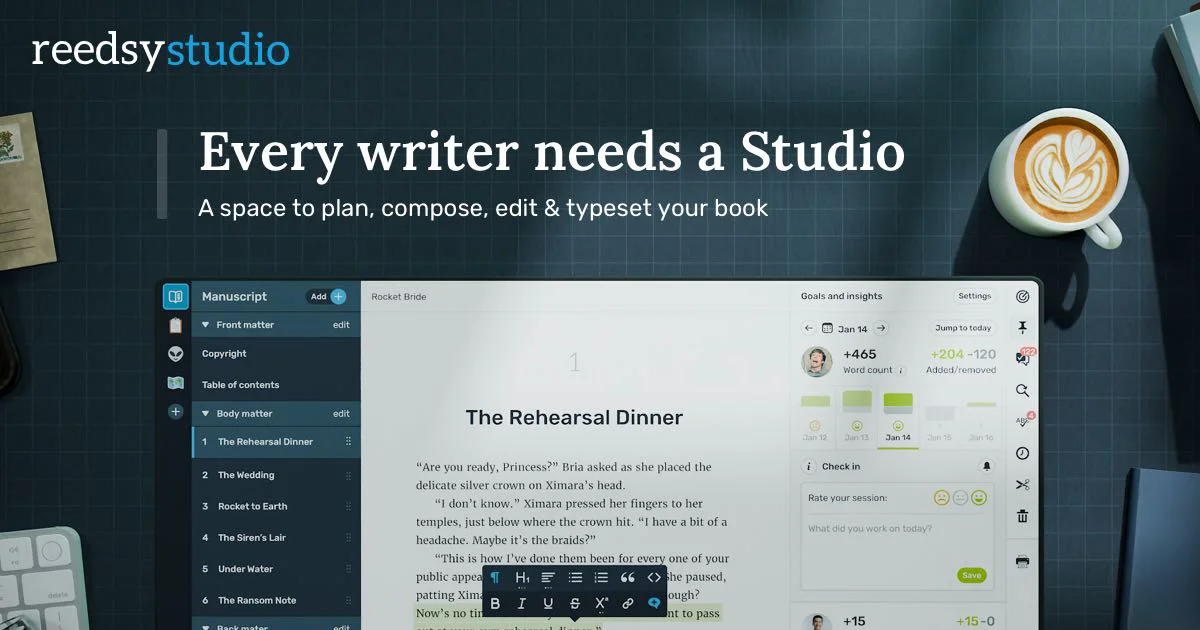
Reedsy Studio (also known as the Reedsy Book Editor) is a free, cloud-based writing application designed from the ground up for authors working on books. Unlike generic word processors, it structures your manuscript into parts, chapters, and scenes via an intuitive sidebar, keeping long-form projects organized and navigable. The editor imports existing drafts from all major text formats so you can continue work already in progress. As you write, you choose a book style and see your formatted output in real time—meaning when you finish writing, your book is already typeset and ready for readers or print, exportable as a polished PDF or EPUB. Productivity features include daily and weekly word-count goals, reminders, and advanced writing-habit statistics (via the Studio Plus add-on). The timeline view lets you rewind to any point in your manuscript's history, compare drafts, and restore previous versions, with 30 days of history free and unlimited history on paid plans. Collaboration is built in: share a live link with beta readers, co-authors, or editors and see tracked changes and comments in real time—no emailing files back and forth. Everything syncs automatically to the cloud and works on any device, including mobile, so your writing session is never interrupted. Reedsy Studio is free to start, with optional paid add-ons for power users.
Key Features
- Chapter & Scene Organization: Structure your manuscript into parts, chapters, and scenes using a sidebar, keeping long-form projects easy to navigate.
- Format as You Write: Choose your book style upfront and see the final formatted output in real time, so your manuscript is print-ready the moment writing ends.
- Export to PDF & EPUB: Generate professional, print-ready PDF and EPUB files directly from the editor with a single click.
- Real-Time Collaboration: Share your manuscript with co-authors, editors, or beta readers and see tracked changes and comments live, without juggling file versions.
- Goal Tracking & Timeline History: Set daily or weekly word-count goals, track writing habits, and rewind your manuscript's timeline to restore any previous version.
Use Cases
- A novelist organizing their first book into chapters and scenes and tracking daily word-count goals to stay on schedule.
- A self-publishing author formatting their manuscript into a print-ready PDF and EPUB for distribution on Amazon KDP or IngramSpark.
- A non-fiction writer sharing a draft chapter with their editor for tracked-change feedback without exchanging email attachments.
- A co-author team working remotely on a book, using real-time collaboration to merge contributions and resolve edits in one shared workspace.
- A writing student importing an existing draft, using version history to compare revisions, and exporting a polished copy for submission.
Pros
- Free to use with no setup: The core editor is completely free and works instantly in the browser—no software installation or steep learning curve required.
- Built for long-form writing: Unlike generic word processors, the app is purpose-built for books, with chapter structures, front/back matter, and publishing-ready export formats.
- Cross-device cloud sync: All changes save automatically to the cloud, so writers can seamlessly switch between desktop and mobile without losing progress.
- Integrated collaboration: Real-time co-editing, comments, and shareable preview links eliminate the friction of back-and-forth email revisions with editors and beta readers.
Cons
- Advanced features locked behind paid add-ons: Power features like unlimited version history, advanced writing stats, and goal reminders require upgrading to Studio Plus.
- Limited AI writing assistance: Unlike some competitors, Reedsy Studio does not offer native AI text generation or smart autocomplete features within the editor.
- Web-only (no native desktop app): There is no dedicated offline desktop application; users who lose internet access may not be able to sync or access all features.
Frequently Asked Questions
Is Reedsy Studio completely free?
The core writing and formatting features are free. Optional add-ons—such as unlimited version history, advanced writing statistics, and goal reminders—are available under the paid Studio Plus plan.
What file formats can I export from Reedsy Studio?
You can export your finished manuscript as a print-ready PDF or an EPUB file, both formatted and ready for publishing or distribution.
Can I import an existing manuscript into Reedsy Studio?
Yes. Reedsy Studio accepts imports from all major text formats, so you can bring in a draft you've been working on elsewhere and continue writing without starting over.
How does real-time collaboration work?
You can share your project with co-authors, editors, or proofreaders who can leave comments and tracked changes. All edits appear live in your editor, removing the need to exchange files via email.
Does Reedsy Studio work on mobile devices?
Yes. The Studio is designed to work on any device—desktop, tablet, or smartphone—and automatically syncs all changes to the cloud so your progress is always up to date.