

About
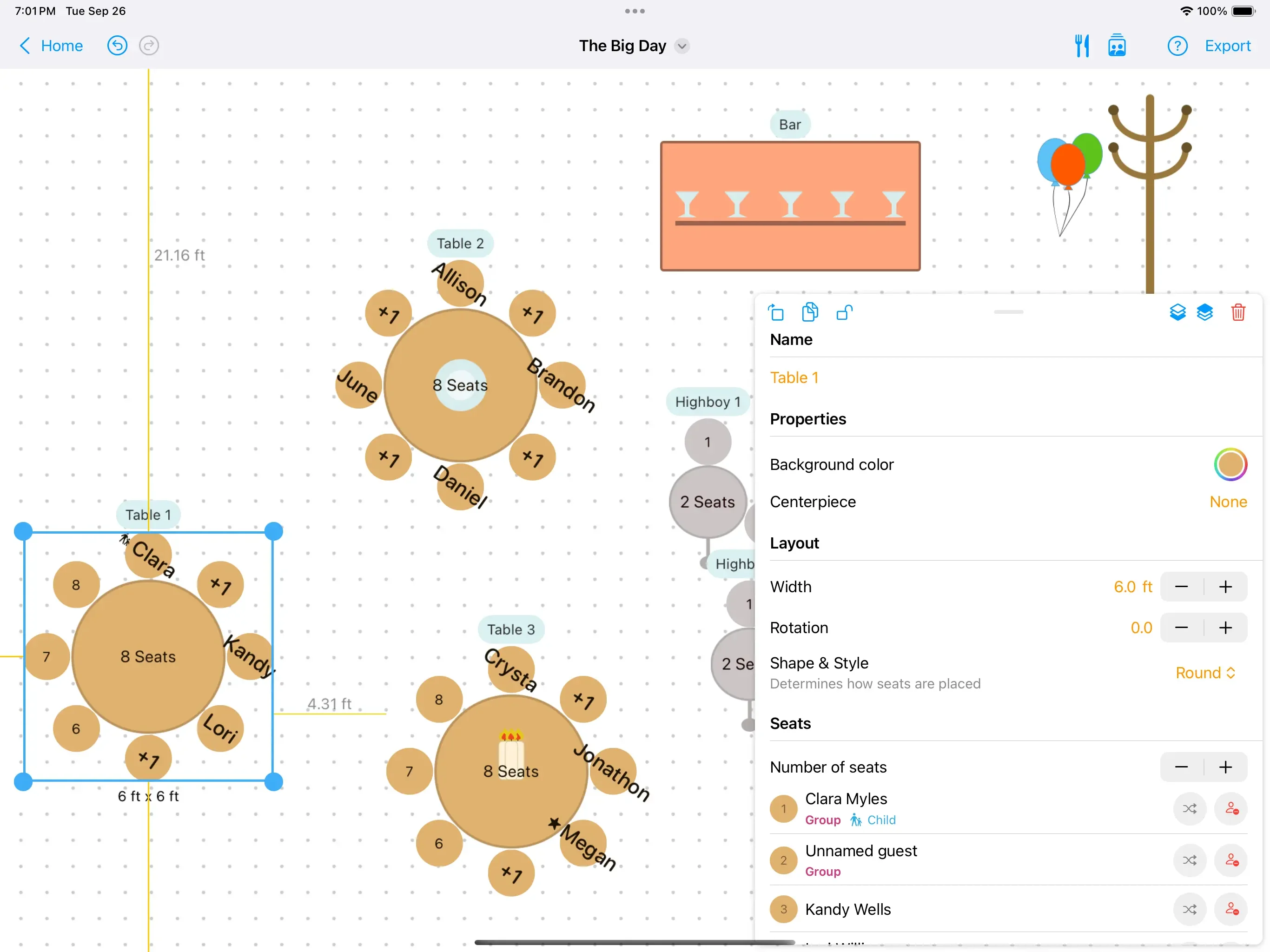
Seat Puzzle is an intuitive seating chart and floor plan design tool tailored for weddings, corporate events, parties, baby showers, and more. Users can build detailed venue floor plans up to 180×180 ft, arrange tables and seating with a drag-and-drop item library, and assign guests to seats with full support for +1s and family groupings. The guest list management system allows you to track RSVPs, mark attendance, assign meals, and tag guests with labels like VIP, children, or accessibility needs. Meal reporting features let you generate vendor-ready summaries of guest responses and menu choices. You can also create event checklists with due dates to stay on top of every planning task. For professionals, Seat Puzzle supports multi-event management with no limits, reusable venue templates, shared floor plans for real-time collaboration with clients and coordinators, and export options including printable charts and spreadsheets. Plans can be shared as images or posted directly to social media. The tool is free in its basic form, with Pro features unlocked for wedding planners and event coordinators who need advanced capabilities. Its ever-growing item library, support for multiple rooms with walls and doors, and metric system compatibility make it a flexible solution for any event professional or individual host looking to take the stress out of seating logistics.
Key Features
- Drag-and-Drop Floor Plan Builder: Design venue layouts up to 180×180 ft with a rich item library including tables, dance floors, DJ booths, and more. Supports multiple rooms with walls and doors.
- Guest List & RSVP Management: Build and organize your complete guest list with attendance tracking, RSVP status, meal assignments, VIP tags, accessibility needs, and +1 linking.
- Meal Reporting & Vendor Summaries: Create menus, assign meals per guest, and generate detailed breakdowns of who ordered what — ready to share with caterers and vendors.
- Sharing & Export: Share floor plans as images with clients, coordinators, or on social media. Export guest lists as spreadsheets and print day-of seating charts.
- Pro Event Management: Manage unlimited events with reusable venue templates, shared collaborative floor plans, and event checklists to track tasks and due dates.
Use Cases
- Couples planning a wedding reception can visualize their venue layout, assign guests to tables, and manage dietary meal preferences all in one place.
- Professional wedding planners and event coordinators can manage all client events from a single account, create reusable venue templates, and share work-in-progress floor plans with clients.
- Conference organizers can design room layouts with tables and seating, manage attendee lists, and track RSVPs for multi-session events.
- Hosts of parties, baby showers, or family gatherings can quickly draft a to-scale floor plan to ensure tables fit the venue before the event day.
- Caterers and vendors can receive meal summary reports generated from guest RSVPs to prepare accurate counts and menu breakdowns.
Pros
- Free to Start: The core seating chart and floor plan functionality is available for free, making it accessible to individuals planning a single event without any upfront cost.
- Professional-Grade Collaboration: Shared floor plans let coordinators, clients, and partners collaborate in real time — a standout feature for wedding planners managing multiple events.
- All-in-One Event Tool: Combines floor plan design, guest management, RSVP tracking, meal reporting, and checklists into a single platform, reducing the need for separate spreadsheets or apps.
- Multi-Platform Availability: Available on web, iOS, and macOS, allowing planners to work seamlessly across devices and locations.
Cons
- Advanced Features Require Upgrade: Pro features such as unlimited event management, reusable templates, and detailed reporting are locked behind a paid plan.
- Not an AI-Powered Tool: Seat Puzzle does not include AI-driven seating suggestions or smart guest optimization, so arrangement decisions are made entirely manually.
- Limited to Event Seating Use Cases: The platform is purpose-built for event planning and does not extend to other project management or productivity workflows.
Frequently Asked Questions
Is Seat Puzzle free to use?
Yes, Seat Puzzle is free in its basic form. You can design a floor plan, manage a guest list, and create a seating chart at no cost. A Pro upgrade unlocks unlimited events, templates, and advanced reporting.
What types of events can I plan with Seat Puzzle?
Seat Puzzle supports weddings, receptions, conferences, baby showers, birthday parties, corporate events, field days, and any other gathering that requires a seating arrangement.
Can I collaborate with others on a floor plan?
Yes. Seat Puzzle's shared floor plans feature lets you work together with coordinators, clients, or partners in real time across all devices.
Can I export or print my seating chart?
Yes. You can export your floor plan as an image to share with guests or post on social media, and print detailed day-of seating charts. Guest lists can also be exported as spreadsheets.
What platforms is Seat Puzzle available on?
Seat Puzzle is available on the web, iOS (App Store), and macOS (Mac App), so you can access your plans from any device.