
About
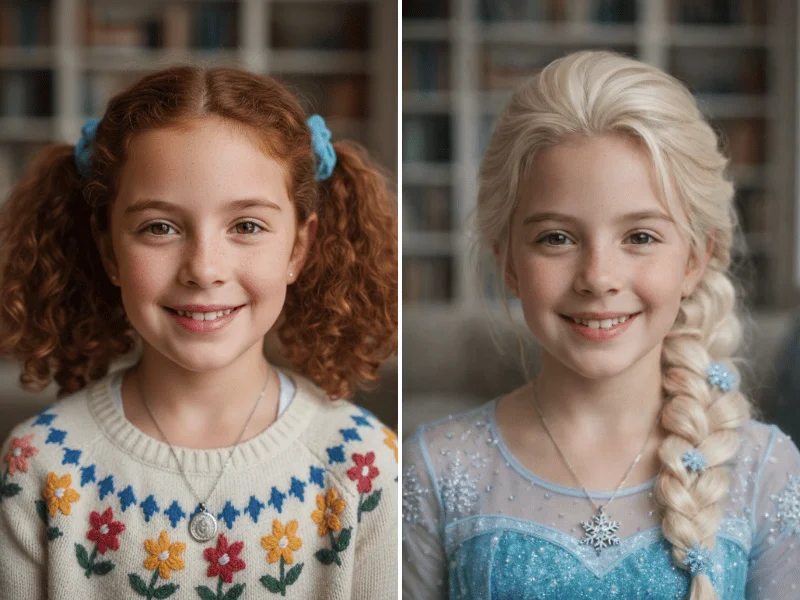
Somake AI Cosplay is an AI-powered photo transformation tool that turns any personal photo into a fully realized cosplay image. Unlike concept generators that produce generic character art, Somake applies costumes, styling, and contextual backgrounds directly onto your uploaded photo — preserving your real features as the foundation of the result. Users simply upload a front-facing photo, enter a character name or description (e.g., "Elsa from Disney," "Naruto," or "steampunk pirate"), choose a setting like a convention hall or outdoor environment, and generate up to several images per session. The AI draws from a broad Multiverse Character Library spanning anime protagonists, Disney characters, Marvel heroes, video game icons, historical figures, and original concepts. A standout feature is contextual background matching — the tool automatically recreates appropriate scene backdrops, such as an icy palace for Elsa or a desert planet for a Jedi. For users who want to design original characters first, an integrated OC Maker helps define a look before the cosplay transformation. Somake AI Cosplay is free to try with a credit-based system (10 credits per generation), runs entirely in the browser with no installation needed, and works on both desktop and mobile. It is well-suited for professional cosplayers previewing designs, social media creators crafting viral content, and families wanting fun character-themed photos.
Key Features
- Photo-Based Character Transformation: Applies costumes and styling directly to your uploaded photo, preserving your real facial features rather than generating generic character art.
- Multiverse Character Library: Supports any character name or description — anime heroes, Disney princesses, Marvel icons, video game characters, historical figures, or custom original concepts.
- Contextual Background Matching: Automatically generates thematically appropriate backgrounds based on the chosen character, such as an icy palace for Elsa or a starship interior for a sci-fi character.
- OC (Original Character) Maker Integration: Design a completely original character concept first using the OC Maker, then use that design as the basis for your cosplay transformation.
- Browser-Based, No Installation Required: Runs entirely in the browser on desktop and mobile — no app download or software setup needed.
Use Cases
- Professional cosplayers testing costume designs and color schemes digitally before investing time and money in materials or sewing.
- Social media creators generating polished, character-themed profile pictures and engagement posts without hiring a photographer.
- Fans and families creating fun, personalized images of themselves or their children as favorite anime, Disney, or superhero characters.
- Game streamers and content creators producing themed channel art or promotional images as video game characters.
- Event organizers or attendees previewing how they will look in costume before a convention or themed party.
Pros
- True Likeness Preservation: Unlike AI art generators, this tool keeps your actual face and features as the foundation, making results feel personal and realistic.
- Free to Try: New users can generate cosplay images without any upfront payment, making it easy to evaluate quality before committing.
- Broad Character Coverage: The open-ended text input supports virtually any character — popular franchises, niche fandoms, or fully original concepts.
- Fast Iteration: Multiple generations can be run in a single session, allowing users to compare results and find the best transformation quickly.
Cons
- Credit-Based Cost: Each generation costs 10 credits, meaning heavy users will need to purchase credits after exhausting any free allowance.
- Photo Quality Dependency: Best results require a clear, front-facing photo with good lighting — low-quality or obscured input images may produce less accurate transformations.
- Limited Fine-Tuning Controls: Advanced users may find the settings (aspect ratio, number of images, scene) somewhat limited compared to dedicated AI image editing platforms.
Frequently Asked Questions
What type of photo works best with the AI Cosplay Generator?
A clear, front-facing photo with good lighting produces the most accurate results. Avoid heavily filtered images, obscured faces, or low-resolution photos.
Will the generated image still look like me?
Yes. Unlike concept art generators, Somake AI Cosplay uses your photo as the base, meaning your facial features remain the foundation of the final image.
Is the tool free to use?
You can start generating for free. Each generation costs 10 credits. Somake offers a credit-based pricing model where you can purchase additional credits as needed.
Can I create cosplay for original characters, not just famous ones?
Yes. You can describe any character concept in text — original designs, genre archetypes like 'steampunk pirate,' or entirely custom ideas. The OC Maker tool also helps define original character looks before transformation.
Do I need to download any software?
No. Somake AI Cosplay is entirely browser-based and works on both desktop and mobile devices without any installation.