

About
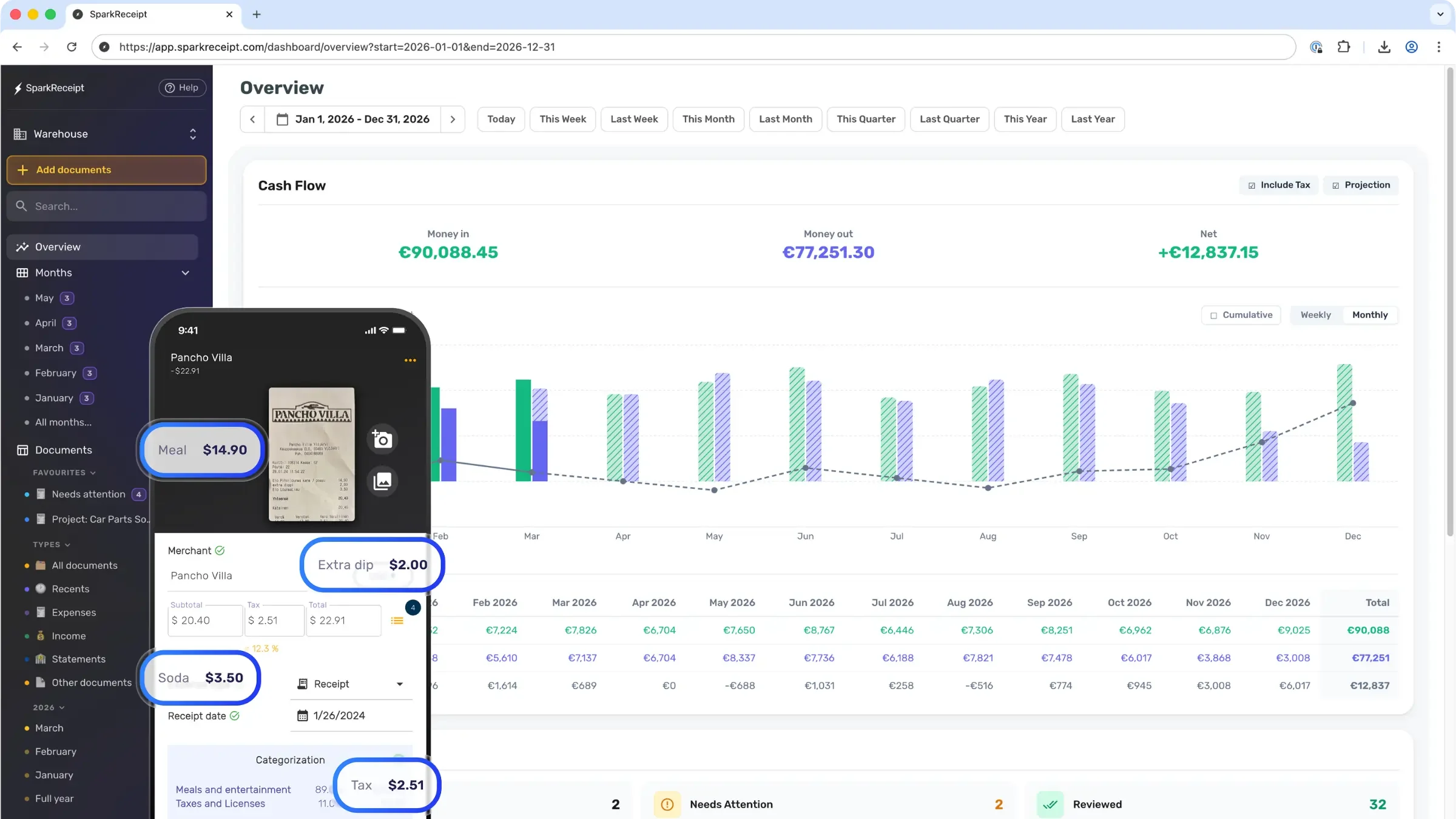
SparkReceipt is a smart expense management platform built specifically for small business owners, freelancers, solopreneurs, and gig workers who want to stop drowning in paperwork. Using AI-driven optical character recognition and data extraction, it processes receipts in just 2–3 seconds—pulling out merchant names, dates, totals, taxes, and currencies automatically. Users can capture expenses by snapping a photo, uploading a file, or enabling automatic email inbox scanning to import digital receipts without any manual effort. The platform supports 150+ currencies and is trusted by customers across 80+ countries, making it ideal for businesses with international expenses. Once scanned, SparkReceipt auto-categorizes every expense, flags duplicates, and organizes transactions into clean, tax-ready reports. One-click export lets users share polished expense reports directly with their accountants at tax time. The platform also includes income tracking, a bank statement extractor, credit card receipt management, and expense reports with data export capabilities—with mileage tracking coming soon. SparkReceipt is particularly popular among construction firms, content creators, e-commerce sellers, healthcare practices, nonprofits, real estate professionals, and rideshare/gig economy workers. It replaces the last-minute spreadsheet scramble with a streamlined, always-organized system that saves time, reduces stress, and ensures no deduction is ever missed.
Key Features
- AI Receipt Scanning: Snap a photo or upload a file and AI extracts merchant names, dates, totals, taxes, and currencies with up to 95% accuracy in 2–3 seconds.
- Auto Email Receipt Import: Automatically scans your email inbox to detect and import digital receipts, ensuring nothing gets missed without any manual effort.
- Automatic Expense Categorization: AI organizes every scanned expense into the right category automatically, keeping your records clean and tax-ready throughout the year.
- Tax-Ready Expense Reports: Generate and export polished expense reports with one click, making it easy to share complete, organized records with your accountant.
- Multi-Currency & Global Support: Supports 150+ currencies and is trusted by small business owners in 80+ countries, making it suitable for businesses with international transactions.
Use Cases
- A freelance consultant snaps photos of client lunch and travel receipts on their phone, letting SparkReceipt auto-categorize them and generate a monthly expense report to send to their accountant.
- An e-commerce seller uses SparkReceipt to scan supplier invoices and import PayPal/email receipts automatically, maintaining clean records for quarterly tax filings.
- A rideshare or gig economy worker tracks all vehicle-related expenses throughout the year, ensuring maximum deductions come tax season without any manual spreadsheet work.
- A nonprofit organization scans paper donation receipts and expense slips to maintain organized financial records and simplify year-end reporting.
- A real estate agent captures receipts for staging, marketing, and property maintenance costs in real time, keeping all business expenses organized and deduction-ready.
Pros
- Fast and Accurate Data Extraction: Processes receipts in 2–3 seconds with up to 95% accuracy, drastically reducing manual data entry and human error.
- Eliminates Tax-Time Stress: Keeps expenses organized all year so there's no last-minute scramble—just clean reports ready to hand off to an accountant.
- Broad Platform & Industry Support: Works for a wide range of industries and use cases, from freelancers to construction firms to nonprofits, with multi-currency support for global users.
- Free to Start: Offers a free tier with no credit card required, lowering the barrier for small businesses to get started with expense management.
Cons
- Mileage Tracking Not Yet Available: Mileage tracking is listed as 'coming soon,' which may be a gap for users like rideshare drivers who need this feature today.
- Limited Accounting Integrations Mentioned: Direct integrations with popular accounting platforms like QuickBooks or Xero are not prominently highlighted, potentially requiring manual export steps.
- Full Feature Set Requires Paid Plan: While free to start, unlocking the complete feature set requires a paid subscription, which may not suit very casual or low-volume users.
Frequently Asked Questions
How accurate is SparkReceipt's AI data extraction?
SparkReceipt's AI extracts data with up to 95% accuracy, pulling merchant names, dates, totals, taxes, and currencies from receipts in 2–3 seconds.
Can SparkReceipt import receipts from email automatically?
Yes. SparkReceipt can connect to your email inbox and automatically detect and import digital receipts, so you don't have to forward or upload them manually.
What currencies does SparkReceipt support?
SparkReceipt supports 150+ currencies, making it suitable for small businesses and freelancers operating internationally.
Is SparkReceipt free to use?
SparkReceipt is free to start with no credit card required. A paid plan is available at $6.58/month (billed annually at $79/year) for full access, with a 30-day money-back guarantee.
Who is SparkReceipt best suited for?
SparkReceipt is designed for small business owners, freelancers, solopreneurs, gig workers, and entrepreneurs across industries like construction, e-commerce, real estate, healthcare, and content creation who need simple, organized expense tracking for tax purposes.