
About
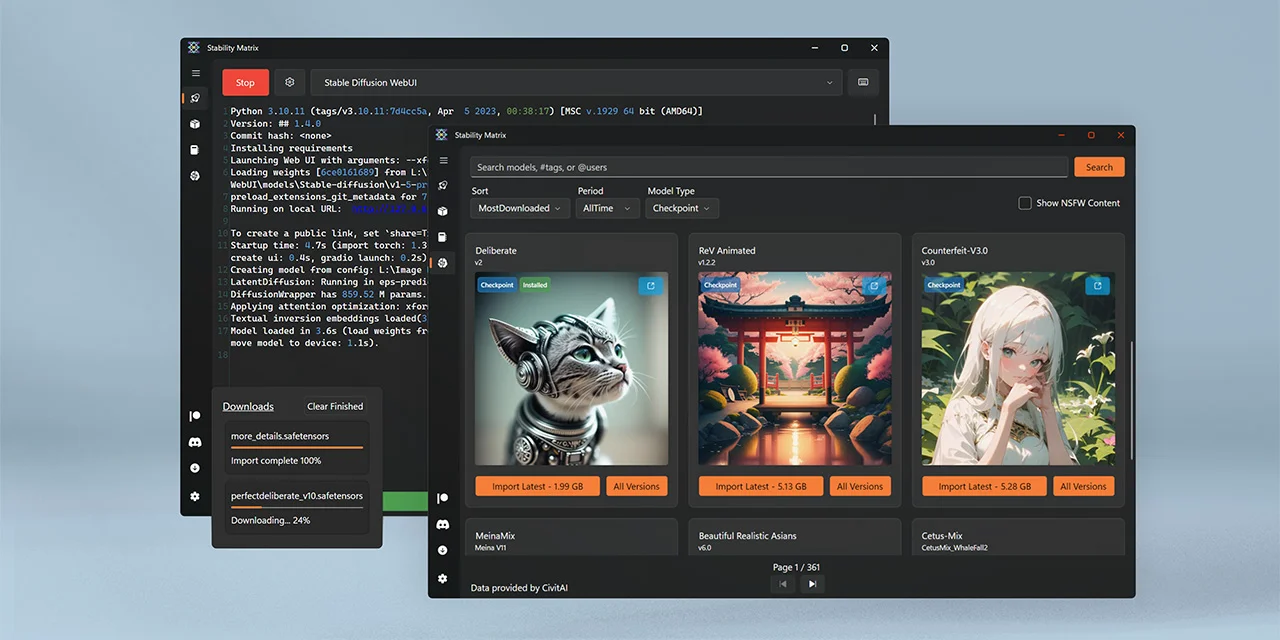
Stability Matrix is an open-source, multi-platform package manager built by LykosAI specifically for the Stable Diffusion ecosystem. It dramatically lowers the barrier to entry for local AI image generation by providing a unified, easy-to-use desktop interface for installing, managing, and running popular Stable Diffusion frontends such as AUTOMATIC1111 WebUI, ComfyUI, InvokeAI, Fooocus, and others. The tool handles all the heavy lifting — Python environments, dependencies, and configuration — so users can get up and running with a few clicks instead of wrestling with the command line. Stability Matrix also features integrated model management, allowing users to browse, download, and organize checkpoints, LoRAs, embeddings, VAEs, and other model types directly within the app. With support for Windows, macOS, and Linux, it truly delivers on its cross-platform promise. The project is actively maintained with a thriving open-source community (8k+ GitHub stars), regular updates, and a comprehensive changelog. Stability Matrix is ideal for artists, hobbyists, researchers, and developers who want to harness local Stable Diffusion image generation without the friction of manual environment setup. It also supports running multiple packages side by side, making it a powerful tool for power users who experiment across different UIs and workflows.
Key Features
- One-Click Package Installation: Install popular Stable Diffusion frontends like AUTOMATIC1111, ComfyUI, InvokeAI, and Fooocus with a single click — no command-line setup required.
- Integrated Model Manager: Browse, download, and organize checkpoints, LoRAs, embeddings, VAEs, and other model types directly within the app.
- Cross-Platform Support: Runs natively on Windows, macOS, and Linux, providing a consistent experience regardless of operating system.
- Multi-Package Environment: Install and run multiple Stable Diffusion UIs side by side, each with isolated environments, enabling easy experimentation.
- Automatic Dependency Management: Handles Python environments, CUDA/ROCm libraries, and all required dependencies automatically, removing configuration headaches.
Use Cases
- Artists and hobbyists setting up local Stable Diffusion image generation without any command-line experience.
- Researchers and developers who need to quickly switch between different Stable Diffusion UIs for testing and experimentation.
- Content creators managing large libraries of AI models, LoRAs, and embeddings in an organized interface.
- Teams or educators setting up consistent Stable Diffusion environments across multiple machines on different operating systems.
- Power users running multiple Stable Diffusion frontends simultaneously to compare outputs and workflows.
Pros
- Completely Free and Open Source: MIT-licensed with an active community and regular updates — no cost, no subscriptions, and full transparency.
- Drastically Reduces Setup Complexity: Transforms a multi-hour manual installation process into a few clicks, making local AI image generation accessible to non-technical users.
- True Multi-Platform: One of the few Stable Diffusion managers with genuine native support for Windows, macOS, and Linux.
- Active Development and Community: With 8k+ GitHub stars and hundreds of forks, the project is well-maintained with frequent releases and responsive contributors.
Cons
- Requires Local Hardware: Stable Diffusion runs locally, so users need a capable GPU (NVIDIA recommended) and sufficient VRAM — no cloud fallback is provided.
- Desktop-Only Application: There is no web or mobile interface; the tool must be installed and run directly on the user's machine.
- Resource Intensive: Managing multiple packages and large model files can consume significant disk space and memory, requiring careful storage planning.
Frequently Asked Questions
What is Stability Matrix?
Stability Matrix is a free, open-source, multi-platform package manager for Stable Diffusion. It lets you install and manage AI image generation UIs like AUTOMATIC1111, ComfyUI, InvokeAI, and Fooocus with minimal technical effort.
Which operating systems does Stability Matrix support?
Stability Matrix supports Windows, macOS, and Linux, providing native desktop applications for all three platforms.
Do I need to know how to code to use Stability Matrix?
No coding knowledge is required. Stability Matrix provides a graphical interface that handles installation, configuration, and model management for you.
Is Stability Matrix free to use?
Yes, Stability Matrix is completely free and open-source under the MIT license. You can download, use, and even modify it at no cost.
Can I run multiple Stable Diffusion UIs at once with Stability Matrix?
Yes, Stability Matrix supports installing and managing multiple packages (e.g., AUTOMATIC1111 and ComfyUI) side by side, each in isolated environments.