

About
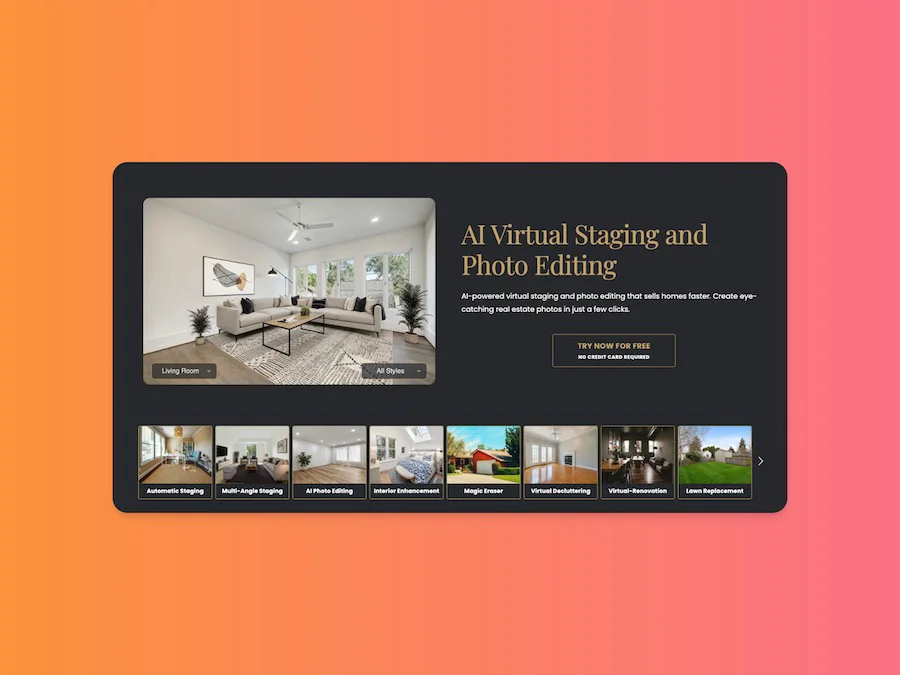
Stager AI is a comprehensive AI-powered real estate photo editing and virtual staging solution designed to help agents, brokers, and property sellers create stunning listing visuals without expensive traditional staging. In just a few clicks, users can upload raw property photos and receive professionally staged, enhanced images within 15 seconds. The platform offers a rich suite of AI tools: Virtual Staging applies multiple design styles—from modern to classic—to furnished or empty rooms, helping buyers visualize the space's potential. AI Photo Editing corrects lighting, color balance, and image quality automatically. AI Auto Renovation previews upgrades like new flooring or cabinetry before construction begins. AI Room Decluttering removes distracting objects so rooms appear larger and cleaner. Additional tools include an AI Photo Eraser for removing cords and blemishes, AI Lawn Replacement for boosting curb appeal, and AI Sky Replacement to swap overcast skies with bright, inviting backdrops. Stager AI is available on web, iOS, and Android, making it accessible for agents on the go. It is ideal for real estate agents, boutique agencies, and property management companies looking to cut staging costs, accelerate listing turnaround, and drive higher online engagement. The tool requires no credit card to try and is praised by industry publications including HousingWire, Realtor Magazine, and Inman.
Key Features
- AI Virtual Staging: Instantly furnish empty or unfurnished rooms in multiple design styles—modern, classic, and more—so buyers can visualize the full potential of any space.
- AI Photo Editing & Enhancement: Automatically correct lighting, colors, brightness, and sharpness to produce clean, bright, and professional real estate photos with a single click.
- AI Room Decluttering & Photo Eraser: Remove unwanted objects, clutter, cords, and stains from photos using precision AI retouching, making rooms look larger and more inviting.
- AI Lawn & Sky Replacement: Replace patchy lawns with lush green landscapes and swap overcast skies with vibrant backdrops to dramatically boost curb appeal in exterior shots.
- AI Auto Renovation: Visualize property upgrades such as new flooring, cabinetry, or finishes before any physical work begins, helping sellers showcase a property's renovation potential.
Use Cases
- Real estate agents staging vacant home listings to attract more online buyer interest and reduce time on market.
- Boutique property agencies enhancing listing photo quality without hiring professional photographers or staging companies.
- Property sellers previewing renovation outcomes—such as new flooring or updated cabinetry—before committing to physical upgrades.
- Real estate marketing teams producing consistent, high-quality listing visuals at scale across large property portfolios.
- Agents refreshing exterior listing photos by replacing dull skies and improving lawn appearance to maximize curb appeal.
Pros
- Extremely Fast Turnaround: AI processes and delivers staged or enhanced photos in approximately 15 seconds, enabling agents to prepare listing visuals in minutes rather than days.
- Significant Cost Savings: Eliminates the need for expensive physical staging services, saving real estate agencies thousands of dollars per listing while maintaining high visual quality.
- Versatile Toolset: Combines staging, editing, decluttering, renovation previews, lawn, and sky replacement in one platform—covering virtually every real estate photo editing need.
- Cross-Platform Accessibility: Available on web, iOS, and Android, allowing agents to edit and stage photos from any device, whether in the office or at a showing.
Cons
- Niche Focus: Primarily designed for real estate use cases; less suitable for general-purpose photo editing or non-property imagery workflows.
- AI Output May Require Review: While results are generally high quality, AI-generated staging may occasionally need manual adjustments to match specific client preferences or property styles.
- Freemium Limitations: Full access to all features and high-resolution downloads likely requires a paid subscription; free tier may restrict usage volume or output quality.
Frequently Asked Questions
What is AI virtual staging?
AI virtual staging uses artificial intelligence to digitally furnish and decorate empty or sparsely furnished rooms in property photos, helping buyers visualize how a space could look without the cost of physical furniture rental or staging.
How long does it take to stage a photo with Stager AI?
Stager AI processes and delivers a staged or enhanced photo in approximately 15 seconds after you upload your image.
Does Stager AI work with furnished rooms, or only empty ones?
Stager AI supports both furnished and unfurnished photos, allowing you to redesign existing spaces or fully stage empty rooms depending on your needs.
Is Stager AI free to use?
Stager AI offers a free trial with no credit card required, giving you the opportunity to test the platform before committing to a paid plan.
What platforms is Stager AI available on?
Stager AI is available as a web application and also offers dedicated mobile apps for both Android and iOS devices.