

About
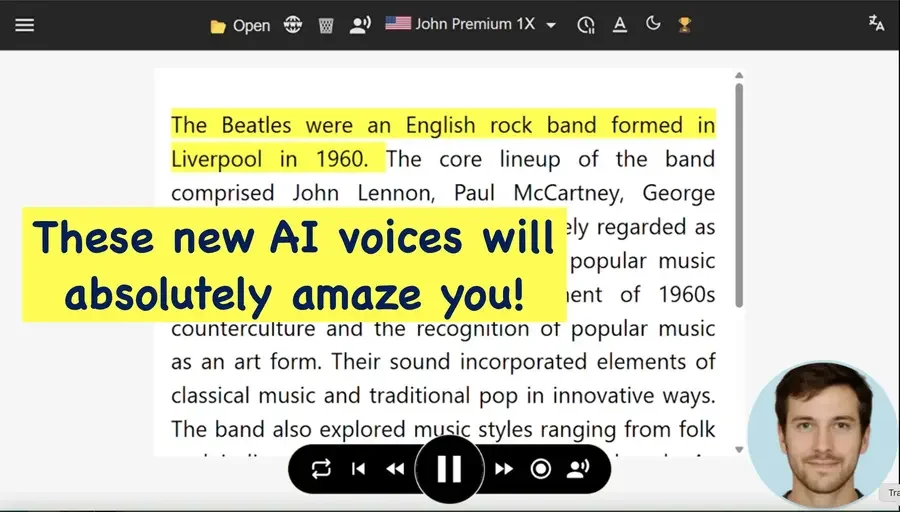
TTSReader is a powerful, browser-based text-to-speech (TTS) solution that transforms written content into high-quality audio with remarkable ease. Users can paste text, upload documents, PDFs, and e-books, or input webpage URLs to have content read aloud instantly — no downloads or installations required. The platform supports over 600 neural AI voices from industry leaders including Microsoft Azure, Google, OpenAI, and xAI, spanning dozens of languages and accents. A standout feature is the Studio Grade Narrations export tool, which allows users to mix voices, languages, speeds, and pauses to produce professional-grade audio files downloadable as MP3. TTSReader remembers your reading position, even after closing the browser, making it ideal for long-form listening sessions. It also includes a Chrome extension, mobile app support, and a SpeechNinja AAC module for users with speech difficulties. Additional tools include WikiTTS for listening to Wikipedia articles, a free podcast channel creator, a pronunciation dictionary for custom word control, multi-voice and multi-language narration, and a legacy player optimized for very long texts. Commercial use of exported audio is permitted, making it suitable for content creators, video producers, and businesses needing professional voiceovers. TTSReader is trusted by students, authors, bloggers, educators, and enterprises alike, processing over 5 million words per day.
Key Features
- 600+ Neural AI Voices: Access premium AI voices from Microsoft Azure, Google, OpenAI, and xAI across multiple languages and accents for natural, expressive narration.
- MP3 Export & Studio Narrations: Export generated speech as MP3 files for offline use, commercial projects, voiceovers, audiobooks, and telephony applications.
- Multi-Format Document Support: Read aloud plain text, PDFs, e-books, uploaded files, and entire webpages by simply pasting a URL.
- Position Memory: Automatically remembers where you left off, even after closing the browser, so you can resume listening anytime.
- Podcast & Multi-Voice Creation: Create free podcast channels and mix multiple voices and languages within a single narration for dynamic audio content.
Use Cases
- Students listening to textbooks, articles, and study materials while commuting or multitasking
- Content creators and bloggers converting written posts into audio for podcast distribution
- Video producers generating professional AI voiceovers for YouTube, ads, and corporate videos
- People with dyslexia or visual impairments using TTS to access written content accessibly
- Authors and editors proofreading long-form documents by listening to them read aloud
Pros
- Generous Free Tier: Offers truly free voices with unlimited character input, making it accessible to casual users and students without any cost barrier.
- No Installation Required: Works entirely in the browser on any operating system or device — just paste text and play.
- Commercial Use Allowed: Exported audio files are fully owned by the user and cleared for commercial use in videos, audiobooks, ads, and more.
- Broad Voice & Language Selection: 600+ neural voices from top AI providers ensures high-quality, expressive output across many languages and styles.
Cons
- Premium Voices Require Payment: The highest-quality AI voices from Microsoft, Google, and OpenAI are behind a paid plan, limiting free users to basic voice options.
- No Native Desktop App: TTSReader is primarily web-based and lacks a standalone desktop application, requiring internet access for full functionality.
- Advanced Features Can Feel Overwhelming: The range of voice options, export settings, and add-on tools may be complex for first-time users seeking a simple TTS solution.
Frequently Asked Questions
Is TTSReader completely free to use?
TTSReader offers a free tier with access to standard voices and unlimited characters. Premium AI voices from providers like Microsoft Azure, Google, and OpenAI are available on paid plans at affordable pricing.
Can I download the generated audio as an MP3?
Yes. TTSReader supports MP3 export for all generated speech. Downloaded audio files are yours to keep and may be used for personal or commercial purposes.
What file formats does TTSReader support?
TTSReader can read plain text, PDF files, e-books, and webpages (via URL input). You can paste text directly or upload supported document formats.
Does TTSReader work on mobile devices?
Yes. TTSReader works on any browser including mobile browsers, and also offers dedicated mobile apps for iOS and Android.
Can I use TTSReader for commercial voiceovers or audiobook production?
Yes. TTSReader explicitly allows commercial use of exported audio. It is designed for professional applications including video voiceovers, telephony, audiobooks, and business content.