
About
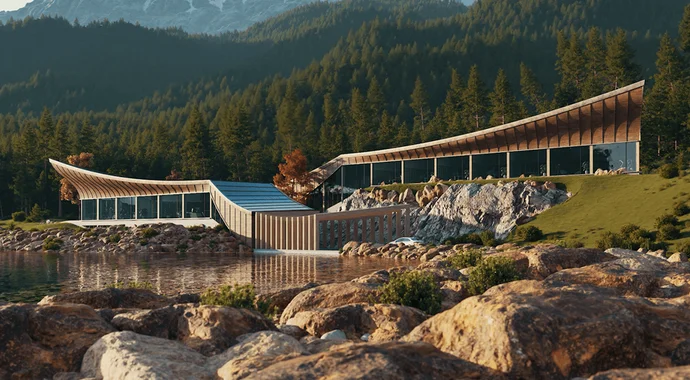
Enscape is a powerful real-time rendering and virtual reality solution purpose-built for architecture, interior design, landscape, and urban planning professionals. It works as a live plugin inside the industry's most popular CAD and BIM platforms — Revit, SketchUp, Rhino, ArchiCAD, and Vectorworks — so designers never have to leave their native workflow to produce stunning visualizations. With a single click, users can open a fully rendered, photorealistic view of their model in real time. Changes made in the CAD environment are instantly reflected in Enscape, enabling rapid design iteration and client presentations without time-consuming re-renders. The tool ships with thousands of built-in assets including furniture, people, vegetation, and materials, reducing the need for external libraries. Enscape integrates AI-powered features for accelerated design ideation and visualization through its companion tool, Veras. The platform also supports immersive virtual reality walkthroughs, standalone executable exports for client sharing, and collaborative panoramas accessible via web browser — no additional software required on the client side. Designed with simplicity in mind, Enscape caters to architects and designers rather than rendering specialists, offering an intuitive interface with minimal learning curve. It is used by studios of all sizes, from independent practitioners to large enterprise firms, as well as students and educators. Educational licensing is available at significant discounts, making it accessible across academic institutions.
Key Features
- One-Click Real-Time Rendering: Instantly open a fully rendered, photorealistic view of your CAD/BIM model with a single click — no configuration or export required.
- Native CAD/BIM Integration: Works as a live plugin inside Revit, SketchUp, Rhino, ArchiCAD, and Vectorworks, keeping your entire workflow within your familiar design tool.
- Virtual Reality Walkthroughs: Create immersive VR experiences directly from your model for compelling client presentations and design reviews.
- AI-Powered Ideation: Integrated AI features (via Veras) enable rapid concept visualization and design exploration without leaving the Enscape environment.
- Built-In Asset & Material Library: Access thousands of ready-to-use 3D assets, materials, and objects directly inside Enscape to populate scenes quickly.
Use Cases
- Architects presenting photorealistic design visualizations to clients during project reviews without time-consuming render exports.
- Interior designers iterating on material and furniture selections in real time within their existing SketchUp or Revit workflow.
- Urban planning and landscape teams creating immersive VR walkthroughs of large-scale development proposals for stakeholder approval.
- Architecture students and educators producing high-quality rendered visuals for academic submissions and portfolio work at discounted educational pricing.
- Design studios collaborating remotely by sharing standalone Enscape executables or web panoramas with clients and partners worldwide.
Pros
- Seamless Workflow Integration: Runs natively inside major CAD/BIM platforms so architects can visualize changes in real time without switching applications or exporting files.
- Minimal Learning Curve: Designed for architects rather than rendering specialists, Enscape's intuitive interface allows teams to start producing high-quality visuals almost immediately.
- Comprehensive Sharing Options: Exports standalone executables and web-based panoramas that clients can view without installing any software, making presentations effortless.
- Rich Built-In Content: The extensive library of assets and materials reduces dependency on third-party resources, speeding up scene setup significantly.
Cons
- Windows-Centric Platform: Enscape's full feature set is primarily available on Windows; macOS support is limited, which can be a barrier for designers on Apple hardware.
- Subscription-Based Pricing: Enscape requires an ongoing paid subscription, which may be cost-prohibitive for freelancers or smaller studios compared to perpetual-license alternatives.
- Hardware Demands: Real-time ray tracing and high-fidelity rendering require a capable GPU, meaning older workstations may struggle to deliver smooth performance.
Frequently Asked Questions
Which CAD and BIM platforms does Enscape support?
Enscape integrates directly with Revit, SketchUp, Rhino, ArchiCAD, and Vectorworks as a native plugin, enabling real-time rendering without leaving your primary design application.
Do clients need to install Enscape to view presentations?
No. Enscape allows you to export standalone executable walkthroughs and web-based panoramic views that clients can open and explore without any additional software installation.
Does Enscape support Virtual Reality?
Yes. Enscape includes built-in VR support, allowing architects to walk through their models in immersive virtual reality using compatible headsets directly from the plugin.
Is there a free trial available?
Yes, Enscape offers a free trial so users can explore the tool before purchasing a subscription. Educational licenses are also available at up to 80% discount for students and institutions.
How does Enscape's AI integration work?
Enscape integrates with Veras, an AI-powered ideation and visualization tool from Chaos, which allows designers to rapidly generate and explore design concepts using artificial intelligence alongside their real-time renders.