
About
GazeRecorder is a comprehensive webcam-based eye tracking platform designed for remote behavioral research, UX analysis, neuromarketing, and accessibility studies. Unlike traditional eye tracking solutions that demand expensive dedicated hardware, GazeRecorder leverages any standard webcam to capture and analyze real-time eye movements, dramatically lowering the barrier to professional gaze research. The platform offers a rich suite of tools: GazeRecorder for recording and replaying eye movement sessions, GazeInsight for behavior analytics and attention heatmaps, GazeCloud for cloud-hosted remote participant studies, GazePointer for gaze-controlled mouse navigation, and GazeBoard for hands-free text entry via eye movements. Developers can embed eye tracking directly into websites and mobile apps using the GazeCloudAPI.js or GazeFlow SDK with just a few lines of code. Key use cases include website UX optimization through attention heatmaps, advertisement and video engagement analysis, virtual shelf and packaging design testing, consumer behavior research in simulated retail environments, and academic studies spanning neuromarketing, medical imaging education, and computer programming pedagogy. The platform also supports smartphone-based mobile eye tracking. GazeRecorder is trusted by academic researchers, UX designers, marketing professionals, and accessibility specialists worldwide and has been cited in dozens of peer-reviewed publications. With a free tier, no hardware requirements, and a browser-based interface, it makes eye tracking research approachable for individual researchers and enterprise teams alike.
Key Features
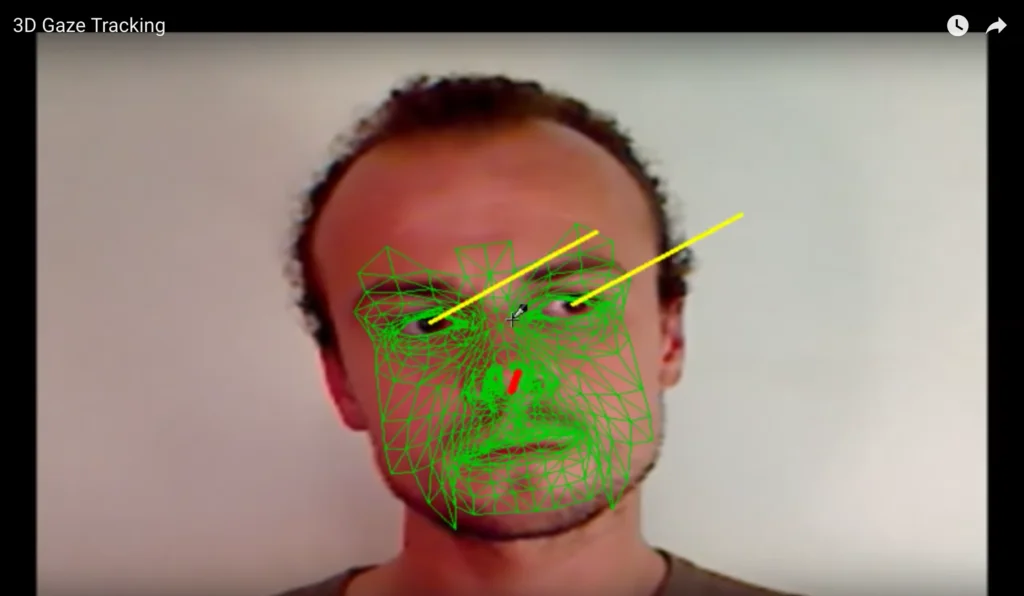
- Webcam Eye Tracking: Tracks real-time eye movements using any standard webcam via computer vision — no specialized hardware or calibration devices required.
- Attention Heatmaps: Generates visual heatmaps that reveal exactly where users focus their attention on websites, ads, product packaging, or any visual content.
- Remote User Studies: GazeCloud enables researchers to run remote eye tracking sessions with participants anywhere in the world, eliminating the need for in-person lab setups.
- Developer API & SDK: GazeCloudAPI.js and GazeFlow SDK allow developers to integrate real-time eye tracking into web and mobile applications with minimal code.
- Mobile & Multi-platform Support: Supports eye tracking across desktop webcams, smartphones, and tablets, enabling research across a wide range of device types and screen sizes.
Use Cases
- UX researchers running website usability tests to generate attention heatmaps and understand where users look, click, and disengage.
- Marketing teams measuring viewer engagement with advertisements and promotional videos to optimize creative assets based on real gaze data.
- Retail and CPG brands testing product shelf placement and packaging design in simulated virtual store environments before physical production.
- Academic researchers studying visual attention, reading behavior, and learning patterns in educational, medical, or psychological studies.
- Developers building gaze-aware or accessibility-focused web applications by embedding real-time eye tracking via the GazeCloudAPI.
Pros
- No Specialized Hardware Needed: Works with any standard webcam, making professional eye tracking research available at a fraction of the cost of dedicated hardware solutions.
- Remote Research Capability: Participants can join studies from anywhere in the world, dramatically expanding sample sizes and reducing logistical overhead.
- Easy API Integration: Developers can embed eye tracking into websites or apps in just a few lines of JavaScript, opening up novel interaction and research possibilities.
- Strong Academic Track Record: Cited in dozens of peer-reviewed publications across UX, neuromarketing, education, and accessibility research, demonstrating reliability and credibility.
Cons
- Lower Accuracy Than Dedicated Hardware: Webcam-based tracking is inherently less precise than purpose-built eye tracking devices, which may limit use in studies requiring high spatial accuracy.
- Lighting and Environment Sensitivity: Tracking performance can degrade under poor or variable lighting conditions, requiring participants to have a reasonably controlled environment.
- Advanced Features Behind Paywall: Full access to analytics, heatmaps, and remote study tools likely requires a paid subscription; the free tier has feature limitations.
Frequently Asked Questions
How does GazeRecorder track eyes without special hardware?
GazeRecorder uses computer vision algorithms to detect facial landmarks and pupil positions through a standard webcam feed, estimating gaze direction in real time entirely through software.
Can I run remote eye tracking studies with participants in different locations?
Yes. The GazeCloud platform is specifically designed for remote research — participants simply open a link in their browser and the study runs using their own webcam, with data collected and analyzed in the cloud.
What is the GazeCloudAPI and who is it for?
GazeCloudAPI.js is a JavaScript library that lets developers integrate real-time eye tracking directly into any website with just a few lines of code. It's aimed at developers building gaze-aware web applications or embedding research tools into existing sites.
Is GazeRecorder free to use?
GazeRecorder offers a free tier that includes basic eye tracking and recording features. Advanced analytics, heatmaps, remote study management, and higher usage volumes are available through paid plans.
What kinds of research or business use cases is GazeRecorder best suited for?
It is well-suited for UX and usability research, advertisement and video engagement testing, shelf and packaging design evaluation, consumer behavior studies in virtual retail environments, and academic research in education, neuromarketing, and accessibility.